

 Français
Bank Reconciliation Example: 6 Practical Cases You Should Know
Discover 6 bank reconciliation examples to master this technique. Manual, Excel, software and Cloud methods explained in detail.

Let’s dive into the world of bank reconciliation!
Mastering bank reconciliation is crucial for sound financial management. This practical guide presents 6 bank reconciliation examples, from manual to fully automated via API, tailored to the needs of sole traders, e-commerce sellers and SMEs. Discover how to optimize your process, from a simple Excel spreadsheet to cloud solutions, for controlled cash flow and accurate financial reporting. Find the ideal method for you, including a bank reconciliation example with open banking, and simplify your accounting.
1. Manual bank reconciliation
Manual bank reconciliation is the traditional bank reconciliation method. It involves carefully comparing, line by line, your company’s accounting entries with the transactions reported on your bank statement. This process, usually carried out monthly by an accountant, helps identify any discrepancies between these two sources and make the adjustments needed to keep your financial data consistent. By comparing your internal records with your bank’s, you ensure the accuracy of your accounting and quickly detect any error or anomaly.

This type of bank reconciliation is characterized by a line-by-line comparison of transactions, the identification of discrepancies such as outstanding checks, deposits in transit or unrecorded bank fees, tracking of adjustments and corrections, and physical documentation of the reconciliations performed. It allows thorough control of each transaction and provides detailed insight into your financial flows. In addition, it requires no specific software and can be carried out by any company, regardless of size.
Concrete examples: Picture a French SME performing its monthly bank reconciliation using an Excel spreadsheet and printed bank statements. Or a sole trader manually checking the transactions on their business account. These are typical examples of manual bank reconciliation in use.
Pros and cons:
Pros:
- Thorough control of each transaction
- No need for specific software
- Suitable for companies of all sizes
- Detailed knowledge of financial flows
Cons:
- Time-consuming for accounts with many transactions
- High risk of human error
- Inefficient for large companies
- Hard to trace over time
When and why use this approach? Manual bank reconciliation is particularly suited to small businesses or sole traders with a relatively low transaction volume. It is ideal for those who want to keep direct, precise control over their finances and are not yet ready to invest in automated accounting software.
Practical tips for an effective manual bank reconciliation:
- Set a regular frequency: Perform your bank reconciliation weekly or monthly to avoid a buildup of discrepancies and make errors easier to spot.
- Use a standardized document template: Create a document template (in Excel, for example) to structure your process and ensure consistency in your bank reconciliations over time.
- Sort transactions by date: Sort transactions chronologically to simplify comparison between your records and the bank statement.
- Keep evidence of adjustments made: Keep a written record of all changes and corrections made for better traceability and in case of an audit.
Learn more about manual bank reconciliation
Manual bank reconciliation deserves its place on this list because it represents the fundamental method for controlling and reconciling bank accounts. Although it can be time-consuming, it offers full mastery of the process and allows a deep understanding of financial flows, which is crucial to the financial health of any company, especially for sole traders, freelancers and small businesses.
2. Bank reconciliation in Excel
Bank reconciliation in Excel is a method that uses Microsoft Excel to compare a company’s bank balances with its own accounting records. This process helps identify differences between the two sources and explain those discrepancies. It is a semi-automated approach that offers a good balance between the simplicity of a spreadsheet and the power of calculation formulas. In practice, it involves creating a comparison table that brings together bank statement data and accounting data, then using formulas to automatically calculate discrepancies and track unreconciled items. This method is particularly relevant for small and medium-sized businesses, sole traders, freelancers and associations looking for an accessible, relatively simple way to manage their bank reconciliation.
Key features and benefits:
- Dynamic tables to compare data: Make it easy to cross-reference information from the bank statement and the accounting records.
- Automated formulas for calculating discrepancies: Minimize the risk of manual errors and speed up the reconciliation process.
- Ability to import bank data via CSV: Makes it easier to bring bank statement data into the spreadsheet.
- Transaction filtering and sorting system: Helps quickly spot pending items or anomalies.
- Customizable templates based on business needs: Adaptable to the specifics of each activity.
Pros:
- Faster than the manual method.
- Accessible with Microsoft Office, a widely used software suite.
- Fewer calculation errors.
- Easily adaptable to specific needs.
- Reconciliation history is preserved.
Cons:
- Risk of errors when manually entering data.
- Requires Excel skills to build effective templates.
- Can become complex for very large transaction volumes.
- Financial data security can be limited.
Usage examples:
Accounting firms such as FIDUCIAL use standardized Excel templates for their SME clients. It is also a solution commonly adopted by associations and small businesses that lack the resources to invest in dedicated software. For sole traders and freelancers in e-commerce, this method offers a practical, cost-effective way to keep control of their financial flows.
Practical tips:
- Create a template with separate tabs for each month.
- Use the VLOOKUP function to automate transaction matching.
- Set up a color code to visually identify discrepancies.
- Protect cells containing formulas to prevent accidental changes.
- Regularly export data from online banking to save time.
Popularized by: Microsoft, communities of accountants and independent chartered accountants.
Bank reconciliation in Excel deserves its place on this list because it offers a balanced solution between simplicity, efficiency and cost. It meets the needs of a broad audience, from sole traders to SMEs, by providing them with a powerful, accessible tool for controlling their finances and ensuring the reliability of their accounting. By mastering Excel’s features, it is possible to build a robust, custom bank reconciliation system without investing in costly software solutions.
3. Automated bank reconciliation (accounting software)
Automated bank reconciliation is a modern, efficient solution for managing your finances. This method uses specialized accounting software that automates a large part of the process, considerably simplifying what was once a tedious bank reconciliation example. These solutions allow you to directly import electronic bank statements and use matching algorithms to automatically pair bank transactions with accounting entries. Only exceptions, such as unmatched transactions, remain to be handled manually.
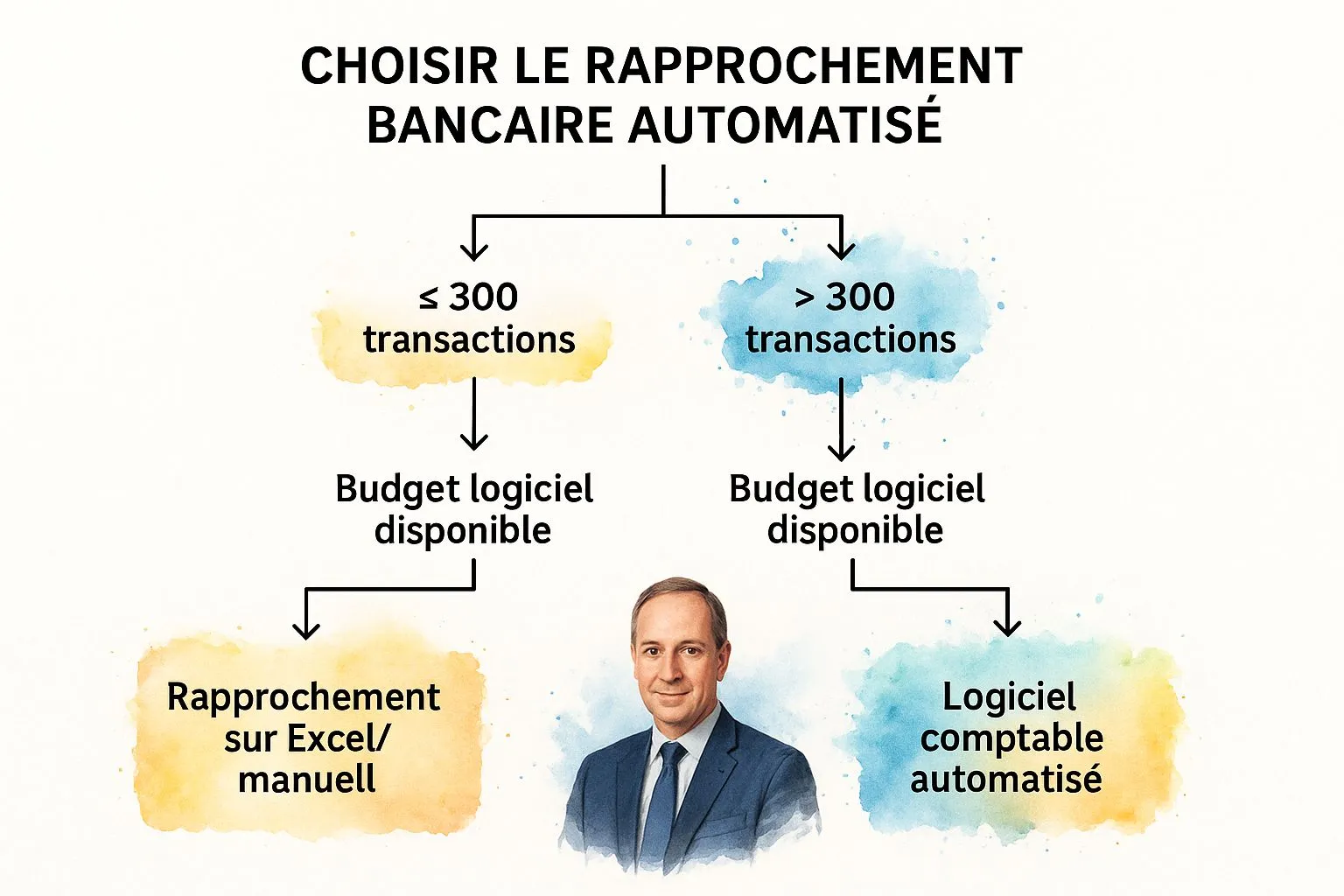
The infographic above visualizes the decision-making process for choosing the right bank reconciliation method. It starts with the question of transaction volume.
The decision-making process shown in the infographic guides the user through a series of questions to determine the most suitable bank reconciliation method for their situation. The first criterion is transaction volume: if the volume is high, automated reconciliation is recommended. Otherwise, the infographic suggests evaluating the desired reconciliation frequency. If frequent reconciliation is needed, automation should be favored. On the other hand, a low volume and low frequency can justify manual reconciliation. The goal is to help the user identify the optimal solution among automation, spreadsheets and the manual method.
Software such as Sage 100 Comptabilité (used by many French SMEs), Cegid Expert (favored by accounting firms) and EBP Comptabilité (adopted by micro-businesses and SMEs) are excellent examples of powerful tools for automating bank reconciliation. Their features include automatic import of electronic bank statements, transaction-matching algorithms, smart suggestions for handling discrepancies, customizable rules for recurring transactions, digital archiving of supporting documents and automatic generation of adjusting accounting entries. Learn more about automated bank reconciliation (accounting software)
Pros: Considerable time savings, fewer human errors, better traceability, more frequent reconciliations (daily/weekly), fast detection of potential anomalies or fraud.
Cons: Acquisition and subscription costs, need to train staff, dependence on the quality of imported bank data, potential loss of detailed understanding of financial flows if you rely entirely on automation.
Tips:
- Check the software’s compatibility with your bank.
- Thoroughly train staff on how to use the software.
- Configure matching rules suited to your business.
- Regularly review automatically matched transactions.
- Reconcile frequently for fast anomaly detection.
Automated bank reconciliation is particularly relevant for companies with a large transaction volume, such as e-commerce businesses, or those wanting precise, regular monitoring of their accounts. It is a major asset for optimizing accounting and financial management, freeing up time to focus on growing the business. This is why this method fully deserves its place in this list of best practices for bank reconciliation examples.
4. Cloud bank reconciliation (SaaS)
Cloud bank reconciliation, based on SaaS (Software as a Service) solutions, is a modern, efficient alternative to traditional methods. Accessible via the internet, this type of solution offers extensive automation of the process, considerably simplifying companies’ accounting and financial management. Access is as simple as an internet connection, allowing accounts to be managed from any connected device (computer, tablet, smartphone). These platforms integrate artificial intelligence features to facilitate transaction matching, reducing manual errors and the time spent on this tedious task. They also foster real-time collaboration between the various people involved (accountants, managers, auditors) and ensure continuous synchronization with bank data for an accurate, up-to-date view of the financial situation.

Key features:
- Secure access from any connected device: Manage your bank reconciliations wherever you are.
- Real-time synchronization with bank accounts via API: Your bank data is always up to date.
- AI technology for transaction matching: Automate reconciliation and reduce errors.
- Advanced dashboards and reporting: Easily visualize your financial situation.
- Multi-user collaboration: Work efficiently with your team and advisors.
- Automatic feature updates with no installation required: Always benefit from the latest improvements.
Pros:
- Mobility and flexibility of use: Access your data and manage your reconciliations wherever and whenever you want.
- Manual tasks reduced to a minimum: Save time and focus on higher-value tasks.
- Automatic regulatory updates: Stay compliant with the latest accounting standards.
- Predictable subscription costs: Keep control of your budget with transparent pricing.
- No IT infrastructure to maintain: Simplify your IT management and reduce related costs.
- Generally stronger data security than on-premise solutions: Benefit from enhanced security thanks to professional cloud infrastructure.
Cons:
- Dependence on an internet connection: Internet access is essential to use the solution.
- Potential questions around data confidentiality: It is crucial to choose a provider that respects security and confidentiality standards.
- Recurring costs that can add up over the long term: The subscription can represent a significant cost over time.
- Sometimes limited customization compared to bespoke solutions: SaaS solutions are not always as flexible as custom software.
Application examples:
- Pennylane: A French collaborative accounting solution that automatically synchronizes bank transactions.
- Georges.tech: Used by independents and micro-businesses for automated accounting management.
- iCompta Pro: Offers intuitive reconciliation features.
Practical tips:
- Check the GDPR compliance of the chosen solution: Make sure the solution complies with data protection regulations.
- Make sure you can export data if you switch providers: Keep control of your data.
- Set up alerts for unreconciled transactions: Quickly identify anomalies and errors.
- Take advantage of mobility to check more frequently: Keep an eye on your finances in real time.
- Use collaborative features to involve different departments in the company: Improve communication and transparency within your organization.
When and why use this approach?
Cloud bank reconciliation (SaaS) is particularly suited to sole traders, freelancers, micro-businesses and SMEs looking to simplify and automate their accounting management. It is ideal for those who want to save time, reduce manual errors and benefit from a solution accessible anywhere, anytime. The flexibility and scalability of SaaS also make it possible to adapt the solution as the company grows. This type of solution is particularly relevant for companies with large transaction volumes or operating in a multi-currency environment. Finally, cloud bank reconciliation meets the needs of companies concerned about the security of their data and wanting to benefit from the latest technological advances in accounting.
5. Bank reconciliation with open banking (bank APIs)
Open banking is revolutionizing bank reconciliation, offering a modern, efficient alternative to traditional methods. This system, based on bank APIs (Application Programming Interfaces) established under the European PSD2 directive, enables a direct, secure, real-time connection between your accounting software and your bank accounts. It is a particularly relevant bank reconciliation example for modern companies looking to automate their processes and become more efficient. It deserves its place on this list because it represents the future of bank reconciliation.
How it works:
Specifically, open banking allows authorized third-party software to access your bank data (with your explicit consent) to automate tasks such as bank reconciliation. Instead of manually downloading account statements, transactions are retrieved automatically and in real time via the API. The software then compares these transactions with your accounting data, making it easier to identify discrepancies and speeding up the reconciliation process.
Key features:
- Direct API connection with banking institutions: Smooth, secure integration.
- Automatic, real-time transaction retrieval: No more manually downloading statements.
- Continuous rather than periodic reconciliation: Real-time monitoring of your cash flow.
- Secure two-factor authentication: Enhanced protection of your data.
- Multi-bank access from a single interface: Centralized management of your accounts.
- Automatic transaction categorization using artificial intelligence: Time savings and efficiency.
Pros:
- Near-total elimination of manual data entry: Reduced errors and significant time savings.
- Drastically shorter anomaly-detection time: Fast identification of errors and potential fraud.
- Real-time view of reconciled cash flow: Informed decision-making thanks to up-to-date data.
- Enhanced security of financial data exchanges: Compliance with the strictest security standards.
- Compliance with recent European regulations: Alignment with PSD2.
Cons:
- Availability varies by bank: Not all banks yet offer full API access.
- Requires software compatible with bank APIs: Potential investment in new software.
- Potentially high cost of solutions integrating these technologies: Compare offers from different providers.
- Confidentiality and consent issues to manage: Ensure transparency and control over shared data.
Successful implementation examples:
- Budget Insight: Provides bank APIs used by many accounting solutions in France.
- Bridge API: Connects more than 500 financial institutions and facilitates automated bank reconciliation.
- Linxo Pro: Uses open banking for French SMEs.
Practical tips:
- Check your bank’s compatibility with open banking solutions.
- Make sure bank consents are renewed regularly (generally every 90 days).
- Set up a control process despite the automation.
- Compare different bank API providers based on institution coverage and pricing.
- Train your staff on the new security risks related to open banking.
When and why use this approach?
Bank reconciliation via open banking is particularly relevant for sole traders, freelancers, SMEs, and any company looking to automate its accounting management. If you manage several bank accounts, sell online, or simply want to save time and reduce errors, this method is for you. It is ideal for getting a clear, real-time view of your cash flow and simplifying your administrative processes. This bank reconciliation example via open banking represents an effective solution for optimizing your financial management.
6. Bank reconciliation for cash flow forecasting
Traditional bank reconciliation focuses on the past. But what if you could anticipate the future of your finances? That’s where bank reconciliation for cash flow forecasting comes in. This more advanced type of bank reconciliation incorporates a forward-looking dimension essential for optimal cash management. It doesn’t just reconcile past transactions; it also projects future transactions, such as checks issued but not yet debited, expected transfers and scheduled direct debits. In doing so, it lets you anticipate the evolution of your bank balance and optimize your financial decisions. This method is particularly relevant for sole traders, freelancers and small businesses with significant, irregular or seasonal cash flows, as it provides a clear view of upcoming cash positions.
How it works and its benefits:
Forecast-based bank reconciliation stands out by incorporating current and future transactions. It clearly distinguishes the accounting balance, the bank balance and, above all, the projected available balance. By tracking customer and supplier payment due dates, you can build short-term cash flow forecasting dashboards and receive alerts on potential overdrafts. In addition, the ability to simulate different scenarios of incoming and outgoing payments gives you better control over your financial situation.
Concrete benefits:
- Anticipating cash flow problems: Identify overdraft risks before they occur and take the necessary steps.
- Optimizing financial decisions: Make informed decisions about your investments or short-term financing needs.
- Reducing bank overdraft fees: Avoid unnecessary charges through better anticipation of your balances.
- Improving relationships with financial partners: Present a clear, reassuring forward-looking financial picture.
- Securing payments at critical due dates: Ensure your suppliers and expenses are paid even during cash flow fluctuations.
Cons to consider:
- Increased complexity: The reconciliation process is more complex than the traditional method.
- Regular updates: Forecasts need to be updated regularly to stay relevant.
- Risk of inaccuracy: Projections can be inaccurate, particularly in the event of unforeseen events.
- Rigorous discipline: Precise, regular recording of future commitments is essential.
Application examples: Picture a freelancer in e-commerce managing deferred payments, or a small construction company juggling deposits and retention amounts. Forecast-based bank reconciliation lets them anticipate their cash flow and avoid unpleasant surprises. Solutions such as Agicap, Cashboard, Tréso2000, Cash Flow Manager and Finance Active are designed precisely to facilitate this type of reconciliation.
Practical tips:
- Categorize future flows by degree of certainty (certain, likely, uncertain).
- Set up a precise calendar of recurring due dates (rent, salaries, etc.).
- Incorporate the payment terms negotiated with your customers and suppliers.
- Update the forecast reconciliation after each significant transaction.
- Plan for several scenarios (optimistic, pessimistic, realistic) for uncertain receipts.
Learn more about bank reconciliation for cash flow forecasting
This type of bank reconciliation deserves its place on this list because it represents a significant shift in cash management, moving from a retrospective approach to a proactive one. For today’s entrepreneurs, anticipating financial flows is essential for steadily running the business and making informed decisions. By mastering your cash flow forecasting, you secure your business and maximize your chances of success.
Comparative Overview of 6 Bank Reconciliation Methods
| Method | 🔄 Implementation complexity | 👥 Resources required | 📊 Expected results | 💡 Ideal use case | ⭐ Key benefits |
|---|---|---|---|---|---|
| Manual bank reconciliation | Low to moderate, manual line-by-line process | Accounting staff, significant time | Detailed transaction control | SMEs, sole traders with few transactions | Thorough control, no software needed |
| Bank reconciliation in Excel | Moderate, requires Excel skills | Office tools, Excel skills | Faster reconciliation with partial automation | SMEs, associations, small businesses | Faster than manual, flexible and customizable |
| Automated bank reconciliation (accounting software) | High, software installation and setup | Specialized software, training | Time savings, fewer human errors | SMEs with high volumes, accounting firms | Extensive automation, better traceability |
| Cloud bank reconciliation (SaaS) | Medium to high, depends on the platform | SaaS subscription, internet connection | Real-time synchronization, collaboration | Mobile companies, multiple users | Mobility, automatic updates, security |
| Bank reconciliation with open banking (bank APIs) | High, API integration and security to manage | Compatible software, IT expertise | Continuous real-time reconciliation | Connected companies, high transaction volume | Near-instant automation, enhanced security |
| Bank reconciliation for cash flow forecasting | High, analytical and forecasting complexity | Analytical tools, financial expertise | Anticipating future financial flows | Large seasonal companies or high-flow businesses | Cash flow anticipation and optimization |
Simplify your bank reconciliations with Bizyness
In summary, bank reconciliation — whether manual, in Excel, automated via software, in the cloud, with open banking, or for cash flow forecasting — is a crucial step for your company’s financial health. Mastering this process not only lets you identify errors and potential fraud, but also gives you a clear, precise view of your financial situation. This accurate overview is essential for making informed decisions, optimizing your cash management and, ultimately, driving the growth of your business. A bank reconciliation example, regardless of the tool used, highlights the importance of reconciling your bank statements with your accounting.
Solutions such as automation and open banking, presented in this article, offer considerable time savings and minimize the risk of errors. Remember that every minute saved on administrative tasks is a minute reinvested in growing your business.
Looking for a simple, effective way to manage your bank reconciliations? Bizyness offers a complete, intuitive solution to automate this tedious task and much more. Discover how Bizyness simplifies bank reconciliation and many other aspects of your financial management by visiting Bizyness today, and enjoy a free trial to explore all its features.
