

 Français
PayPal Account Login: An Easy and Secure Guide
Master your PayPal account login. Easily access your account, API, webhooks and accounting mapping for your e-commerce business. Step-by-step guide.
Your store takes in payments. The real problem starts right after.
A PayPal payment validated on Shopify or WooCommerce doesn’t automatically become usable accounting data. You need to link the account, authorize the right access, make status updates reliable, handle refunds, isolate fees, then map everything to the correct VAT and accounting logic. This is where many merchants confuse login with integration.
When someone searches for PayPal account login, they’re often thinking of a simple login screen. In practice, for an online seller, the login that matters is the one that connects the payment to the rest of the financial cycle. If that chain is poorly built, the back office fills up with discrepancies, inconsistent statuses, and exports that need to be redone by hand.
Beyond simply logging into your PayPal account
The scenario is a classic one. A store is doing well, sales keep coming in, PayPal reports payments all day long, and yet the finance team is still working in a spreadsheet.
Every sale has to be reviewed. You need to distinguish gross from net, identify fees, check whether the refund was properly recorded, then match the transaction to the right invoice or the right customer. For a store selling in France and internationally, the difficulty grows fast.
Most problems don’t come from PayPal itself. They come from a login designed only to collect payments, not to produce reliable data downstream.
A merchant can log into their PayPal account perfectly well, see the payments appear, and still get stuck on the management side. Exports change depending on the need, reconciliation takes time, and VAT gets reprocessed at month-end instead of being prepared as you go.
A good PayPal login isn’t judged at the moment the payment goes through. It’s judged at the moment you need to close the books, issue a refund, reconcile, and justify your flows.
This is also why automation becomes an operational topic, not just a technical one. If you want to dig deeper into the payment-side flow logic, our post on automatic PayPal payments is a good complement.
The right approach is to treat PayPal as one building block of a larger system. Merchant login, application authorization, webhooks, VAT rules, accounting entries and FEC export all need to follow the same logic. Without that, every accepted payment creates extra manual work.
Prerequisite: a Business PayPal account is essential
The classic case comes up quickly. The store is ready, the PayPal module too, but the login gets stuck when it’s time to authorize the integration or to receive the first funds under proper conditions. In most cases, the problem lies with the account type.
For an e-commerce business, you need a Business PayPal account. This is the format designed for taking payments on a store, connecting applications, managing API authorizations, and keeping a usable basis for accounting. A personal account may seem sufficient at first. It quickly becomes a source of friction as soon as you need to automate.

What the business account really changes
The difference isn’t limited to collecting payments. The business account also shapes the rest of the cycle: authorizing an e-commerce platform, receiving payment events, managing refunds, granting access to a third-party tool, and then correctly classifying flows for VAT and accounting.
This is the point many merchants underestimate.
An account properly configured upfront saves you from rebuilding the whole chain later. At Bizyness, this is exactly what we find in our connected e-commerce and accounting integrations: the login only has value if payments come through with a structure usable for reconciliation and accounting entries.
In practice, the business account mainly brings three useful capabilities:
-
Collecting payments in a framework suited to online selling The account is designed for commercial activity, with the settings and validations expected of a merchant.
-
Authorizing application connections OAuth, API, webhooks and third-party tool access all rely on an account built for this purpose.
-
Preparing consistent financial data Legal name, bank details, company information and VAT logic must be aligned from the start.
The information to prepare before connecting PayPal
Before creating or converting the account, prepare the administrative elements. In France, this generally includes the SIRET number, the IBAN, the company contact details, and the legal information used on the store.
The most useful checkpoint is simple. The data entered into PayPal must match your actual business — not a provisional version of the project, not an old trade name, not a bank account used for something else. This is often where verification blockers start.
Another practical point. If you sell in several countries or under different VAT rules, it’s better to clarify this framework before activation. The PayPal account alone doesn’t handle the accounting mapping, but an incomplete or inconsistent business identity later complicates the breakdown of sales, fees and refunds.
Preparing supporting documents and company data before activation saves time. Fixing an account already connected to the store costs far more.
Personal account or business account
The choice should be made without ambiguity:
| Use case | Personal account | Business account |
|---|---|---|
| Receiving e-commerce payments | Poorly suited | Yes |
| Connecting a store | Limited | Yes |
| Authorizing application access | Limited | Yes |
| Structuring flows for VAT and accounting | Weak | Yes |
The order that works best
The order in which you set things up has a direct impact on the stability of the connection.
-
Create or convert the account into a business profile Check this before any attempt to connect from Shopify, WooCommerce or another CMS.
-
Fill in legal and banking identity Company name, IBAN, contact details and administrative information must be complete.
-
Verify consistency with the store The account holder, billing information and business logic must match what you actually operate.
-
Then connect the e-commerce platform and third-party tools Only at this stage does the technical layer become reliable.
The common mistake is to launch the connection from the CMS to save a few minutes, then deal with verification later. In practice, this shortcut mostly creates authorization refusals, temporary limitations, or payment flows poorly framed for automation.
The topic of PayPal account login therefore starts here. With the right account type, clean company data, and a solid enough foundation, you can then connect the API, webhooks and accounting mapping without rebuilding everything along the way.
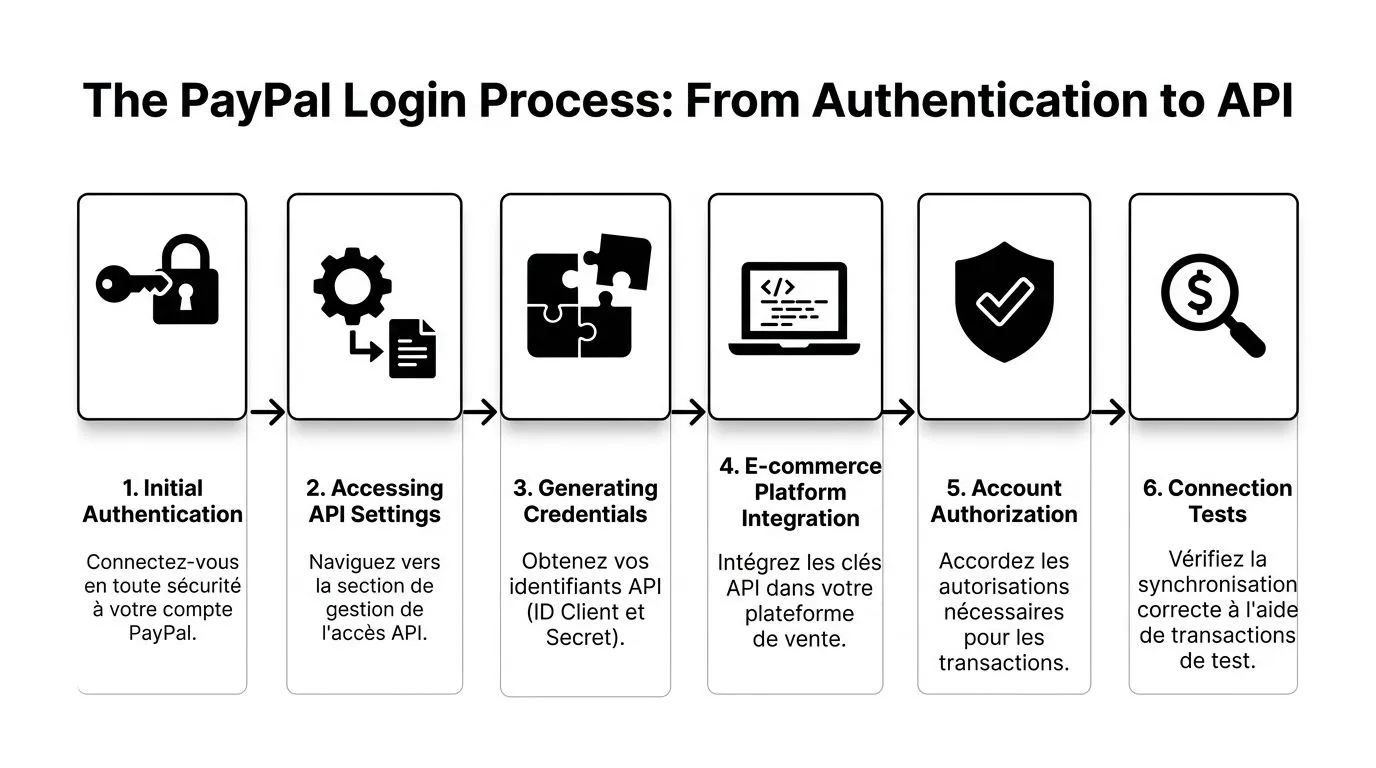
The PayPal login process: from authentication to the API
One case comes up often with merchants. The store collects payments fine on PayPal, but statuses don’t come through properly, refunds arrive late in the back office, and the accounting team receives net amounts that are impossible to reread without reprocessing. The problem isn’t a simple wrong password. It’s an incomplete connection, stopped at authentication, when real operations start with OAuth, the API and webhooks.
A usable PayPal connection therefore follows a clear technical sequence. Authenticate the account. Authorize the e-commerce platform. Define API permissions. Declare the necessary webhooks. Then check that the events received actually serve the order, the refund and the accounting entry.
Basic login on Shopify
On Shopify, the initial login happens from the payment settings, then via redirect to PayPal to authorize the business account. On the surface, the flow looks simple. In practice, three points need to be checked before clicking final authorization: the right PayPal account, the right legal entity, and the right access scope.
This is the sensitive part. If the merchant connects a partially verified account, or an account opened with information that doesn’t match the store, the connection may look accepted and then degrade in production. I’ve seen this happen on stores where payment collection worked fine, but refunds, disputes or certain syncs stayed blocked for an administrative reason, not a technical one.
The right approach is to treat the OAuth authorization screen as an operational commitment, not a mere formality. The application requests specific rights. You need to read them, understand what they cover, then test the flow in a staging environment before going to production.
Where merchants often get stuck
The frequent blockers are fairly predictable:
-
PayPal account connected, but still limited OAuth authorization goes through, then certain actions remain impossible on the store or third-party tool side.
-
Inconsistent banking or legal information The PayPal account, the invoicing company and the store don’t use exactly the same reference data.
-
Permissions granted too quickly The connector has broader access than necessary, or conversely not enough to receive the right events.
-
Tests that are too short The merchant checks a successful payment, but tests neither partial refund, nor cancellation, nor dispute.
-
Data compliance overlooked The payment flow works, but the handling of customer data between PayPal, the store and the financial tools hasn’t been defined.
If the PayPal screen opens correctly but payment statuses come through poorly, you should first check the account status, the OAuth permissions and the expected events. Redoing the installation without this diagnosis often wastes time.
What OAuth actually does
OAuth is used to authorize an application to act within a defined scope without sharing the main PayPal account credentials. It’s the normal mechanism for connecting Shopify, an ERP, a reconciliation tool, or an accounting automation system.
Concretely, this authorization can allow retrieving transactions, tracking a payment’s progress, receiving refunds, or transmitting billing information. The right setting is to grant only the rights necessary for the actual scenario.
This choice has a direct consequence downstream. If permissions are too limited, the connection looks clean but remains unusable as soon as you need to automate statuses. If they’re too broad, the risk of poor governance increases, especially when several providers work on the same flow.
API and integration logic
The PayPal API isn’t just used to confirm that an order has been paid. It structures the transaction’s entire lifecycle. This is where the difference lies between a store that lives with CSV exports and a store that aligns payment, order and accounting without systematic manual rework.
A well-designed integration uses transaction IDs, successive statuses, refunds, fees and order metadata. This level of detail matters as soon as you need to reconcile a payment with a gross amount, a partial refund, or a separate breakdown of PayPal fees. To see how this type of flow fits into a larger system, the Bizyness e-commerce and financial integrations page shows the connectors typically involved around PayPal.
The topic therefore goes beyond simply connecting the account. It already touches on financial orchestration. This is also why approaches like AI-driven financial process automation are drawing increasing interest from merchants who want to reduce rework on payments, refunds and accounting exports.
Webhooks determine the quality of what comes through on the ground
Webhooks are often set up too late, even though they determine operational reliability. PayPal sends an event when a payment is captured, refunded, disputed or modified. Without a webhook, the connected tool often depends on periodic API polling or manual checking.
The result is concrete. Discrepancies stay invisible longer. A refund can exist in PayPal without being immediately reflected in the store or the financial tool. A dispute can appear without triggering the right downstream handling.
You therefore need to select the events that are actually useful, verify their receipt, then check how they’re translated into business logic. A webhook received but poorly mapped solves nothing.
A reliable implementation order
On an e-commerce project, the order that holds up over time is generally as follows:
-
Log in with the right Business PayPal account No test account forgotten in production, no confusion between several entities.
-
Authorize the store via OAuth Review the requested access before validating.
-
Test real cases in sandbox then in a controlled environment Accepted payment, declined payment, full refund, partial refund.
-
Activate the necessary webhooks Payments, refunds, disputes, status changes.
-
Check the result on the operational side The order must change status correctly. The refund must remain traceable. The data must then be reusable in the accounting mapping and VAT.
This is the point where the PayPal connection becomes useful for finance, not just for collecting payments. A well-built integration avoids having to rebuild the entire chain between store, payment flow and accounting later on.
Setting up payment sync and accounting mapping
The technical connection is only the beginning. After that, every PayPal transaction needs to be interpreted, then classified.
This is where many merchants lose reliability. Payments come in, but the accounting system can’t clearly distinguish a sale, a refund, a PayPal fee or a settlement discrepancy. The result is always the same: accounting that requires a lot of manual rework.
What good synchronization must do
Good synchronization doesn’t just import lines. It must attach each event to a management logic.
Concretely, you need to be able to handle at least:
-
The original sale It must point to the right product or the right revenue category.
-
PayPal fees They must not stay buried inside the net amount collected.
-
Refunds Whether full or partial, they must correct the right sale and the right period.
-
Secondary statuses Disputes, cancellations or adjustments require a different reading than a simple successful payment.
Accounting mapping is not a detail
Accounting mapping means telling the system what to do with each type of event. Without this work, an integration mostly produces noise.
A well-mapped PayPal flow automatically routes operations to the correct revenue, expense or third-party accounts. This is where a financial structuring tool takes over from the simple payment gateway. In this use case, Bizyness connects sales, payments, VAT and accounting export into a single flow, instead of leaving each piece of data in its own silo.
If your PayPal exports still end up in a spreadsheet before reaching your accountant, your login is active, but your financial chain isn’t.
The central topic for an online seller remains VAT
The difficulty isn’t recording a payment. The difficulty is recording a payment correctly, based on the country, the customer type and the applicable tax framework.
A well-designed integration must be able to use order and destination information to apply the expected logic:
| Sales scenario | Expected treatment |
|---|---|
| Sale in France | Application of the regime corresponding to the transaction |
| EU sale under the OSS scheme | Qualification based on the destination country and OSS logic |
| Sale outside the EU | Treatment based on the regime applicable to export or the relevant exemption |
This work requires that data not only be imported, but reconciled with order information. A bare payment isn’t enough. It must be linked to a sale, a country, a document, then an accounting entry.
To broaden the discussion beyond payment alone, this piece on AI-driven financial process automation is worth reading. It shows well why the quality of a financial system depends on its ability to qualify flows, not just collect them.
The flow logic that holds up over time
Merchants who keep a stable system don’t try to automate everything at once. They first define a clear circuit.
A solid circuit looks like this:
- The store creates the order
- PayPal confirms the payment event
- The synchronization system attaches the event to the order
- The accounting rules qualify the nature of the operation
- VAT is assigned according to the correct logic
- The prepared entry goes to the accounting export or the FEC
Once this chain is in place, reconciliation becomes much cleaner. If you’re working on this topic from the treasury and banking side, this article on automatic bank reconciliation provides a good complementary framework.
What doesn’t work well
Three approaches almost always create problems:
-
Importing only the PayPal net amount You lose visibility into fees and complicate control.
-
Mapping all sales into a single account without nuance This simplifies the start, then complicates analysis and closing.
-
Handling VAT at month-end, outside the flow You’re shifting the error instead of avoiding it.
The topic of PayPal account login therefore isn’t closed once the login is validated. A successful connection is one that turns a payment into a usable, documented accounting entry consistent with your tax reality.
Security best practices to protect your account
The risk often shows up in an ordinary situation. An owner approves their PayPal payments from their phone, a service provider still has an old API access, and nobody knows where the production key was copied. The account works fine, until the day a refund needs to go out fast or an accounting connector stops receiving flows.

On PayPal, security isn’t just about the login screen. It also covers human access, authorizations granted to applications, webhooks, and how secrets are stored. This is the point many merchants underestimate. The login protects the entry point. Financial automation depends on the whole chain.
A password isn’t enough for a merchant account
A unique password remains the baseline. For a Business PayPal account used in an e-commerce context, you also need to strengthen the authentication method.
Where the option is available, activate the passkey. PayPal explains how it works and how to set it up in its help article on logging in with a passkey.
In practice, the passkey reduces two common problems: reused passwords, and phishing attempts targeting the merchant’s main account.
I recommend a simple setup:
-
Daily access Enable the passkey on the primary device of the owner or the administrative manager.
-
Backup access Document a tested recovery procedure, with an identified backup person.
-
External contributors Never share the main account credentials. Grant access suited to the task, or go through an application authorization.
Governance matters too. If you need to formalize an internal emergency procedure for financial access — including deciding how to block a bank account — align this procedure with your PayPal access and your banking access. Incidents never stay confined to a single tool.
Securing the API layer and webhooks
I often see accounts properly protected on the user side but exposed on the integration side. The classic pattern is well known. A production API key gets shared in a message, a webhook is no longer verified, or a former provider still holds access that was never revoked.
For a merchant connecting PayPal to their store, their ERP, or a tool like Bizyness to prepare accounting entries, the useful rules are concrete:
-
Limit permissions to actual needs A synchronization application doesn’t need the same rights as a refund tool.
-
Separate sandbox and production Test credentials must never end up in live flows.
-
Store secrets in a manager designed for that purpose Not in a shared spreadsheet, not in an email, not in a team note.
-
Verify webhooks An unverified webhook can create status discrepancies, duplicates or inconsistent entries.
-
Plan for access rotation With every change of provider, developer or financial manager, take inventory and regenerate credentials if necessary.
This work has a direct impact on accounting. If a compromised secret lets a third-party flow send fake events, the problem isn’t only technical. You can end up with poorly reconciled payments, misclassified refunds, or sales missing from the export.
A visual reminder can be useful before formalizing your internal procedures.
What holds up over time
Good security is the kind the team keeps applying without cutting corners after two weeks.
The most reliable model rests on three layers. Strong authentication for people. Separate authorizations for tools. A clear registry of access, secrets, owners and review dates. This discipline is what protects payment collection, operations, and the quality of accounting data all at once.
Troubleshooting login and account issues
The typical case happens at the worst possible time. A merchant needs to process refunds, check disputed payments or review the day’s collections, and PayPal access gets blocked at the verification code step, or on an account that has been restricted. At that point, the issue goes beyond a simple login. It affects operations, customer support and the accounting chain.
On the ground, two incidents come up often. The first involves losing access to two-factor authentication, especially after a change of phone number or device. The second involves rarely used accounts that become active again after several weeks or months and run into a restriction.
Losing access with two-step verification
The scenario is simple. The username is known, sometimes the password too, but the security code no longer arrives. In practice, this is one of the most damaging blockers for an e-commerce team, because it cuts off both management access and certain checks useful at end of day or at closing.
PayPal documents the case of a changed mobile number on its help page, and on the corresponding source page: changed mobile number and unable to log in. That said, a merchant also needs to assess the operational impact in parallel, since waiting alone doesn’t resolve refunds that need processing or discrepancies that need explaining to finance.
Immediately prepare what proves account ownership and business consistency:
- Proof of identity
- Bank statement linked to the account
- Company legal information
- Precise description of the blocker Changed number, lost phone, replaced device, secondary access unavailable
Then treat the incident as a business continuity issue. If the main account is inaccessible, it needs to be reported quickly to internal support, to whoever handles accounting, and to customer service if refunds or checks risk being delayed.
I stress this point in e-commerce integrations. The real risk isn’t just the blocked screen. The risk is the break in the chain between payment, order status and accounting treatment. If flows keep moving on the store side but nobody can check PayPal, anomalies pile up fast.
Restriction after a period of inactivity
This case often affects seasonal sellers, businesses that favor another PSP for several months, or multichannel merchants who only use PayPal occasionally. When returning to the account, access sometimes still exists, but certain actions are limited or require additional verification.
The tricky part is practical. The precise inactivity threshold isn’t clearly disclosed, which makes real planning difficult. For a merchant, this means anticipating this risk before returning to active use, not on the day a refund needs to be issued or history needs to be pulled for reconciliation.
The consequences are concrete:
- Delayed refunds
- More manual checks
- Partial access to history useful for review
- Delays on accounting entries if PayPal flows feed an automation tool or accounting mapping
For teams formalizing emergency procedures around financial access, this resource on how to block a bank account offers a useful response and escalation framework, even though it doesn’t specifically deal with PayPal.
What to check operationally
Not every account blockage has the same effects. Three levels need to be distinguished.
The first is human access to the account. The second is the application authorizations already in place, for example an e-commerce connection or a sync flow. The third is the accounting impact. A merchant may lose interface access while events still come through via API or webhook, or the reverse, depending on the setup.
This is precisely where tools like Bizyness bring operational value. If sales, payment, refund and VAT flows are already structured and mapped, the team knows more quickly what keeps flowing, what stops, and what will need to be cleanly redone. Without this organization, resolving the login issue often leaves behind a second problem: rebuilding the accounting records.
Useful prevention in practice
Merchant PayPal accounts managed like personal accounts often end up causing problems. A cleaner setup significantly reduces long blockages and manual rework.
Here are the most useful checks:
- Keep the mobile number, email and legal information up to date
- Have a documented recovery method ready before an incident
- Periodically check administrative access if PayPal isn’t used every week
- Identify who handles refunds and who checks the accounting impact in case of a block
- Document the dependencies between account access, API, webhooks and accounting exports
A merchant doesn’t need to wait for an incident to get this in order. As soon as PayPal is used to collect payments, issue refunds, or feed accounting, account access becomes a full operational topic in its own right.
Conclusion: your PayPal login as the cornerstone of financial automation
Logging into PayPal isn’t an end point. It’s the entry point of a complete financial flow.
When the login is well designed, it links authentication, application authorization, webhooks, status processing, accounting mapping and VAT into a single coherent chain. You don’t just save time. You also reduce manual rework, reconciliation discrepancies and accounting classification errors.
Conversely, a connection limited to a simple login only solves the first step of the problem. The rest falls back on the team, often at month-end, when it’s time to reconstruct what actually happened.
The right level of maturity on PayPal account login is to make every payment usable data from the moment it originates. That’s when finance stops chasing the sale. It becomes its natural continuation.
If you want to bring your PayPal flows, e-commerce sales, VAT and accounting exports together into a single operational workflow, Bizyness lets you centralize this data to avoid manual rework and prepare accounting that’s ready as soon as the transaction happens.
