

 Français
Organizing Administrative Documents: A Complete, Simple Guide
Discover how to organize your administrative documents effectively with our proven methods. Simplified organization for your everyday life!

Why your current filing system is wasting your time
How much time do you spend each week searching for an important administrative document? Over a year, that time adds up to a significant loss — not just in hours, but also in productivity and even money. Those “wasted” hours could instead be invested in growing your business or in your personal life.
An inefficient filing system is a source of stress and frustration. Failing to quickly find an invoice, a contract, or a certificate can have harmful consequences. Imagine the penalties tied to a missing document, or the stress of a fruitless search before a crucial appointment. This disorder affects both your efficiency and your everyday well-being.
The impact of disorganization on your business
For sole traders and small businesses, poor administrative organization can hold back growth. Time spent hunting for documents is time not spent on business development, prospecting, or client management.
An unsuitable filing system can also lead to invoicing errors, late payments, and a blurry view of the company’s financial health. You might be interested in this article: How to master the administrative management of your business.
The hidden costs of administrative disorder
A poor filing system has hidden costs that are often underestimated. In France, document storage and management are governed by strict regulations, including those of the Journal officiel de la République française. Since 2016, the Journal officiel has been digital, simplifying access to administrative documents. Find out more about the 2025 statistics and standard.
These regulations come with retention and archiving obligations. An unsuitable system can make it difficult to comply with these rules, with the risk of penalties. On top of that, administrative disorder has a psychological impact. Working in a chaotic environment generates stress, reduces concentration, and hurts productivity.
An organized workspace, by contrast, fosters mental clarity and peace of mind. It is therefore essential to rethink your filing system to optimize your time, efficiency, and well-being.
Decoding your documents: what really matters
Managing your administrative documents can seem like a tedious task. Yet effective organization is essential to save time, avoid stress, and protect your rights. It’s important to understand that not all documents carry the same importance. Some are vital, while others can be discarded without risk.
The six essential document families
To simplify filing, it helps to group your administrative documents into six broad families. This breakdown gives you a clearer overview and makes it easier to find a specific document.
- Tax: This category includes tax returns, tax assessment notices, and proof of income. It’s crucial to respect the legal retention periods to avoid any issues in the event of a tax audit.
- Housing: Leases, rent receipts, utility bills, and home insurance contracts are the key documents in this category. Keep them safe to assert your rights and obligations.
- Health: Health insurance cards, prescriptions, medical bills, and reimbursement statements make up the bulk of this family. Good organization will let you optimize your reimbursements and track your health spending.
- Employment: Employment contracts, payslips, unemployment office certificates, and training records should be carefully kept to protect your rights in case of a dispute.
- Family: Family record books, birth certificates, divorce rulings, and documents related to family benefits should be centralized to simplify your administrative procedures.
- Assets: Property deeds, life insurance contracts, and documents related to investments and inheritance require rigorous filing to ensure the security of your assets.
For each family, we’ll look in more detail at retention periods, must-keep documents, and those you can get rid of.
Retention periods: nuances and recommendations
Legal retention periods are a good starting point, but it can be wise to keep certain documents longer. For example, proof of address can remain useful well beyond the three years generally recommended. Likewise, some tax documents, such as tax assessment notices, can prove valuable in the event of a dispute with the tax authorities, even after the legal retention period.
Here is a summary table of retention periods for the main categories of administrative documents:
Retention periods for administrative documents
Summary table of the main document categories and their legal retention periods
| Document type | Retention period | Legal basis |
|---|---|---|
| Tax assessment notice | 3 years | Article L166 of the French Tax Procedures Code |
| Rent receipts | 3 years | Article 1372 of the French Civil Code |
| Payslips | 5 years | Article L3243-4 of the French Labour Code |
| Property deeds | Unlimited | Lifetime retention recommended |
This table is not exhaustive, and it’s important to refer to the relevant legal texts for each type of document.
Critical documents vs. secondary documents
It’s essential to distinguish critical documents from secondary ones. The former are indispensable and must be kept securely and remain accessible — for example, the tax assessment notice for taxes, or the lease for housing. Secondary documents, such as receipts once the invoice has been checked, can be discarded more quickly. For managing your expense reports, you might find this article useful: How to master your expense reports.
A personalized system for optimal efficiency
The goal is to create a filing system tailored to your needs. This system should be simple, clear, and easy to maintain. By sorting your documents by category and identifying the key ones, you’ll save time and avoid the stress of searching for important information. This gain in time and peace of mind will let you focus on your personal and professional projects.
Mastering physical filing without losing your mind

Forget complex, inefficient systems. This practical guide offers simple, durable physical filing methods that are easy to set up for the whole family. Organizing your administrative documents shouldn’t be a chore anymore! With a clear method and the right tools, this task becomes a quick, efficient routine.
Choosing the ideal filing method
Three main physical filing methods are available to you: chronological, alphabetical, and thematic. Each has its advantages and drawbacks. The best choice depends on your needs and habits.
-
Chronological filing: Easy to implement, this system is particularly well-suited to documents consulted regularly and for which the order of arrival matters — think invoices or bank statements, for example.
-
Alphabetical filing: Ideal for a limited volume of documents, this method is intuitive and simple to use. It can, however, become more complex if you have many documents with similar names.
-
Thematic filing: Versatile, this system groups documents by category (housing, health, taxes, etc.). It’s the most effective method for quickly finding a specific document, especially if you have a large volume of paperwork. Large-scale administrative document management, such as for population censuses in France, illustrates just how important effective filing is. These operations generate a considerable volume of data used for public policy.
The tools of perfect filing
Choosing the right tools is essential for effective filing. Tools suited to your needs will simplify the task and help you maintain order over the long term.
-
Binders vs. boxes: Binders are ideal for frequently consulted documents. Boxes are better suited to archiving documents you use less often.
-
Labeling: Clear, precise labeling is essential. Use legible labels and systematically indicate the category and date of the document.
-
Dividers: Dividers structure your binders and separate the different document categories. Favor sturdy, easy-to-handle dividers.
Keeping order: a family challenge
Getting the whole family involved in organizing administrative documents can be tricky. Here are a few tips:
-
Clear rules: Set simple rules everyone can understand.
-
Dedicated space: Set up a specific space for filing, accessible to all family members.
-
Regular routines: Establish filing routines, such as a weekly sort of new documents.
Purging: a necessary evil
To avoid piling up useless paperwork, regularly purge your archives. Caution: some documents must be kept for a legal retention period. Check the retention periods before throwing anything away. A well-organized purge will free up space and simplify your filing. It will let you focus on the documents that matter and avoid overload. Keep the goal in mind: creating a simple, effective, and durable system for managing your administrative documents.
Smart digitization: beyond simple scanning
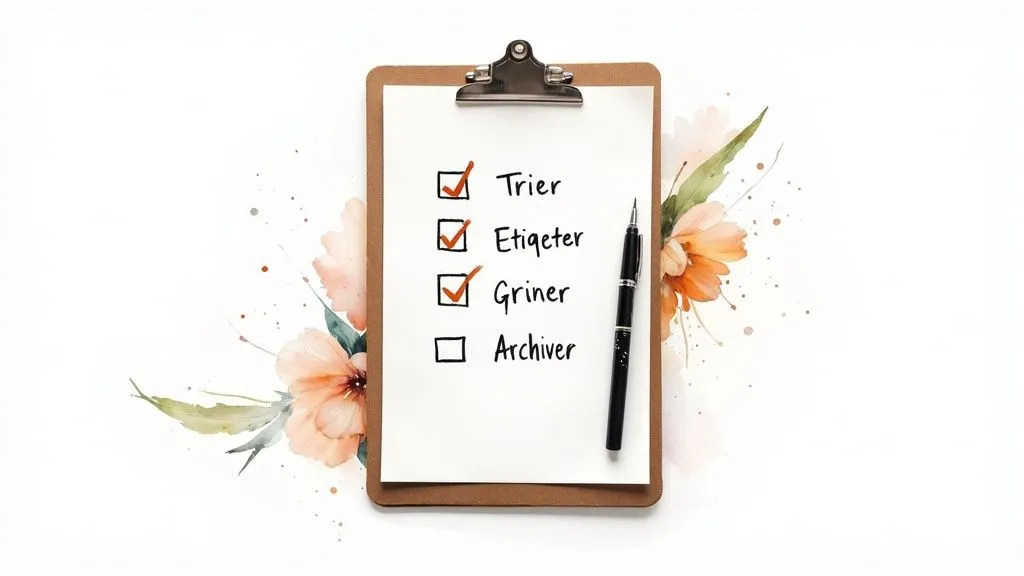
Digitizing your administrative documents is much more than simply scanning them and saving them to a folder on your computer. The goal is to create a high-performing digital system that simplifies document management and lets you find what you need in seconds. This system should be designed for optimal time savings and peace of mind.
Tools for effective digitization
Successful digitization starts with choosing the right tools. Several solutions exist, ranging from mobile apps to professional scanners, as well as secure online storage services.
-
Mobile apps: Scan your documents directly with your smartphone, organize them, and share them easily using dedicated apps.
-
Scanners: For large volumes of documents, a Fujitsu scanner offers superior speed and scan quality.
-
Online services: Store your documents in the “cloud” via secure platforms like Google Drive or Dropbox, accessible from any device.
File formats and naming conventions: a long-term view
The file format is a crucial element for preserving your digital documents. Favor the PDF/A format, which guarantees long-term readability regardless of software changes. A clear, consistent naming convention is just as important. Name your files descriptively, including the date and document type, for example: “Invoice_EDF_2024-03-15.pdf”.
Indexing and metadata: instant access to your documents
Indexing is a key element for effective digitization. It lets you quickly find a specific document using keywords. Metadata is also a major asset. This invisible information — such as the date, document type, or keywords — refines your searches and optimizes your time.
Folder organization and syncing: mastering your digital space
Rigorous folder organization is essential to avoid digital clutter. Create a logical folder structure, sorting your documents by category (taxes, housing, health, etc.). Syncing across your various devices (computer, tablet, smartphone) lets you access your documents wherever you are. Sometimes, physical filing can become a real challenge. Understanding extreme situations, such as Diogenes syndrome, can shed useful light on the importance of organization. Diogenes syndrome cleaning
Scan quality: an essential point not to overlook
A quality scan is essential for the readability and archiving of your documents. Choose a sufficient resolution (300 dpi minimum) and good contrast. A poorly scanned document can be hard to read, and important information can be lost.
Backup and security: protecting your data
Finally, regular backup of your data is essential. Use an external hard drive, a secure cloud service, or ideally both, to protect yourself against data loss in the event of a computer failure or cyberattack. A well-thought-out digitization strategy will let you manage your administrative documents efficiently, find them easily, and save precious time day to day.
Building your own hybrid system
Filing administrative documents isn’t just a binary choice between all-digital and all-paper. The most effective approach is often a hybrid system, cleverly combining both methods to meet your particular needs. Such a personalized system lets you benefit from the advantages of digital while preserving the security and practicality of paper for certain essential documents.
Identifying documents to keep in physical form
Some documents require physical retention, whether for legal reasons or their evidentiary value. Notarized deeds, original diplomas, and important contracts, for example, should be carefully kept in paper form. Other documents, such as proof of identity, may also be kept in original form as a precaution.
Digitization: which documents should you scan?
Most of your administrative documents can be digitized without risk. Invoices, bank statements, tax assessment notices… digitization offers considerable space savings and makes finding information easier. Remember to secure your digital data with regular backups and strong passwords.
To better understand the pros and cons of the different filing methods, see the comparison table below:
Comparison of filing solutionsComparative analysis of the pros and cons of paper, digital, and hybrid methods
| Method | Advantages | Disadvantages | Best for |
|---|---|---|---|
| Paper | Accessible without technology, tangible, legal value for certain documents | Bulky, hard to search, risk of loss or damage | Important original documents (notarized deeds, diplomas), documents requiring a handwritten signature |
| Digital | Space savings, easy search, quick access, simplified sharing | Requires IT equipment, risk of hacking or data loss, some procedures still require paper | Everyday documents (invoices, bank statements), frequently consulted documents |
| Hybrid | Combines the advantages of paper and digital, flexibility, tailored to specific needs | Requires rigorous organization, a clear referencing system | The optimal solution for most situations, allows efficient management of all document types |
This table summarizes the strengths and weaknesses of each method, helping you choose the solution best suited to your situation. The hybrid approach emerges as the most versatile, striking a balance between security and practicality.
Bridging physical and digital: cross-referencing
For optimal management, it’s important to link your physical and digital archives. Use QR codes, numbering systems, or document management software (DMS) to create bridges between your paper documents and their digital versions. A QR code stuck on a binder can, for example, redirect directly to the corresponding digital folder. Resources such as this article on tax optimization for sole traders may also be useful for managing your documents.
Backup and security: a priority
The security of your data is essential. Put in place a regular backup strategy, using an external hard drive and/or a secure cloud service. Choose complex passwords and enable two-factor authentication where possible. Naturalization statistics, which are also important administrative documents, are similarly affected. Their regular publication allows authorities to track trends and adapt immigration policy. See detailed statistics here.
Gradual transition and adaptation
Don’t hesitate to adopt a gradual transition toward a hybrid system. Start by digitizing the simplest documents to manage, then refine your system progressively. Adapt your system to major life changes, such as moving house or a new professional situation.
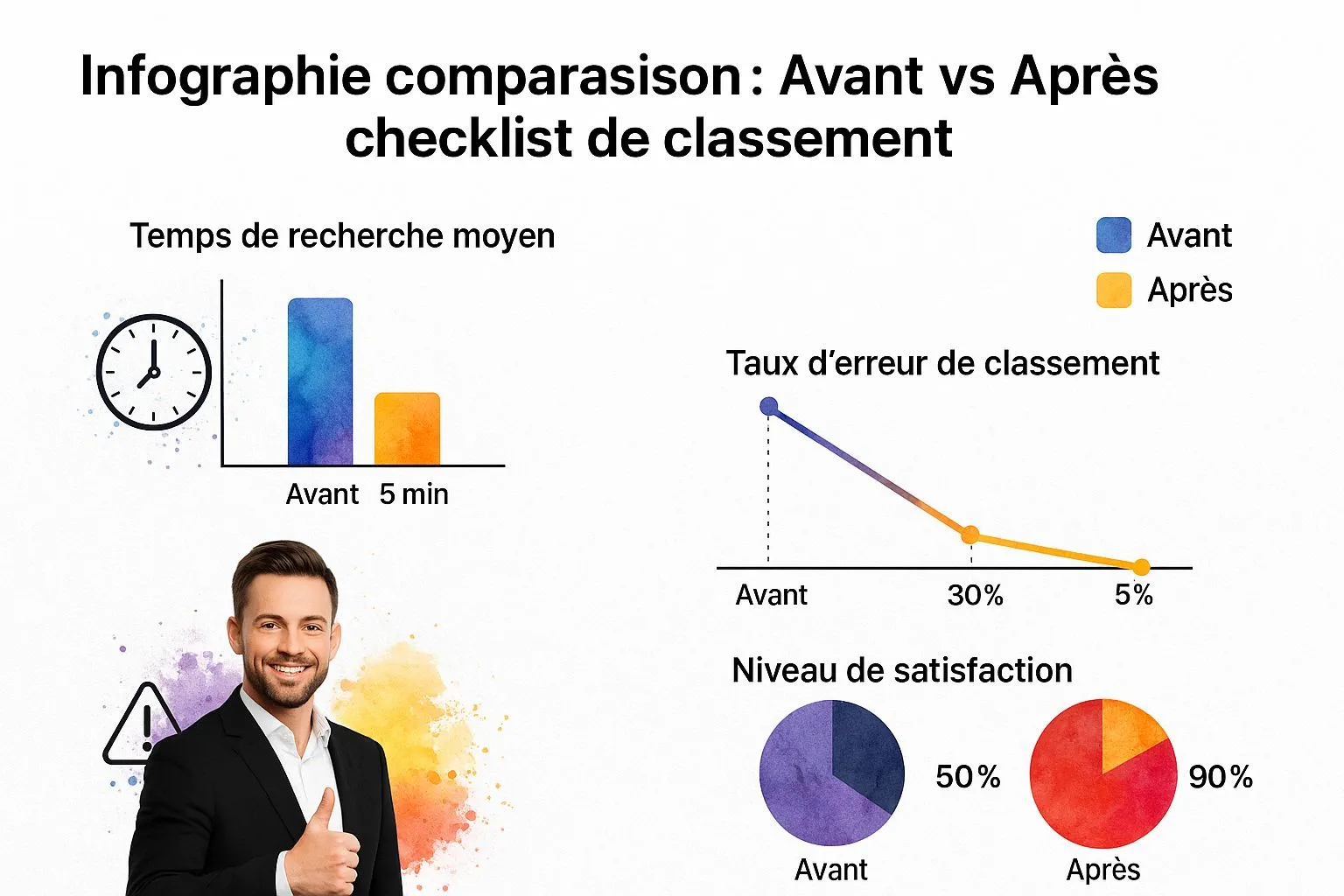
The infographic above illustrates the impact of a checklist on filing efficiency. Search time drops from 15 minutes to 5 minutes, the error rate from 30% to 5%, and the satisfaction level rises from 50% to 90%. A well-organized hybrid system, combined with a checklist, therefore optimizes the management of your administrative documents.
Turning organization into a natural habit
Setting up an effective filing system for your administrative documents is an important first step. The real challenge, however, lies in turning this organization into a natural habit, deeply embedded in your daily life. That’s the only way to maintain order over the long term and fully enjoy the benefits of a well-structured system.
The importance of micro-routines
The secret to lasting organization lies in adopting micro-routines — simple and quick to carry out. Instead of spending long hours filing once a month, it’s better to favor short, regular actions. Just as with healthy eating, it’s the small daily habits that make all the difference.
-
Immediate processing: Open your mail as soon as it arrives and deal with it right away. Decide whether the document should be kept, filed, or thrown away. This action, which takes only a few minutes, will save you from a pile-up of paperwork and simplify sorting later on.
-
Weekly rituals: Set aside 15 minutes each week to file accumulated documents. This ritual will help you maintain order and ensure every document is in its place. Don’t forget to include scanning important documents in this routine.
-
Monthly review: Once a month, spend 30 minutes evaluating how well your system is working. Are there areas to improve? Categories to add? This exercise will let you adapt your organization to your needs and ensure it lasts.
Getting the family involved smoothly
Buy-in from the whole family is essential for a filing system to last. Clearly explain the rules and the benefits of effective filing. Split responsibilities among family members and recognize everyone’s efforts. Turning filing into a game or a challenge can make it easier to get younger family members involved.
Adapting to life changes
Your filing system needs to be flexible and able to adapt to life changes. A move, the arrival of a child, or a new career direction often bring new documents and new requirements. Anticipate these changes and adapt your system accordingly. For example, plan additional categories for documents related to a child’s birth or a new professional project.
Anticipating future needs
An effective filing system anticipates future needs. Think about your long-term projects: buying property, starting a business, retirement… What documents will you need? How will you organize them? Anticipating these needs will let you adapt your system in advance and avoid unpleasant surprises.
By following this advice, organizing your administrative documents will become a natural habit, a source of peace of mind and efficiency. As the article How can craftspeople find time for their paperwork? points out, the key is to prioritize and integrate administrative management into your daily routine.
Key takeaways
Organizing your administrative documents effectively isn’t as complex as it seems. By following the advice in this guide, you can build a lasting, personalized organization system. This summary will help you get started and keep the system going.
Prioritizing and categorizing: the foundations of your system
Before you start organizing, prioritize your documents. Identify essential documents (notarized deeds, contracts) and secondary documents (flyers, receipts). Then categorize your documents by theme (housing, health, finances) to simplify searches. This step is essential for an effective system.
Choosing the ideal filing method
Thematic filing is often the most relevant approach for administrative documents. Use labeled binders or boxes for each category. Clear labeling (category, date) and dividers are essential. Binders are ideal for frequently consulted documents, while boxes are better suited to archiving.
Here’s an overview of the different methods:
- Chronological: Simple, but can become complex with a lot of documents.
- Alphabetical: Intuitive, but less effective for a large volume.
- Thematic: Versatile and makes searching by subject easier.
Digitization: saving time and space
Scanning is a major asset. Choose the PDF/A format for long-term archiving. Name your files descriptively (e.g., “Invoice_EDF_2024-03”). Indexing by keywords and using metadata make searching easier. Consider regular backups on an external hard drive or a cloud service like Dropbox.
The hybrid system: combining physical and digital
Combining paper and digital is often the most practical solution. Keep important originals (notarized deeds, diplomas) and digitize the rest. Use QR codes to link your physical and digital documents.
Maintaining order: the key to success
Setting up a system is one thing, maintaining it is another. Adopt micro-routines: processing mail, weekly filing, monthly review. Involve the whole family with clear rules and shared responsibilities.
Adaptability and anticipation: a system that evolves with you
Your system needs to be flexible. Adapt it to life changes (moving, a new baby) and anticipate future needs (buying property, retirement). A well-thought-out system will save you time and reduce your stress.
To simplify managing your business, discover Bizyness: the solution for sole traders and small businesses who want to optimize their management and focus on their business.
