

 Français
 Best accounting software for sole traders 2024
Discover our guide to accounting software for sole traders to simplify your management and stay compliant. Choose the best solution today!
The days when a simple Excel spreadsheet or a notebook were enough to run your micro-business are well and truly over. Today, accounting software for sole traders is no longer a nice-to-have — it’s a genuine copilot, essential for moving forward with peace of mind.
Why accounting software has become essential
For many self-employed people, paperwork is a burden. A source of stress that pulls us away from what really drives us: our core business. What if we looked at it differently? With the right setup, this administrative chore can become an asset for your growth. The goal isn’t to turn you into an accountant, but to give you the means to automate what can be automated so you can work with more peace of mind.
Moving from “manual” management to a dedicated tool is a bit like switching from a paper road map to a GPS. No more wasted time redoing calculations, hunting down data-entry errors, or worrying about forgetting something.
Say goodbye to administrative stress
Good accounting software for sole traders is first and foremost a safety net. It structures your habits, from drafting a quote to sending an invoice, making sure every legal mention is included. It’s simple, it’s tidy, it’s reassuring.
The benefits are felt immediately:
- More security: The risk of human error in your calculations or filings is virtually eliminated.
- Always compliant: The software makes sure your invoices and your income ledger are fully in order.
- Peace of mind: No more panic at the thought of a URSSAF audit or a costly mistake when declaring your revenue.
This infographic sums up the concrete benefits of such a tool perfectly.
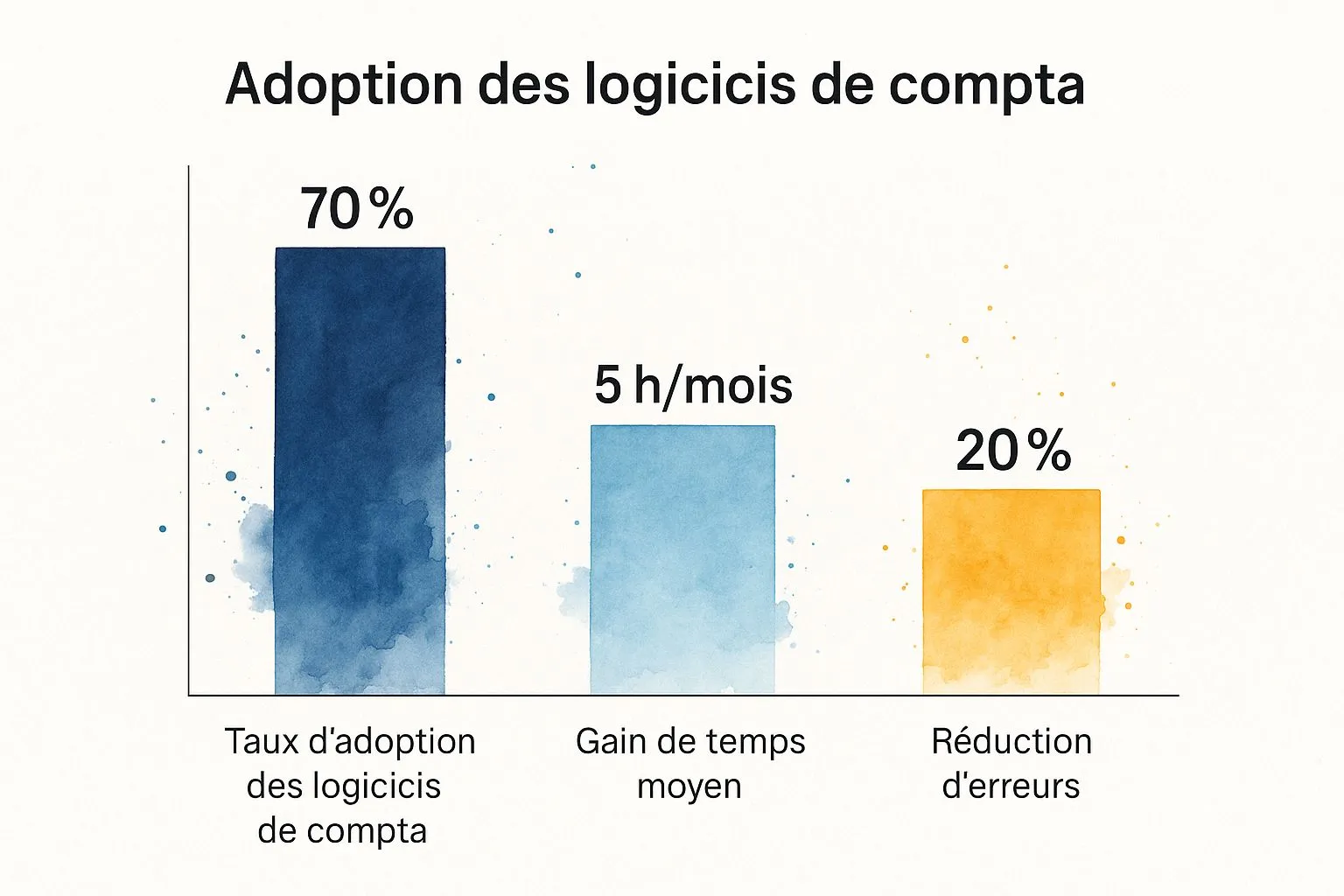
These figures speak for themselves. Specialized software doesn’t just save you time — it turns your management into a genuine strength.
A professionalization that has become necessary
This enthusiasm for specialized tools fits into a much broader context. France is breaking records for new business creation, and micro-businesses account for nearly 70% of these new structures. With such momentum, professionalizing is no longer optional — it’s a condition for lasting. For those who like numbers, the data on business creation in France speaks for itself.
To fully understand the gap between these two approaches, this comparison table highlights the key differences.
Manual management vs. dedicated software
This table highlights the fundamental differences between a manual approach to accounting and using specialized software for sole traders.
| Management aspect | Manual management (Spreadsheet/Paper) | With accounting software |
|---|---|---|
| Creating quotes/invoices | Manual entry, risk of missing legal mentions, calculations to double-check. | Pre-filled, compliant templates, automatic calculations (VAT, totals). |
| Payment tracking | Manual reconciliation, manual and time-consuming follow-ups. | Real-time dashboard, automatic alerts and reminders. |
| Revenue declaration (URSSAF) | Manual calculation of revenue to declare, high risk of error. | Automatic calculation of the amount to declare, one-click filing possible. |
| Income ledger | Manual upkeep, time-consuming and a potential source of errors. | Automatic generation and real-time updates, legally compliant. |
| Overall view of the business | Hard to get, requires manually compiling data. | Clear dashboards: revenue tracking, thresholds, top clients. |
| Time spent | Several hours a month. | A few minutes a week. |
In short, the choice is simple: either you spend hours being your own amateur accountant, with all the risks that involves, or you let a tool do the work so you can focus on what really matters.
Moving from management you endure to management you drive — that’s the real challenge. It’s the first step toward making your micro-business an activity that lasts and thrives.
Good software doesn’t just do things in your place. It gives you a clear, real-time view of your business’s financial health. You can track your revenue, get alerts when you’re approaching thresholds, or even automate reminders for unpaid invoices. You’re no longer at the mercy of your admin — you’re in control of it. And that precious time you save, you can finally reinvest where it has the most impact: with your clients.
The features that truly change the game
Choosing accounting software for sole traders isn’t just about ticking boxes on a list. To be honest, not all tools are equal. Some do the bare minimum, while others can genuinely transform your day-to-day management, turning it from a tedious chore into a real strategic cockpit.
The trick is knowing how to spot the features that will actually save you time and give you peace of mind. Think of your software as your business’s cockpit: it should give you a clear, immediate overview so you can make the right decisions, without ever flying blind.
The dashboard: the control tower of your business
The first screen you see when you open your software is the dashboard. A good dashboard doesn’t just list numbers. It should tell you the story of your business at a glance. This is where effective steering really happens.
Concretely, here’s what it should offer you:
- Real-time revenue tracking: To know where you stand against your goals, without waiting until the end of the month.
- Revenue threshold alerts: The software should warn you when you’re approaching the status’s critical thresholds (the well-known €77,700 for services or €188,700 for trade), to keep you from crossing over without having anticipated it.
- A projection of your social contributions: To know how much you’ll need to declare to URSSAF and avoid unpleasant cash-flow surprises.
With this information centralized, you stay in control effortlessly. You always know whether your business is doing well and whether it’s time to adjust course.
Quotes and invoices: the showcase of your professionalism
Drafting quotes and invoices is at the heart of your client relationship. Good software changes everything. No more afternoons spent tinkering with documents in Word, with the constant fear of forgetting a mandatory legal mention.
Software worthy of the name ensures that every document sent is 100% compliant with French law. Invoice numbering, VAT mentions, your SIRET number… it’s all there, automatically.
In a few clicks, you generate a flawless quote, turn it into an invoice once approved, and send it directly to your client. This smooth, secure process saves an enormous amount of time, but it’s also a mark of seriousness and reliability that reassures your clients.
Bank syncing and automatic reminders: your personal assistants
Here we’re touching on two features that alone justify the investment. They automate the most thankless tasks to free your mind: bank synchronization and unpaid-invoice reminders.
Bank synchronization is a small revolution. It connects your business account to your software, then automatically imports and categorizes every transaction. In short, it’s the end of manual entry — a task that’s not only tedious but also a frequent source of errors. Your income ledger updates itself.
As for automatic reminders for overdue invoices, it’s a relief. No more playing the “bad guy” and chasing after your money. You set up scenarios (a first friendly email at day 5, a firmer one at day 15, for example), and the software takes care of everything. You preserve your client relationship while making sure you get paid on time. It’s a gain in efficiency and peace of mind that’s simply invaluable.
How to choose the right tool without getting it wrong

Choosing accounting software for sole traders can quickly become dizzying. You find yourself facing a jungle of options, each more appealing than the last. So how do you sort through them to find the tool that will genuinely support you, rather than add to your mental load? The goal is simple: find a copilot that adapts to you, not the other way around.
This decision shouldn’t be taken lightly. It’s a real investment in the financial health and peace of mind of your micro-business. To guide you step by step, let’s break down the essential criteria together.
Ease of use and simplicity above all
The number-one criterion is probably the most obvious one: is the tool easy to pick up? You’re an entrepreneur, not an accountant. Your time is precious, and you shouldn’t have to waste it deciphering an interface that looks like it’s from another era.
Think of it like an app on your phone. If you need a manual to send a simple message, it’s badly designed. It’s exactly the same for your management software. Creating an invoice, checking your revenue, or linking your bank account should be as natural as a click.
Fortunately, most solutions, including Bizyness, offer free trial periods. This is the perfect time to form your own opinion. If after a few hours you already feel overwhelmed by the options, don’t push through — move on to the next one.
Data security and GDPR compliance
The heart of the matter is your financial data. It’s both the core of your business and extremely sensitive. It’s therefore absolutely crucial to make sure the software you’re considering takes its security very, very seriously.
Concretely, here are a few points to check:
- Data hosting: Is it stored on secure servers? Ideally, hosting should be in Europe to guarantee GDPR compliance.
- Privacy policy: Is the publisher transparent about how your information is used?
- Certifications: Does the software display recognized security credentials?
Never hand the keys to your finances to a platform that stays vague on these points. The peace of mind that comes from a trustworthy partner is priceless.
Responsive, knowledgeable customer support
Even with the most intuitive tool in the world, you’ll inevitably have a question one day. A doubt about a feature, a hesitation before filing your declaration… This is precisely the moment when the quality of customer support makes all the difference.
Good support is support that is:
- Accessible: Do you have a choice of channel (email, chat, phone)?
- Responsive: Is a reply promised within hours or over several days?
- Knowledgeable: Do the advisors know the specifics of sole-trader status in France inside out?
Customer support based in France is often an excellent indicator, since it fully understands our legal and tax context. It’s a selection criterion that shouldn’t be overlooked.
Pricing transparency
Price is a decisive factor, of course. But you need to learn to read between the lines. Be wary of introductory offers that seem too good to be true; they often hide extra costs for otherwise essential features. For those starting out on a tight budget, our guide to free accounting software for sole traders can give you some pointers.
Ask yourself the right questions:
- Does the advertised price include everything I need day to day?
- Are there hidden fees (invoice limits, paid support, etc.)?
- Is the pricing model scalable? Will the tool be able to grow with my business?
The right pricing model is clear, straightforward, and fair. The goal isn’t to find the cheapest option at all costs, but the best value for your situation.
To help you see things more clearly, here’s a summary table to use as a personal checklist.
Checklist for evaluating your future accounting software
Use this checklist to score and compare the accounting software options you’re considering for your sole-trader business.
| Criterion to check | Priority level | Your notes and comments |
|---|---|---|
| Ease of use (Ergonomics) | High | Software A: Very intuitive / Software B: A bit confusing |
| Data security (EU hosting, GDPR) | High | A: Servers in France / B: No clear information |
| Quality of customer support (Responsiveness, expertise) | High | A: Responsive chat / B: Email support only |
| Pricing transparency (No hidden fees) | High | A: All-inclusive / B: Paid add-ons |
| Essential features included | Medium to High | Invoicing, income ledger, quotes, etc. |
| Bank synchronization | Medium | Is it reliable and easy to set up? |
| Reviews and online reputation | Medium | What do other users say? |
| Room for the software to grow | Low to Medium | Will the tool keep up if my revenue grows? |
Take the time to fill in this table for each solution. It will give you an objective view and help you make an informed choice, away from marketing talk.
Get ahead of the e-invoicing revolution
A small revolution is coming, and it would be a shame to miss it. Electronic invoicing, or e-invoicing, will soon become the norm for everyone, including sole traders. Note that this isn’t just about turning your invoices into PDFs. It’s the whole way you manage your transactions that’s going to be rethought from the ground up.
It’s best to understand now what’s coming so you’re not caught off guard. Even if the transition happens gradually, it’s inevitable. Better to prepare calmly now than to have to scramble later.
What exactly is electronic invoicing?
To put it simply, imagine that every invoice you create or receive is no longer a simple document, but a stream of structured data. An electronic invoice isn’t a PDF sent by email. It’s a document created, transmitted, and received via a certified e-invoicing platform, in a special format (such as Factur-X) that computers can read and process automatically.
The goal? To guarantee that your invoices are authentic, unaltered, and perfectly readable. At the same time, key information is transmitted to the tax authorities. It’s a real shift in logic aimed at modernizing business exchanges and fighting VAT fraud more effectively.
The timeline sole traders need to know
The rollout will happen in two stages, giving you time to adapt. Keep these two key dates in mind:
- From September 1, 2026: You’ll need to be able to receive electronic invoices from your suppliers via a dedicated platform. This is the receiving obligation.
- From September 1, 2027: You’ll also need to issue all your invoices to other businesses (B2B) via this same electronic system. This is the issuing obligation.
Even if you’re under the VAT exemption threshold, you’re still considered “liable” for VAT and therefore fully affected by this reform. Choosing good accounting software for sole traders today is clearly the best strategy to prepare without stress.
Anticipating is turning a legal obligation into an opportunity. By adopting a tool that’s already compliant, you’re not just securing your business — you’re also sending a signal of professionalism and modernity to your clients and partners.
Fortunately, sole traders seem to be off to a good start. An industry study showed that 78% of those already using management software feel ready to switch to e-invoicing before the deadline.
So why is this good news for you?
This transition may seem a bit heavy, but it hides real everyday benefits. Automation reduces time spent on invoicing by nearly 30% compared to paper and cuts the risk of data-entry errors. On top of that, it secures your transactions and can even help reduce payment delays.
What’s more, new mandatory mentions will be required on your invoices. Up-to-date software, like Bizyness, will take care of integrating these changes for you, without you having to think about it. Your compliance is guaranteed, simply. To review the current rules, feel free to check out our complete guide to invoicing for sole traders. By choosing a tool that’s ahead of the curve, you ensure a smooth transition and turn this regulatory constraint into a genuine advantage.
Let’s move from theory to practice with a concrete example.
Talking about features is one thing, but nothing beats a real-life scenario to truly understand how good accounting software for sole traders can change your life. To make it more tangible, let’s follow the journey of a freelancer using a tool like Bizyness, designed specifically for their needs. The idea isn’t to advertise, but to show you, step by step, how well-designed software makes things smooth and intuitive.
Imagine: you’re a graphic designer. You’ve just wrapped up a great briefing with a new client who’s asking you for a proper quote to design their logo. That’s where it all begins.
Step 1: Create a professional quote in under 2 minutes
No more wasting time digging up your old Word template, wondering whether your legal mentions are still up to date, or racking your brain over VAT calculations (if you’re subject to it). With a dedicated tool, it’s child’s play.
You open your dashboard, click “New Quote,” and a clear interface appears.
- Choosing the client: You select them from your database (or create their profile in a few seconds). All their details — name, address, SIRET number — fill in automatically.
- Adding services: You add your service lines, like “Logo design - Essential Pack.” The price you’ve already set appears, or you adjust it if needed.
- The finishing touch: The software calculates the totals, inserts the mandatory legal mentions, and generates a flawless PDF in your brand colors. One last click, and it’s sent by email directly from the platform.
The quote is sent. Your client receives it within the minute, giving an ultra-professional, responsive impression. On your side, the quote’s status on your dashboard switches to “Sent.” Simple, clean, precise.
Step 2: Turn the quote into an invoice in one click
Your client is won over and gives you the green light. Invoicing, a step that’s often a bit tedious, becomes child’s play. No need to redo the whole document by hand.
You go back to your dashboard and find the quote in question. You click “Accept,” then “Convert to invoice.” And there you go! The software pulls in all the quote’s information and creates a fully compliant invoice, with a new unique number that respects the legal sequence.
This screenshot of the Bizyness interface shows just how visual and intuitive the management experience is.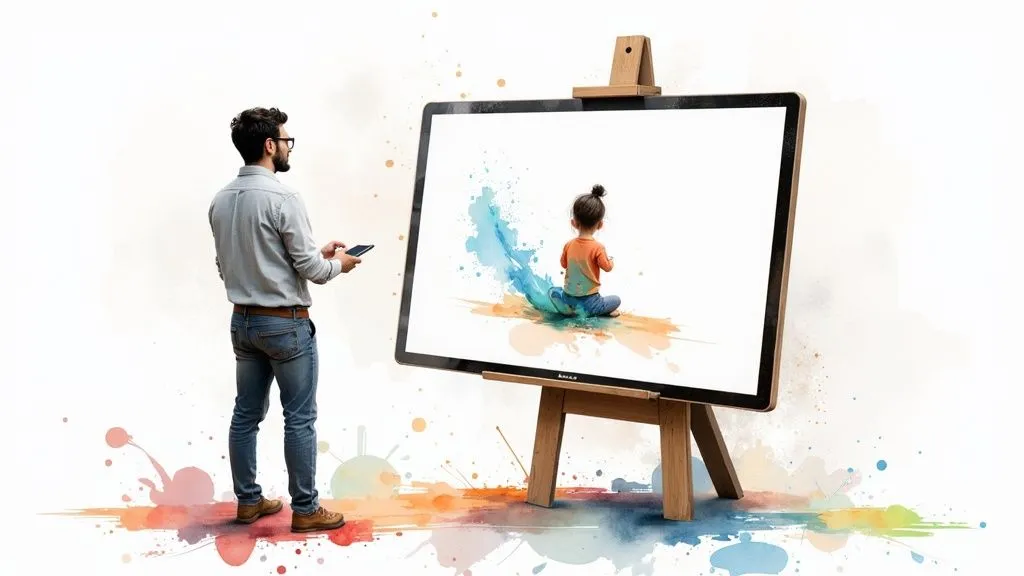 You can see right away where things stand: documents are centralized, with a clear status for each quote and invoice. This is what lets you steer your business at a glance.
The real magic of automation is that it makes friction disappear. A task that used to easily take you 15 to 20 minutes (and quite a bit of mental energy) is wrapped up in under 30 seconds, with zero risk of error.
Step 3: Get paid and let the accounting take care of itself
A few days go by, and you receive the payment from your client. This is the moment when bank synchronization, if you’ve enabled it, shows its full power.
The software automatically detects the incoming funds in your business account. It then intelligently offers to match this payment to the pending invoice. One click to confirm, and that’s it.
Without you having to lift a finger, several things happen behind the scenes:
- The invoice status switches to “Paid.”
- The transaction is recorded in your income ledger, which is now up to date and 100% compliant in the eyes of the authorities.
- Your revenue on the dashboard is updated in real time.
- The software has already calculated the amount of your next social contributions based on this payment.
You didn’t have to enter anything by hand. The risk of forgetting or making a typing error is simply eliminated. Within a few minutes, you’ve closed the entire sales cycle, from proposal to payment, all while keeping flawless accounting. It’s this time saved and peace of mind that let you focus on what matters most: growing your business.
Answering your most frequently asked questions
Choosing accounting software for sole traders is a key step, and it’s perfectly normal to have a few questions on your mind. The idea here is to clear up any remaining doubts with frank, direct answers, so you can make your choice with complete peace of mind.
Is accounting software actually required by law?
The short answer? No, not directly. The law doesn’t force you to subscribe to a specific piece of software. However, it does impose very real accounting obligations: keeping an up-to-date income ledger and creating invoices that comply with strict rules.
That said, there’s a significant “but.” With the e-invoicing reform coming in 2027, using a certified platform will, in practice, become essential for invoicing your business clients. A tool like Bizyness is already ready for this, making sure you stay compliant without even having to think about it.
Why is it a bad idea to stick with Excel?
Managing your accounting in Excel is a bit like trying to cook a gourmet meal with just a Swiss Army knife. At first, you think it’ll do the job, but you quickly find yourself limited and overwhelmed. The risk of a small typing mistake is huge, and a single broken formula can throw all your numbers into chaos.
Above all, Excel gives you no guarantee of compliance. It can’t ensure that your invoice numbering is continuous and unalterable, nor generate an income ledger that would hold up in the event of a URSSAF audit. It’s a fragile crutch that exposes you to risks you can easily avoid.
Thinking Excel is “free” is an illusion. The time you spend checking everything, correcting your errors, and stressing over whether your documents are valid has a real cost. It’s time you’re not spending growing your business.
Specialized software, on the other hand, is designed to be your safety net. It automates tasks, secures your data, and guarantees that every document you issue is fully compliant.
What budget should you plan for a good tool?
Prices can vary widely, but you need to look beyond the price tag. Good accounting software for sole traders will typically cost you between €10 and €30 per month for a solid offer.
One piece of advice: be wary of free offers that quickly reveal their limits, or very low introductory prices that often hide paid add-ons for basic features. The best approach is to opt for a tool with clear, all-inclusive pricing. You need unlimited invoices, a connection to your bank, and customer service that’s there when you need it.
Can the software handle my URSSAF declarations for me?
Yes, and it’s probably one of its biggest strengths! Good software doesn’t just list your incoming payments. It calculates your revenue in real time and prepares the exact amount to declare to URSSAF, whether you report monthly or quarterly.
Some tools even go a step further and let you submit the declaration directly from their interface. All you have to do is check and click to confirm. It’s a huge time saver, but above all it’s one less source of stress. No more anxiety about deadlines and no more fear of making a calculation error that could cost you dearly.
Take action for genuinely stress-free management
Choosing accounting software for sole traders isn’t just another expense on your list. Think of it instead as a real investment in the health and longevity of your business. It’s not about ticking an administrative box — it’s about equipping yourself with a reliable copilot. An ally that secures your day-to-day and gives you back time for what really matters: growing your business.
Between the new legal obligations on the horizon, like e-invoicing, and the constant need to be more efficient, this tool quickly becomes your best asset. No more management perceived as a burden — say hello to a dashboard that works for you.
Good software turns repetitive, time-consuming tasks into automation. It gives you a clear, real-time view of your micro-business’s financial health. It’s the difference between flying blind and making informed decisions based on reliable data.
Take advantage of free trials to form your own opinion
The best way to know if a tool is right for you? Try it yourself. Most solutions, including Bizyness, offer free trial periods. This is the perfect opportunity to see firsthand the time savings and peace of mind it can bring you, with no commitment.
Try creating a quote, converting it into an invoice in one click. It’s by getting hands-on that you’ll realize just how much simpler your day-to-day can be.
Don’t wait until you’re overwhelmed or until a regulatory deadline catches up with you. The best time to get properly equipped is now. Taking this step toward more professional management means giving yourself the peace of mind you need to grow.
By securing your invoicing and simplifying your declarations, you protect your business while also freeing up your energy for your clients and your projects. More than just an accounting tool, it’s a growth partner. What’s more, well-run management is the first step toward optimized taxation. To learn more, take a look at our article on tax optimization for sole traders.
Ready to transform your management and focus with peace of mind on your growth? Bizyness was designed for you. Try our tool for free and discover simpler, more efficient management. Get started with Bizyness.
