

 Français
Guide: the FEC accounting entries file for your e-commerce compliance
Master the FEC accounting entries file: structure, generation and checks for your e-commerce business, to avoid errors and save time.

Picture the Fichier des Écritures Comptables (FEC) — the accounting entries file — as your company’s digital logbook. But not just any logbook: this one is tamper-proof and standardized. Every sale, every refund, every small fee charged by a platform is recorded with absolute rigor, following the tax authority’s very precise standards. It’s the centerpiece that traces your entire financial life.
What is the accounting entries file and why is it so crucial for your e-commerce business?

Put yourself in the shoes of a tax inspector coming to audit your online store. The very first thing they’ll ask for, even before glancing at your balance sheet or invoices, is your FEC. This document is the unavoidable starting point of any computerized tax audit.
For an online seller, this obligation takes on a whole different scale. A physical shop might handle a few dozen transactions a day. But a thriving e-commerce business on Shopify, Amazon or via Stripe? We’re talking about thousands of operations every month.
The backbone of your tax compliance
The FEC is not a simple export of your sales. The real challenge is translating every financial event — a sale, a customer return, transaction fees, marketplace commissions — into a perfectly standardized accounting entry. Everything must follow a strict format and a chronology that can never be broken. For many e-merchants, this is a genuine headache.
The purpose of the FEC is simple: give the tax authority a clear, computerized audit trail. It must reflect the economic reality of your business so faithfully that any attempt at manipulation or omission becomes nearly impossible to hide.
This transparency requirement was made official on January 1, 2014, marking a real turning point in the fight against fraud. Before, audits were often carried out on mountains of paperwork. Today, everything is digital. It’s Article A47 A-1 of the French Tax Procedures Code that set the rules of the game, requiring every business with computerized accounting to be able to generate this file. To dig deeper, you can check out this resource on the FEC’s legal framework.
Turning a constraint into genuine peace of mind
Faced with this complexity, trying to build a FEC yourself by picking through thousands of transaction lines from multiple platforms is not only a herculean task, it’s also a recipe for trouble. A single date error, a break in the numbering sequence, and the whole file can be rejected.
That’s where specialized tools like Bizyness come in. They act as a tireless, expert translator between the language of your sales platforms and that of the tax authority.
- Direct connection: Bizyness plugs directly into your Shopify, Amazon, Stripe and other sales channel accounts to pull data straight from the source.
- Automatic translation: Every order, fee or refund is instantly turned into a valid accounting entry, with no manual work required.
- One-click generation: In case of an audit, your FEC is ready, complete and accurate. You can download it immediately.
Far from being a mere administrative chore, a well-kept FEC is the foundation of sound, secure management. It protects your business and frees your mind to focus on what really matters: growing it.
Decoding the FEC structure, field by field
Picture the FEC as the DNA of every financial transaction in your store. It’s not just a simple list, but a highly structured table where each column tells a fragment of an operation’s story. For an e-merchant, understanding this structure means knowing exactly how a sale on Shopify or a refund on Amazon gets translated into the language of the tax authority.
Rather than running through a dry technical list, let’s break down the most important fields together. We’ll see how they come to life with concrete examples straight from the daily reality of online selling.
The FEC is serious business. Its structure is set in stone by the tax authority: 18 mandatory fields, no more, no less. This rigor guarantees full traceability and consistency. These fields cover everything: from the journal code to the description, the entry number, the date, the accounts, the supporting document reference… all meticulously sorted in chronological order. For the more curious among you who want to check the official standard, you can find more details on the FEC structure on appvizer.fr.
The backbone of your accounting journal
Some fields are the true pillars of your FEC. They guarantee the order, origin and authenticity of every line. Without them, everything falls apart.
- JournalCode: The code that identifies the accounting journal concerned. In e-commerce, “VT” is typically used for Sales, “BQ” for Bank, or “AC” for Purchases. A tool like Bizyness, for example, automatically creates and assigns these codes for each flow: Shopify sales, Stripe fees, Amazon payments, etc.
- JournalLib: Simply the full name of the journal. For example, “Shopify Sales Journal.” Clear and simple.
- EcritureNum: The unique entry number. This field is absolutely critical. It must follow a continuous sequence, with no gaps whatsoever, for each journal. A break in this numbering is an immediate red flag for a tax inspector.
The ‘EcritureNum’ field is the guardian of your accounting’s integrity. Faced with thousands of transactions from multiple channels, only automation can guarantee perfect, bulletproof sequential numbering.
Identifying the operation, the parties involved, and the timing
Once the entry is located in the right journal, the next fields answer the key questions: what is this about, who is involved, and when did it happen?
- EcritureDate: The date of the accounting entry, which must of course follow the chronology of events.
- CompteNum: The account number drawn from the French general chart of accounts (PCG). For example, account 707100 for a sale of goods or 411CLIENT for the customer account.
- CompteLib: The account name in full, such as “Sales of goods” or “Miscellaneous customers.”
- CompteAuxNum and CompteAuxLib: Golden fields for e-commerce! CompteAuxNum can correspond to your customer’s unique ID (e.g., “CUST12345”) and CompteAuxLib to their name (“Jean Dupont”). This information turns an anonymous accounting line into a transaction that’s perfectly traceable back to the end customer.
- PieceRef: The reference of the supporting document. For an online sale, this is the Shopify order number or the invoice number. It’s the bridge between your accounting and your business activity.
- PieceDate: The date of the invoice or order.
Understanding the role of journals is an essential first step. To dig deeper, feel free to read our guide on accounting journal examples.
The numbers: the heart of the reactor
Now we get to the financial fields, the ones that quantify the transaction. Never forget the golden rule of double-entry bookkeeping: every entry must be balanced. The sum of debits is always equal to the sum of credits.
- Montant: The value of the line, always expressed as a positive number.
- Sens: This indicates whether the amount is a Debit (D) or a Credit (C). For a €120 sale, the 411 customer account will be debited €120, while the product account (707) and VAT account (44571) will be credited for a total of €120.
- EcritureLet and DateLet: These fields are used for reconciliation, an operation that links an invoice to its payment. This is where you match the Shopify order to the payment actually received via Stripe.
To help you visualize how all this fits together, here’s a concrete example for an online sale.
Examples of the FEC’s 18 fields for a Shopify sale
This table concretely illustrates how the information from a single online sale is translated into the mandatory fields of the accounting entries file.
| Mandatory Field (Technical Name) | Simple Explanation for E-merchants | Example for a €120 Sale (incl. VAT) |
|---|---|---|
| JournalCode | The journal code (Sales, Bank…). | VT |
| JournalLib | The full name of the journal. | Shopify Sales Journal |
| EcritureNum | The unique, sequential entry number. | VT202405-00123 |
| EcritureDate | The date the entry was recorded. | 20240521 |
| CompteNum | The customer’s account number. | 411000 (for the customer line) |
| CompteLib | The name of the associated account. | Customers |
| CompteAuxNum | The customer’s unique identifier. | CUST98765 |
| CompteAuxLib | The customer’s name. | Marie Durand |
| PieceRef | The invoice or order number. | SHOPI-1054 |
| PieceDate | The order date. | 20240521 |
| EcritureLib | A clear description of the operation. | Invoice SHOPI-1054 - Marie Durand |
| Debit | The debited amount (the receivable on the customer). | 120.00 |
| Credit | The credited amount (zero here, since this is a debit line). | 0 |
| EcritureLet | The reconciliation code linking to the payment. | AB1 |
| DateLet | The reconciliation date. | 20240522 |
| ValidDate | The entry’s validation date. | 20240521 |
| Montantdevise | The amount in the original currency (if different from Euro). | (left blank if sale in Euros) |
| Idevise | The currency code (e.g., USD, GBP). | (left blank if sale in Euros) |
This example shows only one line of an accounting entry (the one debiting the customer account). A complete sale actually generates at least three lines: one for the customer (Debit), one for the product sold (Credit), and one for the VAT collected (Credit).
As you can see, manually filling in these 18 fields for every sale, every refund and every commission is a monumental task and an open door to errors. This is precisely the tedious work Bizyness automates. By connecting to your platforms, the tool translates every event into a perfect FEC entry, filling each field with the correct information. The result: guaranteed tax compliance, with zero effort.
How to generate a compliant FEC for your e-commerce business
Producing an accounting entries file (FEC) that truly and faithfully reflects your e-commerce business isn’t just a matter of exporting data. It’s much more than that. It means translating the full complexity of your business with surgical precision: multiple sales, customer returns, platform fees, various commissions… every detail matters.
There are two schools of thought to get there. On one side, the traditional method, often manual and a bit disjointed. On the other, a modern approach, far more integrated and automated. The choice you make will have a direct impact on your time, your peace of mind and, of course, your tax compliance.
The limits of traditional methods
For many online sellers, the first instinct is to use classic methods. This usually means exporting raw data from standard accounting software, or trying to consolidate everything by hand in spreadsheets.
But this approach quickly runs into the realities of e-commerce.
- Endless manual entry: Imagine having to re-key thousands of transactions from Shopify, Amazon or Stripe into your accounting software, one by one. It’s a monumental task that steals precious hours — hours you could spend growing your business.
- A very high risk of error: A typo, a forgotten marketplace fee, a poorly consolidated figure — and your entire FEC becomes non-compliant. The risk of penalties is never far away.
- The consolidation headache: How do you logically and chronologically link the sales from your WooCommerce store, the payments received on PayPal, and the commissions taken by Amazon? It’s a real puzzle, and it’s very difficult to end up with a single, reliable file.
These manual methods are a bit like trying to build a piece of furniture with screws that don’t come from the same box. The end result is rarely perfect.
The modern approach with Bizyness: automation in three steps
Faced with these difficulties, an automated solution like Bizyness completely changes the game. The idea is no longer to “cobble together” a file, but to build a system where the FEC generates itself, in real time, from your sales. The process becomes smooth, logical and, above all, much safer.
Here’s how it works, in three very simple steps.
-
Connect the sources The first thing to do is plug Bizyness directly into your sales and payment channels: your Shopify store, your Amazon seller account, your processors like Stripe or PayPal. This direct connection puts an end to all manual entry and ensures 100% of the data is captured at the source, with nothing lost along the way.
-
The tool does the translation work Once the connection is set up, Bizyness acts as an expert translator. It takes every event (a sale, a refund, transaction fees) and automatically turns it into a clean accounting entry that respects the FEC’s 18 mandatory fields. It assigns the right accounts, calculates VAT, and makes sure everything is perfectly sequenced.
-
Export the FEC in one click At any moment, whether for your accountant or ahead of an audit, you can generate your complete, compliant FEC in a single click. The file is ready, it’s accurate, and it gives a perfect picture of your business.
This diagram illustrates this simplified flow, from the sale to the final file.
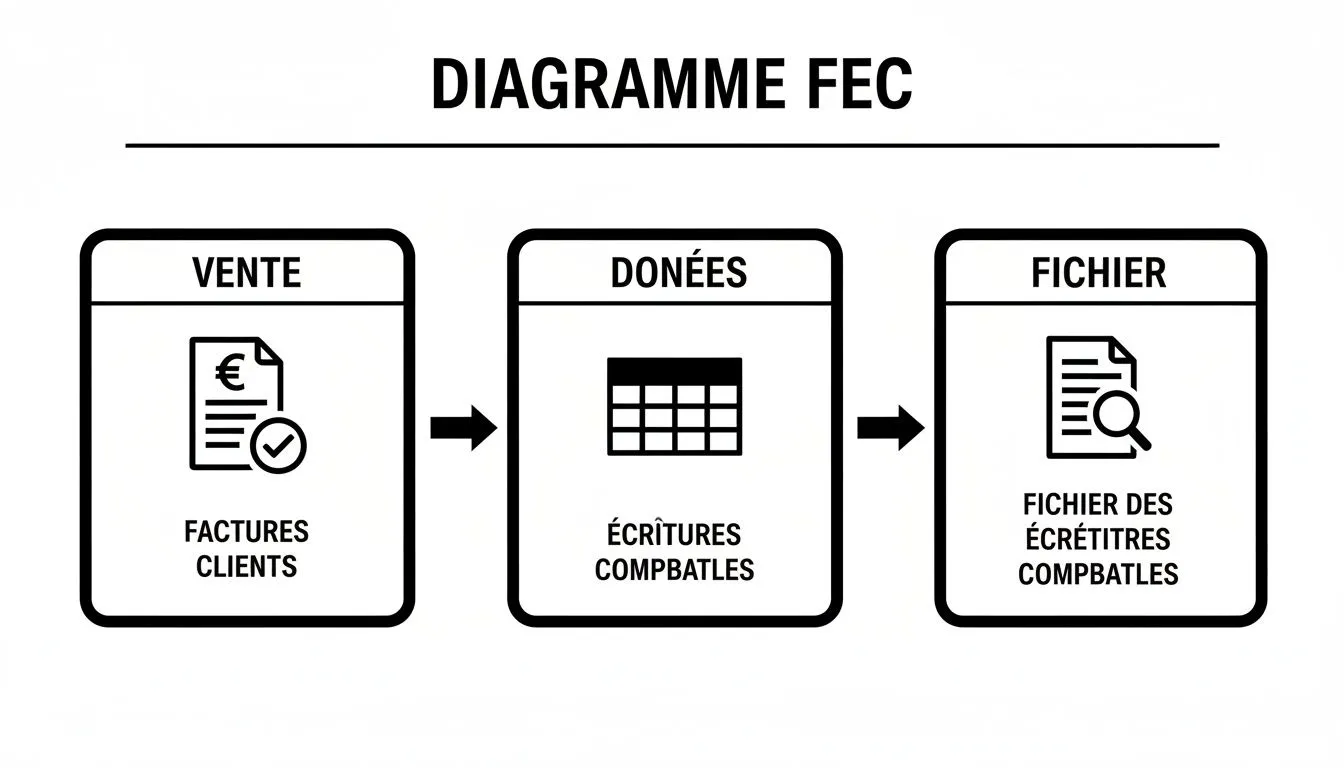
You can clearly see how an integrated approach turns a pile of sales data into a structured document that’s valid in the eyes of the tax authority.
At Bizyness, FEC automation exists for this exact reason: to avoid tedious manual entry and guarantee 100% compliance. For an e-merchant, every sale, every Stripe or PayPal payment, must be tracked chronologically in this file, without exception.
FEC automation is a pillar, but it’s only part of the strategy. For truly stress-free e-commerce management, it’s also crucial to master all your other obligations, such as the mandatory legal notices for your e-commerce site.
By adopting a specialized solution, you’re not just saving time. You’re protecting your business against tax risks and building solid accounting foundations, essential for steering your growth. To go further, take a look at our complete guide on e-commerce accounting.
Common FEC mistakes that can cost you dearly

Generating an accounting entries file (FEC) might seem like a mere administrative formality. Big mistake. It’s actually a high-wire act where the slightest misstep acts as a warning signal for the tax authority, potentially triggering deep audits and painful penalties.
The best defense is anticipating the pitfalls.
In the fast pace of e-commerce, certain mistakes keep coming up. They’re not the result of bad intent, but the logical consequence of having to juggle thousands of transactions from all over.
To bulletproof your FEC, the first step is identifying these weak points. Let’s review the most common ones and see how automation takes them out of the game.
Sequence gaps and chaotic numbering
If there’s one mistake tax algorithms love, it’s this one: a gap in the entry number sequence (EcritureNum). It’s simple — every accounting journal, whether sales, bank, or otherwise, must read like a book, with pages that follow one another without ever skipping one.
A single missing number, and it’s a red flag. The tax authority will see it as a sign that an operation was potentially deleted or modified after the fact, which is strictly forbidden. For an Amazon seller handling hundreds of orders a day, maintaining this sequence by hand is close to mission impossible.
A solution like Bizyness puts an immediate stop to the problem. By centralizing and automatically processing every transaction, it guarantees tamper-proof sequential numbering. The result? A crystal-clear audit trail and total peace of mind.
Forgetting platform fees and commissions
This is a classic among e-merchants: booking gross revenue while “forgetting” the jungle of fees eating away at the margin. We’re talking about Stripe commissions, Amazon FBA fees, advertising costs on marketplaces… the list goes on.
This omission creates a gap between your accounting and the financial reality of your business. On audit day, the inspector only has to compare the transfers into your bank account with the declared sales. The discrepancy will jump right out.
A compliant FEC isn’t just a sales journal. It’s the exact reflection of all the financial flows in your business. Ignoring commissions means presenting incomplete accounting — and therefore non-compliant accounting. Full stop.
Bizyness, by connecting directly to your platforms (Shopify, Amazon, Stripe), automatically detects and isolates all these fees. Each commission is then turned into an expense entry, guaranteeing a FEC that matches your real performance 100%.
Poor reconciliation and approximate bank matching
Reconciliation is the art of linking an invoice to its payment. For you, as an e-merchant, that means connecting a Shopify order to the Stripe transfer that arrives several days later, buried among other transactions.
Poor or nonexistent reconciliation, and your entire receivables tracking falls apart. Bank reconciliation becomes a real headache. If the tax authority can’t easily verify that every sale was actually collected, it can call your entire accounting into question.
Precision is non-negotiable. A field that should be empty must contain neither a zero nor a space, or your file risks being rejected outright. Since 2014, the number of FEC-compatible accounting software packages has thankfully grown a lot, which has helped reduce formatting errors by 25% on average. That’s a huge time saver for anyone processing thousands of operations. If you want to dig deeper, you can check the technical details on Appvizer.
Automating reconciliation isn’t a luxury, then — it’s a necessity. It guarantees that every sale is firmly tied to its payment, for a clear cash position and rock-solid accounting.
Facing a tax audit with a flawless FEC
Tax audit day is no longer an exceptional event. It has become a fairly standardized procedure, where digital tools now take center stage. And in this game, the accounting entries file (FEC) is your very first line of defense. It’s the document the inspector will ask for before even starting the slightest discussion.
Let’s be clear: being unable to provide it, or worse, presenting an incomplete file riddled with errors, turns a simple check into a real ordeal.
The consequences of a defective FEC are direct and severe. People often think of the flat €5,000 fine per non-compliant fiscal year, but that’s only the tip of the iceberg. The tax authority can go much further.
A file that doesn’t hold up can lead to your accounting being rejected outright. In practice, the inspector will consider it unreliable and reconstruct your revenue and expenses themselves. This situation almost systematically leads to hefty tax reassessments, with penalties that can climb up to 40% for deliberate non-compliance.
Understanding how the audit unfolds
During an accounting audit, the inspector won’t go through your invoices one by one. They’ll first run specialized software to dissect your FEC. Their goal? To spot within minutes the anomalies that betray potential weaknesses: gaps in entry numbering, balances that don’t add up, inconsistent dates…
The FEC is truly the pillar of tax audits in France. It’s requested systematically, and the tax authority can go back up to ten years. A poorly built FEC can cost dearly, with a fine of up to €10,000 per irregularity. To give you an idea, in 2022 nearly 150,000 tax audits involved analyzing a FEC, representing 20% of all audits.
Here’s what the inspector will scan first:
- Chronological consistency: The dates of your entries (
EcritureDate) and those of your supporting documents (PieceDate) must tell a logical story. - Sequential integrity: The entry numbers (
EcritureNum) must follow one another perfectly, with no gaps anywhere. - Compliance with formal requirements: The famous 18 mandatory fields must all be present and correctly filled in.
- Traceability of operations: Each accounting line must be easily traceable to a clear supporting document (an invoice, an order, a commission statement).
It’s therefore vital not to treat the FEC as an administrative chore to knock out at the last minute. It’s the foundation on which the credibility of your entire management rests. This also involves a good grasp of legal retention periods, a point we cover in detail in our article on accounting documents to keep.
Automation, your anti-stress insurance
If I’m dwelling on these penalties, it’s not to scare you, but to underline the importance of preparing in advance. This is where a tool like Bizyness completely changes the picture: it’s no longer just an expense, but real insurance against very real — and much costlier — financial and legal risks.
Thinking about your FEC only on the day you receive the audit notice is like trying to buy fire insurance while the house is already burning. Compliance is built day by day, transaction after transaction.
The automation Bizyness offers guarantees that every sale, every refund and every commission is instantly turned into a clean, standardized, valid accounting entry. The structure is respected, the sequences are perfect, and traceability is total.
Being able to generate a flawless FEC in a few clicks radically changes the perspective of an audit. What used to be a source of anxiety becomes a simple formality. No more wasted time frantically compiling data, no more fear of human error. You simply present a file that reflects your rigor, and the audit can proceed quickly and smoothly.
FAQ about the accounting entries file
The accounting entries file (FEC), even though it’s very standardized, raises quite a few questions on the ground, especially for e-merchants juggling different platforms and tax nuances. Let’s untangle the most frequent questions together so everything becomes clearer and you can feel confident about your compliance.
The idea here is to give you frank, direct answers. Enough to turn your doubts into certainties.
Does a sole trader / micro-entrepreneur really have to provide a FEC?
This is the ultimate trick question! The short answer is: not always, but far more often than you’d think. In fact, the obligation to provide a FEC doesn’t depend on your legal status (sole trader, SAS, etc.), but on how you keep your books.
The rule is fairly simple: if you use accounting software or any computerized system to record your operations, the tax authority can ask you to generate a FEC.
- Case 1: The “old-school” sole trader. If you write everything down by hand in an income-and-expense ledger, or in a simple spreadsheet that just lists money in and out, you’re not affected.
- Case 2: The sole trader using a management tool. If you go through a solution like Bizyness that automatically records your Shopify, Amazon or Stripe sales, then your accounting is considered computerized. And in that case, yes, you must be able to produce a FEC.
It’s not the legal status that creates the obligation, it’s the tool. As soon as accounting software comes into play, even for a micro-entrepreneur, the FEC requirement applies. For the tax authority, it’s a guarantee of traceability.
At the end of the day, this is a good thing. Using a tool does make you liable for the FEC, but in return it gives you spotless, audit-ready accounting. That’s a much greater safety net than a hand-filled spreadsheet.
But can’t my accountant just handle it?
Yes, of course. Producing the accounting entries file is very much part of your accountant’s job. They’re perfectly equipped for it. The real question is rather: what information will they be working with?
Imagine handing them a bag of receipts and a stack of bank statements. They’ll manage, but it will take them a huge amount of time to sort, enter and interpret every line. That time gets billed to you, and the risk of a data-entry error is always there.
For an e-merchant, the “receipts” are actually thousands of transactions from Shopify, Amazon, Stripe or PayPal, each with its own fees, VAT, refunds… Sending them these raw exports is handing them a giant puzzle, a long and therefore very costly piece of tedious work.
This is where a tool like Bizyness completely changes the game. Instead of sending raw files, you hand over a pre-built general ledger or an already clean, structured accounting export, where every sale has already been translated into an accounting entry.
- Before: You send indigestible CSV files with 10,000 lines.
- After: You send an accounting export ready to be imported straight into their software.
The result? Your accountant saves precious time, focuses on where they add the most value (advice, optimization, the balance sheet) and, logically, their fees go down. Your collaboration becomes simpler and more efficient.
What does the FEC of an Amazon seller actually look like?
The case of an Amazon seller is a great example for understanding the complexity that can hide behind the FEC. It’s not enough to record the total sales amount. Each transaction is actually a small ecosystem of entries.
Let’s take a simple example:
- The Sale: A customer buys a product from you for €50. You need to record this sale, the receivable you have on Amazon, and the VAT you collected.
- FBA Fees: Amazon charges fees to store, prepare and ship the package. This is an expense to record.
- The Commission: Amazon takes its commission on the sale (say, 15%). This is another expense.
- Advertising: You ran ads with “Sponsored Products.” These advertising costs are yet another, distinct expense.
- The Payout: Two weeks later, Amazon transfers the balance to you: €50 minus all these fees. This last entry settles the receivable you originally recorded.
A specialized tool like Bizyness is precisely designed to automatically break down this reality. It knows how to recognize each type of fee and assign it to the right account. Your FEC then becomes a faithful reflection of the real profitability of your Amazon business.
Should every single one of my bank account operations go into the FEC?
No, absolutely not! This is a classic mistake. The FEC is not a copy of your bank statement. It’s the journal of your economic activity, not just your cash flows.
The FEC records what’s known as your company’s rights and obligations at the moment they arise (this is the accrual accounting principle).
- You make a sale on May 10? The receivable on your customer and the revenue are recorded in the FEC on that date.
- You receive the money in your account on May 15? The bank movement will be recorded on that date to show the receivable has been paid.
Bank reconciliation is precisely the operation that consists of checking that each line of your bank statement matches an entry in your accounting. It’s crucial to make sure your FEC is accurate, but the two documents are distinct and tell complementary stories.
Ready to turn this complex obligation into a simple, stress-free process? With Bizyness, connect your online stores and let our platform automatically translate every sale, fee and commission into perfect accounting entries. Generate your FEC in one click and make your accountant’s life easier. Discover how Bizyness can secure your tax compliance today.
