

 Français
Simple invoice template: create yours without the stress
Discover how to build an effective simple invoice template with practical tips from experts. Free tools and pro tricks included.

Why a simple invoice template changes everything
Honestly, creating an invoice shouldn’t be a headache. Yet I know plenty of entrepreneurs pull their hair out over it. A well-thought-out simple invoice template can truly change your life. We’re talking about saving time, of course, but also about polishing your professional image.
Picture the effect a clear, precise, professional invoice has on your clients. It builds trust, doesn’t it? A good template is like oil in the gears: it smooths out your exchanges and simplifies your bookkeeping. In fact, the simple invoice template has become essential, especially for sole traders. Believe it or not, about 75% of sole traders in France use this kind of template. Learn more about simple invoice templates
And all that time saved can be reinvested into the core of your business. Careful though, simple doesn’t mean amateur! Quite the opposite: a simple, effective invoice is proof of top-notch organization.
Beyond making it easier for your clients to read, a clear template also helps you avoid mistakes. No more missed items or compliance worries. It’s a real investment in peace of mind.
Mastering legal mentions without the headache
Let’s be honest, legal mentions are rarely the most exciting topic. Yet, trust me, they’re essential to avoid trouble and properly protect your business. I’ve seen firsthand how well-crafted legal mentions saved entrepreneurs from tricky situations. Every little piece of information matters and serves both your interests and your clients’.
So let’s demystify these obligations together. We often wonder why a particular mention is mandatory, and above all how to fit it into a simple invoice template without turning it into a novel. For example, the SIRET number is essential to clearly and precisely identify your business, while payment terms help avoid misunderstandings (and unpaid invoices!).
Adapting your legal mentions to your business status
Depending on your status (sole trader, micro-business, company…), the rules change. A sole trader doesn’t have the same obligations as a limited company (SARL). So it’s really crucial to adapt your invoice template to your specific situation. Need a full refresher on mandatory mentions? Take a look at this article, it’s super clear: Mandatory information on an invoice.
To help you see things clearly, I’ve put together a quick summary table of mandatory and optional legal mentions by status. Handy for checking you haven’t forgotten anything!
Mandatory legal mentions by business status
Comparison of required legal mentions for different business statuses
| Status | Mandatory mentions | Optional mentions |
|---|---|---|
| Sole trader | SIRET number, name and address, issue date, invoice number, description of services, unit price and total, “VAT not applicable - article 293 B of the French Tax Code” | Phone number, email |
| SARL | SIRET number, name and address, share capital, RCS number, issue date, invoice number, description of services, unit price and total, VAT | Phone number, email, payment terms |
| SAS | SIRET number, name and address, share capital, RCS number, issue date, invoice number, description of services, unit price and total, VAT | Phone number, email, payment terms |
As you can see, mandatory mentions can vary. Don’t hesitate to check what applies specifically to your situation to be sure you’re compliant.
Perfecting the presentation of your invoices
Finally, and this isn’t insignificant, presentation plays an important role! Clear, concise, well-organized legal mentions reinforce your image of professionalism. Picture it: an airy invoice, easy to read, with all the important information well presented… it makes all the difference! Even with a simple invoice template, you can be perfectly compliant and inspire trust.
Choosing the tool that’s really right for you
Now that we’ve seen the importance of a simple invoice template and the mandatory legal mentions, let’s talk tools! Trust me, I’ve tested quite a few, and there’s no miracle solution. What matters is finding the one that fits perfectly with your way of working.
Some like the simplicity of Excel, others the flexibility of Canva. Personally, I have a soft spot for invoicing software like Bizyness. Their often-automated features are a real time-saver. For inspiration, check out these examples of professional emails and their winning templates. There’s a lot to learn about clear, effective communication, a valuable asset for your invoices too!
The infographic below compares a standard invoice template to a customized one:
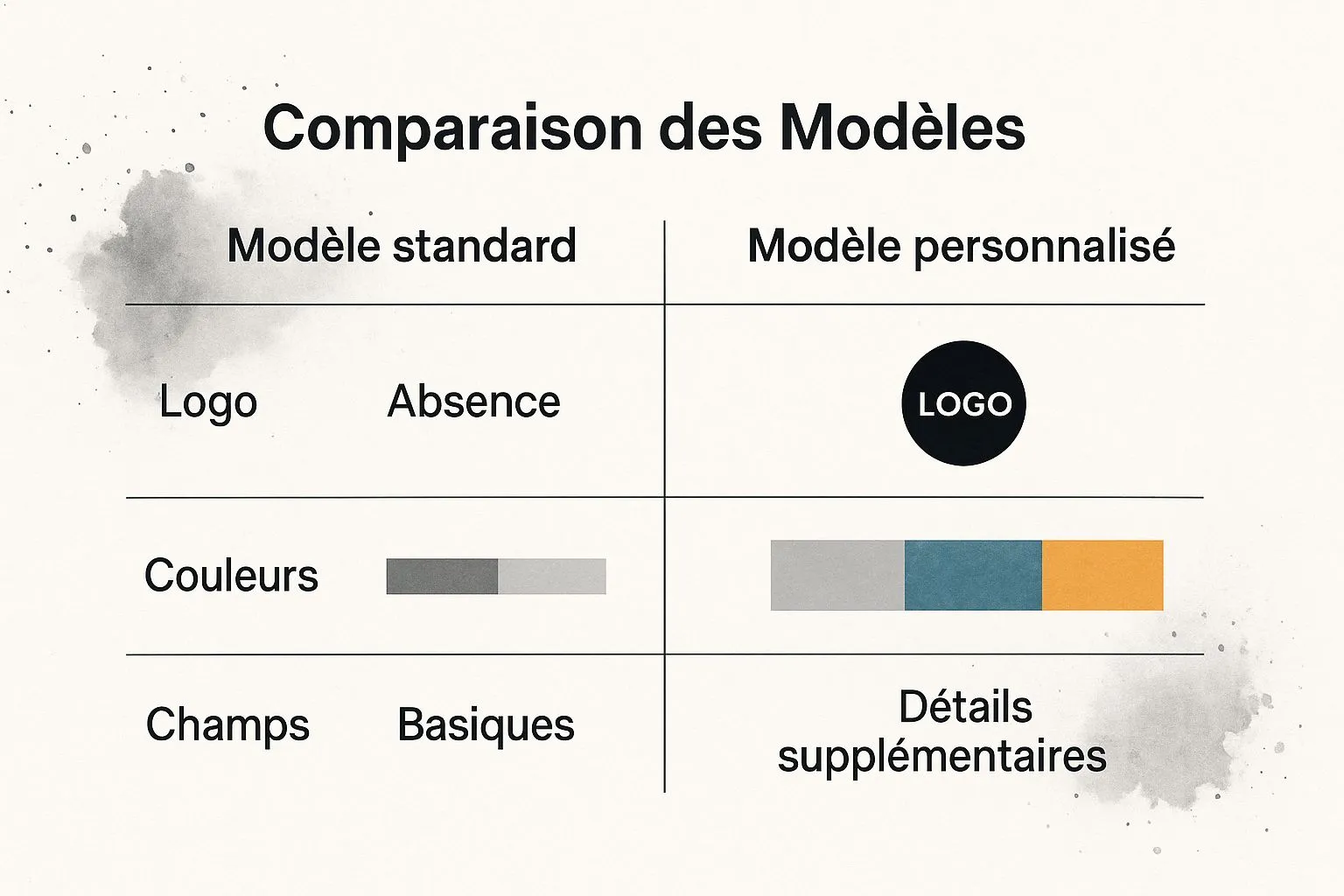
A customized template, with your logo and colors, reinforces your brand image. There’s no denying it. But careful not to overdo it! A simple, effective invoice template must above all stay clear and readable.
Here’s a look at the invoice templates available on Canva:
Canva offers a wide range of templates, from the simplest to the most elaborate. A good option if you’re after a professional design without breaking the bank.
Free or paid? The real question
Of course, the budget question comes up. When starting out, free solutions are perfect. But as your business grows, paid software can become a smart investment. Automated payment reminders or quote management, for example, will save you precious time. Something to think about!
To help you choose, here’s a comparison table of a few solutions:
Comparison of invoicing tools - Analysis of the main available solutions with their pros and cons
| Tool | Price | Ease of use | Features | Ideal for |
|---|---|---|---|---|
| Excel | Free | Simple but limited | Basic | Very small businesses or beginner sole traders |
| Canva | Free (limited version), paid | Intuitive and design-focused | Varied, customizable templates | Sole traders, freelancers, small businesses |
| Bizyness | Paid | Full-featured, may take some time to learn | Automation, quote and client management, etc. | Businesses with a high volume of invoices |
| Facture.net | Paid | Simple and fast | Invoice creation and sending, payment tracking | Sole traders, small businesses |
This table gives you an overview of the different options. Don’t hesitate to try several solutions before making your choice! The ideal tool is the one that truly simplifies your life.
Creating a design that naturally inspires trust
Your invoice is a bit like the first impression you give. Even before the client looks at the figures, they see the design. And a polished design immediately builds trust, showing your professionalism. Rest assured, you don’t need to be a Photoshop pro to create an effective simple invoice template.
Clarity above all! Let the layout breathe. Clear headings, well-defined sections, that’s the basics. For the font, choose something readable and professional, like Arial or Calibri. Skip overly quirky fonts, they can quickly look amateurish.
Colors matter too. Ideally, reuse your brand’s colors for visual consistency. But avoid the Christmas tree effect! Too many colors tire the eye and make the invoice hard to read. A white or light background is generally the most effective.
To further optimize your invoicing, consider using a customer relationship management tool. There are many interesting options for 2025. Your logo, of course, has its place on the invoice. But be careful not to overdo it! A logo that’s too large throws off the balance. Place it discreetly at the top left or bottom of the page.
Adapting your design to your industry
A craftsperson and a consultant don’t have the same needs, and that shows on their invoices too. If you work in a creative field, you can allow yourself a bit more originality. On the other hand, if you work in finance, it’s better to stay understated and classic. The goal is to find the balance between professionalism and personality. Need a hand? Check out our full guide on online invoicing, it’s packed with useful information. And don’t forget: your invoice should also be tailored to your client. An invoice for a large company will necessarily differ from one sent to an individual.
Ultimately, good invoice design is design that makes reading easier and inspires trust. It’s a small investment that can make a big difference for your brand image and client loyalty.
Structuring your information logically
Picture an invoice like a shop window. If it’s clear, clean and precise, the client walks in without hesitation. A well-structured invoice is the same: it should guide the eye and let you grasp the essentials at a glance. The goal of a simple invoice template? For your client to know exactly what you’re billing them for, without racking their brains.
For that, information hierarchy is key. Highlight key elements like the invoice number and the issue date, for instance using bold text or a larger font size. And don’t forget the importance of your company visual identity for a professional, polished invoice.
Next, think about how you organize the space. Group information into logical blocks: contact details, description of services, totals. Use dividing lines and whitespace to give the document room to breathe. The aim is to create a smooth reading flow, almost like a pleasant stroll.
Clearly presenting your services
The heart of your invoice is your services. Be precise and concise in your descriptions. Imagine you’re explaining your work to a friend who knows nothing about it: clarity and simplicity are your best allies. If you’re billing for several services, list them individually with their unit price and quantity.
For each service, spell out exactly what you did. Avoid technical jargon and obscure abbreviations. The simpler it is to understand, the happier your client will be.
Calculating and displaying totals without ambiguity
When calculating totals, transparency is essential. Clearly state the amount excluding VAT, the VAT, and the amount including VAT. If you’re granting discounts or deposits have been paid, detail them to avoid any confusion. A small summary table can be very useful for consolidating this information and allowing a quick check.
Tip: always double-check your totals before sending the invoice. Even a minor error can give an unprofessional impression.
Handling special cases: discounts and deposits
Discounts and deposits can sometimes complicate things. To fit them easily into your simple invoice template, be methodical. Clearly state the amount of the deposit already paid and the remaining balance due. For discounts, specify the percentage or amount of the reduction and its impact on the total. Clarity is key to a smooth client relationship.
A small tip: for a significant discount, don’t hesitate to add a short explanatory note to justify the reduction.
Numbering and organization for simplified tracking
Good numbering is like a well-organized library: you can find everything easily! Choose a logical, sequential system (by year, by client, for example). Keep your invoices carefully, sorted by number or date. Trust me, in the event of an audit or simply to find a piece of information, you’ll thank yourself!
Avoiding the pitfalls that can cost you dearly
We’ve seen how to create a simple invoice template, refine its design, and structure information well. Now let’s talk about the mistakes to absolutely avoid. Seriously, I’ve seen plenty of invoices go by… and some mistakes can cost you far more than a simple late payment.
Classic mistakes and how to avoid them
Let’s start with the classic: calculation errors. A misplaced decimal, an addition gone wrong… and boom, your credibility takes a hit. Personally, I’ve made a habit of double-checking everything with a calculator. It might seem trivial, but it’s saved me more than once!
Next, forgetting legal mentions. Especially with a simple invoice template, we tend to think these are minor details. Big mistake! Date, invoice number, full contact details… nothing should be missing. A short checklist can save you a lot of trouble.
Numbering inconsistencies too, might seem harmless, but can quickly become a headache. Imagine looking for a specific invoice and finding numbering that’s all over the place. A real nightmare! Set up a clear system from the start and stick to it.
And finally, let’s not forget date issues. Issue date, due date… again, rigor is essential. An incorrect date can lead to late payments and unnecessary administrative complications.
The consequences of errors and how to fix them
An invoice with errors opens the door to late payments. The client may dispute it, ask for corrections… in short, payment is delayed, and your cash flow suffers. And the worst part is it can tarnish your professional image. A client who receives a sloppy invoice may start questioning the quality of your services.
If you ever make a mistake, don’t panic! What matters is reacting quickly. Contact your client, explain the situation, and send a corrected invoice as soon as possible. A bit of honesty and responsiveness, and the incident is usually closed.
Maintaining quality, even during busy periods
We all know that during rush periods, we’re more prone to making mistakes. Paradoxically, that’s exactly when you need to be most vigilant. My advice? Simplify your invoicing process. Use pre-filled templates, automate certain tasks… The goal is to save time without compromising the quality of your invoices.
Your action plan for stress-free invoicing
Alright, now that we’ve covered the basics of the simple invoice template together, let’s get practical! Creating an invoice is good, but having an overall approach so everything runs smoothly is even better. Here’s how to do it.
Checklist for a flawless template
Before you get started, a quick check is in order. Your simple invoice template absolutely must include these points:
- Mandatory legal mentions: SIRET, address, invoice number… basically the classic stuff, but essential. Make sure it’s all there!
- Clarity and readability: Picture your client looking at your invoice. They should understand everything easily, without any hassle.
- Professional design: A polished invoice is like a business card. It reflects your image!
- Complete information: Description of services, prices, VAT… have you thought of everything?
With this quick checklist, you can be sure your template is top-notch.
Evolving your system
Your business grows, your needs change, and your invoicing needs to keep pace! A simple template is perfect to start with, but later on you may need more options. Plan ahead! For example, for sole traders, invoicing rules differ depending on revenue. A quick read of this article on sole trader invoicing can shed some light.
Measuring effectiveness
How do you know if your invoicing system is performing well? Keep an eye on these indicators:
- Average payment time: Are your clients paying quickly?
- Number of reminders: Do you spend your time chasing payments?
- Unpaid invoice rate: A lot of unpaid invoices to report?
These figures will give you a clear picture of the state of your invoicing. If payment times are stretching out or reminders are piling up, it might be time to automate things a bit more.
Want to simplify your management and focus on your core business? Take a look at Bizyness, an all-in-one solution to manage your sole proprietorship.
