

 Français
The CRM guide for accountants that transforms your practice
Discover how a CRM for accountants can optimize your client relationships and boost your productivity. Complete guide with concrete strategies.

Let’s be clear: a CRM for accountants has nothing to do with a simple upgraded address book. Think of it instead as your practice’s cockpit, a system that centralizes all the information, interactions and engagements tied to your clients to give you total control over your activity.
Beyond the address book: the real value of a CRM

Forget endless Excel spreadsheets and overflowing inboxes. A well-chosen CRM (Customer Relationship Management) gives you a 360-degree view of every client file, a genuine control tower for your practice.
Many practices still operate with a patchwork of disparate tools: spreadsheets to track engagements, emails to communicate, and shared folders that quickly turn into a battlefield. While this approach may have worked for a while, its limits are now clear.
The blind spots of traditional methods
This lack of centralization creates real day-to-day bottlenecks and risks. Information is scattered everywhere, which complicates collaboration and can even stall an engagement if the right team member is unavailable.
Concretely, this disjointed organization leads to several frustrations:
- Considerable time wasted: Finding the date a document was sent or the last topic discussed with a client can quickly turn into a treasure hunt.
- Silly mistakes: Working from an outdated file version or missing a tax deadline for lack of a reminder — these are errors that can prove costly.
- A lack of vision: Without an overview, it’s impossible to anticipate a client’s needs or spot an opportunity for a new advisory engagement.
A CRM isn’t just contact management software. It’s a new way of working, entirely client-focused, that brings structure, automation and security to every stage of the relationship.
The challenge is even greater with clients who generate a high volume of data, such as online sellers. Between their multiple sales channels, complex VAT obligations and need for responsiveness, a simple spreadsheet is no longer a viable option.
The case for a unified view
Faced with these challenges, adopting a CRM for accountants is no longer really a choice. It’s a strategic decision. It’s not about stacking on yet another tool, but about laying the foundations for a more efficient, less stressful practice.
The goal is simple: make your data work for you. By bringing together every email, call, document and deadline in one place, the CRM becomes the single source of truth for each client. Not only do you improve the client experience, you also secure your information and, above all, save precious time.
And that time is what really matters. It can finally be allocated to what counts: advisory work and strategic support. A CRM also lays perfect groundwork for connecting to more specialized tools, such as an accounting automation platform like Bizyness, which can handle complex data flows. The practice can then focus on its real added value: guiding its clients.
Centralizing data and automating repetitive tasks

Adopting a CRM for accountants means tackling head-on two problems that undermine any practice’s day-to-day operations: scattered information and the burden of manual tasks. By betting on centralization and automation, we’re not talking about a vague promise, but a concrete, immediate productivity gain.
Imagine no longer having to dig through your emails for an attachment or juggle between three folders to reconstruct a client’s history. That’s exactly what a CRM enables: it acts as a single, shared, always up-to-date client file.
Every exchange, every document, every deadline is directly attached to the client’s record. This 360-degree view ensures the whole team works from the same information base, accessible in one click.
Ending the scattering of information
Without a centralized tool, client information is often split across team members. One person goes on vacation, someone is out, and an entire engagement can end up stuck. The CRM is precisely what breaks down these silos.
Concretely, what does centralizing data in a CRM mean?
- A complete client record: You’ll find the history of emails and calls, shared documents, ongoing engagements, key contacts and all deadlines. Everything in one place.
- Secure, shared access: No more sensitive documents floating around by email. The CRM offers a controlled space to share information, whether internally or with your clients.
- Guaranteed continuity of service: Any authorized team member can pick up a file with a perfect overview. The practice’s responsiveness is multiplied.
This approach has quickly become the norm. It’s no coincidence that the French CRM market is expected to reach €3.2 billion in 2025. Practices that make the shift see client retention increase by up to 25% in a single year.
Automating processes to free up time
Once all your data is neatly organized in one place, the real magic of the CRM kicks in: automation. It’s no longer just about storing information, but making it work for you. Your CRM then becomes a proactive assistant handling repetitive tasks on your behalf.
Think of all those small manual actions that fill your days. Much of it can be delegated to the software.
Automation isn’t there to replace the accountant, but to give them back their most precious resource: time. By eliminating low-value tasks, the CRM lets team members focus on advisory work, analysis and strategy.
Here are some very concrete examples of what a CRM for accountants can automate for you:
- Document collection: Schedule automatic reminders to gather accounting documents from your clients before deadlines. No need to think about it anymore.
- Tax deadline tracking: Create automatic reminders and tasks for each step of a return (VAT, corporate tax), assigned to the right people well in advance.
- Engagement letter management: Automatically send your engagement letters from pre-filled templates and track their status (sent, signed) directly from the client record.
- Onboarding a new client: Trigger a full scenario at every new signature: sending a welcome email, creating client portal access, scheduling a kickoff meeting.
This organization frees up dozens of hours every month, reduces deadline-related stress and drastically limits the risk of oversight. To dig deeper into the topic, our guide on business process automation will give you the keys to implementing these strategies.
Here are the CRM features that truly matter for a practice
Not all CRMs are created equal, that much is obvious. But for an accounting practice, this difference is even more pronounced. The market is saturated with options, ranging from highly flexible generalist tools to ultra-specific industry platforms. To see things clearly, you need to know how to separate the essential features from the superfluous gadgets.
A CRM for accountants isn’t just an upgraded address book. It’s the true engine of your organization, designed to understand and simplify the very particular processes of your profession.
The foundation: centralized management of clients and engagements
The starting point is contact management that goes beyond a simple name/phone number pair. Your CRM must be able to distinguish between an individual and a legal entity, and above all, link contacts to the companies they run or work for.
But the real value lies in engagement management. In a practice, everything revolves around them: bookkeeping, VAT returns, financial statements, HR advisory… Each engagement has its own lifecycle, critical deadlines and dedicated team members.
A well-designed CRM should let you:
- Track every engagement: From the signing of the engagement letter to the final invoice, every step should be clear and visible.
- Manage deadlines without stress: The system should alert you well ahead of tax and social filing deadlines. No more last-minute scrambles.
- Centralize documents and exchanges: Every email, attachment or call note should be attached to the relevant engagement, not buried in a general inbox.
Automation and the client portal for smooth exchanges
Automation is what turns a CRM from “practical” into “essential.” Think of automated workflows as your best productivity ally. They take on all those repetitive tasks that eat up your time: reminders to collect documents, internal notifications when a step is completed, and so on. As proof, a study shows that 79% of companies that automate their marketing see their number of leads increase. The principle is exactly the same for optimizing engagement tracking.
The other key piece is the secure client portal. Exchanging sensitive documents by email is no longer acceptable. It’s an open door to security risks and a nightmare for GDPR compliance.
The client portal is no longer a luxury but an absolute necessity. It creates a single, secure space where your client uploads their documents, tracks the progress of their file and communicates with you. It’s a mark of trust and transparency.
This portal centralizes everything, ensures perfect document traceability and offers your clients a much more professional experience. They know exactly where to find and submit their information, at any time.
Integration and reporting: the keys to performance
A CRM, even the best in the world, is useless if it operates in isolation. Its ability to communicate with your other tools is fundamental. A smooth connection with your accounting production software (such as Cegid, Sage or ACD) is a non-negotiable requirement. The goal is simple: put an end to double data entry and ensure information flows effortlessly between client management and production itself.
Also think about integration with your everyday tools, such as your email and calendar. That’s what anchors the CRM into your team’s working habits.
Finally, a good CRM for accountants should give you the right indicators to steer your activity. Not dozens of complex charts, but clear answers to strategic questions:
- What is the real profitability of each client or engagement?
- How much time is spent by each team member on each file?
- Where are the bottlenecks in our internal processes?
This data gives you the cards in hand to make informed decisions, adjust your pricing and continuously improve your efficiency. GDPR compliance must also be handled natively, with tools to track consents and manage access rights. This is the baseline for protecting your clients’ highly sensitive information.
Choosing and deploying the right CRM in your practice
Launching a CRM for accountants project can be a little intimidating. You immediately picture a complex, unwieldy system and a budget that spirals out of control. Yet, by following a methodical approach, the exercise becomes much simpler. Here’s a 5-step roadmap, drawn from real-world experience, to make the right choice and, above all, succeed in the rollout.
The secret is not putting the cart before the horse. Before diving into comparisons, the real work starts internally.
1. Assess your real needs
This is the most important step. Most CRM projects that go off the rails have one thing in common: they were chosen for the wrong reasons. The idea is to lay out your ways of working to identify where things are really getting stuck.
Take the time to ask yourself the right questions:
- Concretely, where do my team and I lose time every day?
- What are the most frustrating and repetitive manual tasks? (client reminders, duplicate data entry…)
- How does information currently flow between teams? And with our clients?
Above all, do this exercise with your teams. They’re on the front line and know exactly where the real day-to-day pain points are. In the end, you won’t have a list of trendy features, but a clear specification of what you actually need.
2. Evaluate the solutions on the market
Once your priorities are set, you can start looking at what’s available. The market splits into two main families: generalist CRMs (such as Salesforce or HubSpot) and solutions designed specifically for accounting practices.
The former are true Swiss Army knives, very powerful, but their flexibility comes at a price: it often takes considerable time and configuration to adapt them to your jargon and processes. The latter already speak your language. They natively integrate engagement management, engagement letter tracking or tax deadlines. Some, like ACD Suite Expert, even go as far as embedding client relationship management at the heart of their production tool, which is often a very sound choice.
3. Ask for tailored demonstrations
Don’t fall for polished marketing videos. Once you have 2 or 3 pieces of software in mind, demand a personalized demo, built around your specific issues. Prepare one or two scenarios typical of your practice.
The goal of a demo isn’t to see the full range of possibilities, but to check whether the tool meets your precise needs, simply and smoothly.
Use this moment to test the ergonomics, the navigation logic, the speed at which you find key information. It’s the only way to “feel” whether the tool will be a true daily ally or a new constraint.
4. Check the technical and financial details
A CRM is a long-term commitment. On the technical side, one point is non-negotiable: security. Verify that data hosting is located in Europe to comply with GDPR. That’s an absolute minimum.
On the financial side, dissect the pricing model. Is the price calculated per user, per number of files, or a mix of both? Are there hidden fees for setup, training, access to certain integrations or customer support? Having a clear view of the total cost over 3 years is essential to avoid unpleasant surprises.
5. Plan the rollout and team adoption
The best tool in the world is worthless if no one uses it. Change management is just as crucial as the choice of software. Your rollout plan should cover two things: a migration plan for your existing data (clients, contacts, etc.) and a training schedule tailored to your team.
Adoption by your team will be much easier if you involve them from the start. By having them take part in the thinking and the decision, you’re not imposing a tool on them. You’re giving them a lever to work better, a shared project that benefits everyone. It’s a pillar of successful business digitalization.
Managing your online-seller clients with a CRM: the practical guide
Online-seller clients are a goldmine for a practice… but also a real headache. We’re talking about a colossal volume of transactions, a multitude of payment flows and international VAT rules that keep changing. Trying to keep track of all that with traditional methods isn’t just inefficient, it’s taking unnecessary risks.
This is precisely where the combination of a CRM for accountants and an accounting automation platform comes into play. Your CRM becomes your control tower for the strategic relationship, while a specialized tool tames the continuous flow of operational data.
Drive the strategy, stop being at the mercy of operations
With an online-selling client, your role goes well beyond simple bookkeeping. You become a genuine partner, one who anticipates major turning points such as international expansion or margin optimization. It’s your CRM that will help you structure this high-value approach.
Concretely, in your CRM, you’ll be able to:
- Track engagements specific to e-commerce, such as managing VAT thresholds or OSS/IOSS filings.
- Segment your clients by platform (Shopify, Amazon, etc.) to offer them tailored advice.
- Plan strategic check-ins and keep a record of every decision for impeccable follow-up.
- Anticipate upcoming needs by keeping an eye on key indicators and setting up alerts to propose new engagements at the right time.
This mind map summarizes the steps for choosing the right CRM: starting from needs and arriving at deployment.
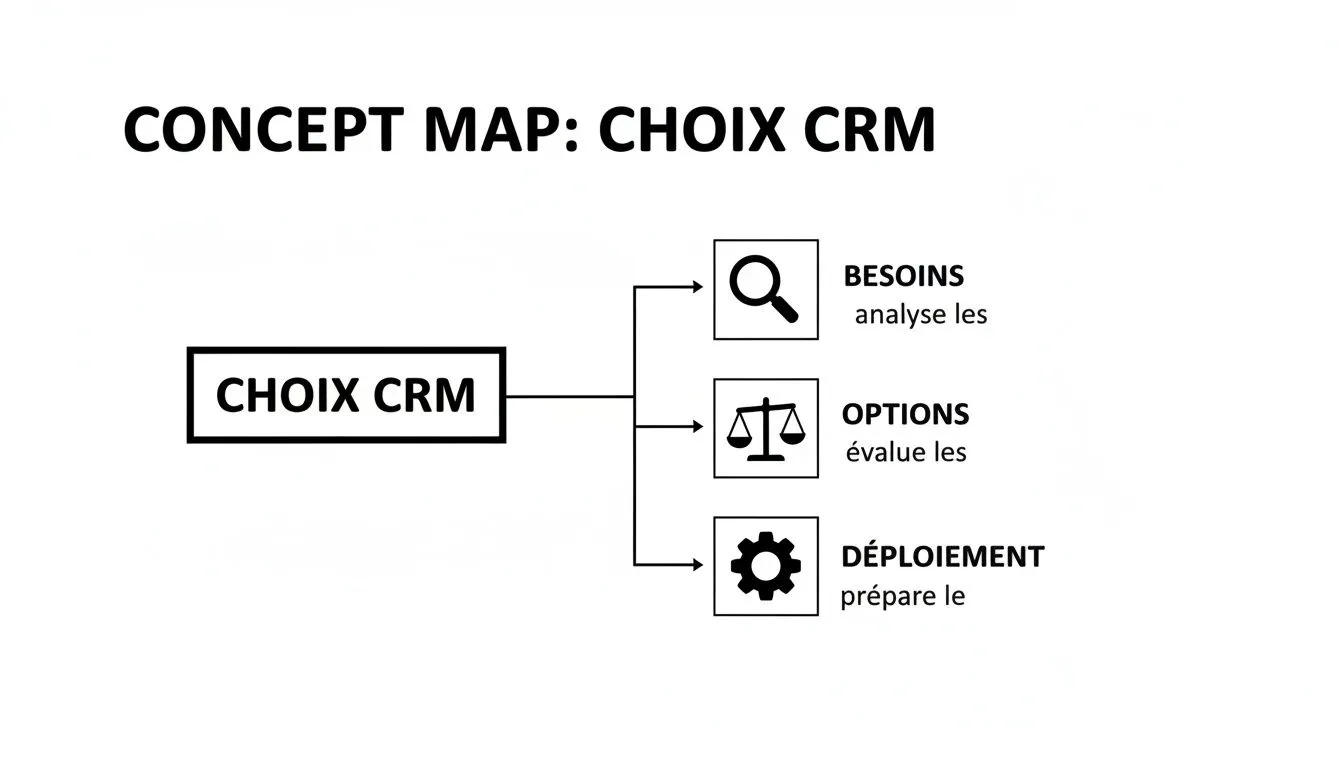
Putting this approach in place is the first building block for creating a technology ecosystem that truly supports your growth and that of your clients.
The winning synergy with accounting automation
The CRM is great, but it doesn’t solve the main problem: how do you process the thousands of transactions generated by online sales? The real breakthrough is pairing your CRM with an accounting automation platform like Bizyness.
Think of it as a duo: the CRM is the strategic brain that orchestrates the client relationship and advisory engagements. Meanwhile, a platform like Bizyness acts as the nervous system, automatically collecting, processing and organizing all financial data in real time.
While you’re in a strategic meeting with your client, Bizyness is working for you behind the scenes. The platform connects directly to the sources (Shopify, Amazon, Stripe…), pulls in every sale, qualifies it (product, customer’s country, applicable VAT rate) and prepares the accounting entries. All without any manual intervention on your part.
This integration turns raw, complex data into reliable, structured accounting information ready to use for your engagements.
No more chasing after receipts and spending hours reconciling sales. This technological partnership gives you the means to serve a growing portfolio of online-seller clients without exploding your workload.
You thus turn a flood of data, which seemed unmanageable, into a source of precise, high-value advice. To go further on working with this type of client, take a look at our article on the accounting challenges of e-commerce and discover how to turn these complexities into real opportunities. The CRM + Bizyness duo is the key to growing your services and becoming an indispensable partner for companies that sell online.
FAQ on CRM for accountants
Thinking about adopting a CRM, but still have doubts? That’s completely normal. A new tool means a change of habits. To help you see things more clearly, we’ve gathered the questions that come up most often in accounting practices. Here are our answers, no sugarcoating.
Is a CRM really useful for a small accounting practice?
The answer is a resounding yes. The trap is seeing a CRM for accountants as a simple expense. See it instead as a direct investment in the solidity of your practice, from day one.
For a small structure, the whole point is to lay healthy foundations so you can grow with peace of mind. By adopting a CRM early, you put clear processes in place before the workload becomes unmanageable. Automatic reminders and centralized tracking keep you from drowning in manual tasks as your client portfolio starts to grow. Adoption will be much easier, and the benefits immediate.
For a small practice, a CRM isn’t a tool to “manage” growth, it’s a tool for growth. It establishes rigorous organization and impeccable client service, two assets that truly make the difference in standing out.
What’s the difference between my production software and a CRM?
Excellent question, as it’s at the heart of any practice’s organization. To put it simply, imagine your accounting production software (such as Cegid or ACD) is the engine of your practice. It does the technical work: it produces the books, the financial statements, the tax returns.
The CRM is the dashboard for the client relationship. It gives you a 360° view of the entire client journey, from first contact to retention, including engagement tracking and business opportunities. They’re not in competition, they’re perfectly complementary:
- Production software focuses on executing accounting engagements.
- The CRM focuses on managing the client relationship and growing the practice.
Neither replaces the other. By making them work together, you make your practice much more efficient and proactive.
How long does it take to set up a CRM?
That obviously depends on the size of your team and the solution you choose. But rest assured: for a small or medium practice opting for a modern online solution, it’s often much faster than you’d think.
Generally, it takes a few days to a few weeks to be up and running. This timeframe includes initial software configuration, importing your contacts and basic data, and a training session so everyone feels comfortable. What matters most isn’t speed, but the quality of upfront preparation.
Is my practice too small for automation with Bizyness?
Quite the opposite! Automation is no longer a luxury reserved for industry giants. Tools like Bizyness are precisely designed to deliver an immediate efficiency gain, whatever the size of your practice.
Even if you only have a single online-selling client, automating the collection and processing of their sales data frees up considerable time. That time can be reinvested where your added value is greatest: advisory work, winning new engagements, or simply improving your services. Automation makes you more competitive, from your very first file.
Ready to transform how you manage your online-seller clients? With Bizyness, automate the collection and processing of sales data so you can focus on what really matters: advisory work. Find out more at https://www.bizyness.fr.
