

 Français
 Delivery Note Template: Complete Guide and Free Template to Download
Discover the delivery note template: a clear guide and free template (Word/Excel/PDF) with all mandatory information. Download it for free.
Looking for a delivery note template? You’re in the right place. This document, often seen as a simple administrative formality, is actually much more than that. It’s the tangible proof, the “signed receipt” of your transaction, confirming that your customer has indeed received their goods. A small detail that changes everything when it comes to securing the business relationship.
The delivery note: much more than just a piece of paper

The delivery note, often shortened to “DN,” is really not just a sheet of paper hastily slipped into a package. It’s a cornerstone of your sales cycle, the link that connects order preparation to invoicing. Its primary purpose? To formalize the transfer of goods between you and your customer.
Think of it as a proof of receipt. When your customer signs this document, they’re not just saying “thanks.” They’re formally attesting that they received the listed products, in the correct quantities. This simple signature turns the delivery note into solid legal proof, your best ally in the event of a dispute.
A signed delivery note is your shield against claims like “I didn’t receive anything” or “an item is missing.” It puts an end to misunderstandings and clarifies responsibilities, helping preserve a good relationship with your customer.
A tool that builds trust and simplifies management
Beyond its legal weight, the delivery note is an excellent tool for running your business day to day. In very concrete terms, it helps you:
- Track your goods all the way from your warehouse to the customer’s door.
- Keep a precise eye on your stock by recording the actual outflow of products.
- Simplify your invoicing, by ensuring the invoice perfectly reflects what was delivered.
For a sole trader or a small business, making it a habit to issue delivery notes projects an image of seriousness and rigor. It’s a simple gesture that reassures the customer and shows them their order is being handled with the utmost care. Be careful not to confuse it with other business documents; its function is quite specific, as we explain in our guide to purchase orders.
This practice is also booming thanks to digitalization. Did you know that 45% of French companies had already started digitizing their delivery notes in 2023 to boost efficiency? A strong trend that shows just how important it has become in modern logistics.
What information must appear on a delivery note?
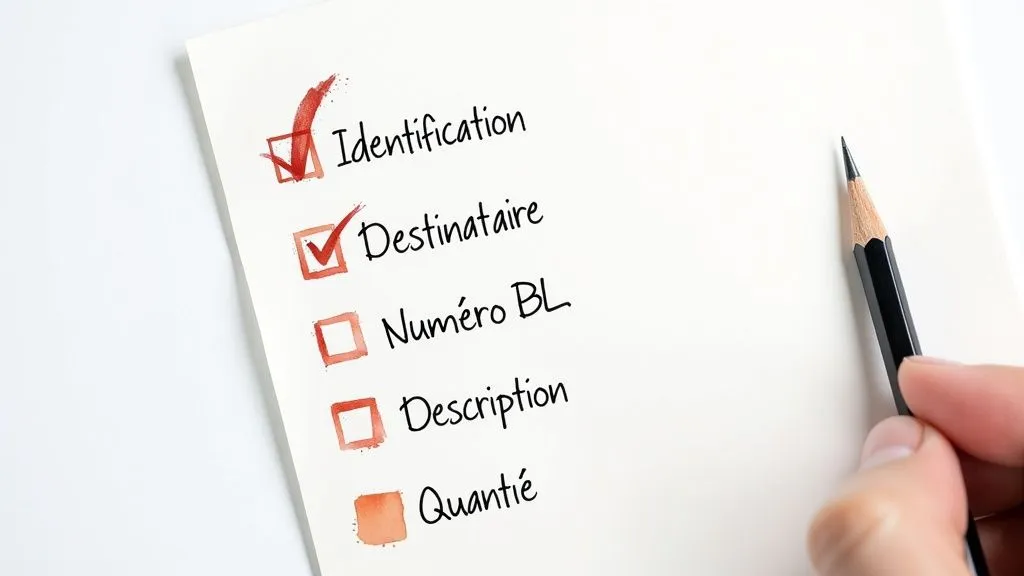
For a delivery note to be genuinely useful and hold up when needed, it must contain a certain number of key pieces of information. Think of them as the foundations of your document: if they’re not solid, everything else can crumble. Even a minor omission can lead to misunderstandings or leave you defenseless in a dispute.
The goal is simple: make sure everyone — you and your customer — knows exactly who’s who, what was delivered, and when the delivery took place. That’s the basis of a healthy business relationship, built on clarity and trust.
Mandatory information: the foundation for a valid document
For your delivery note to be taken seriously as a business document, every delivery note template absolutely must contain the following elements. This is the bare minimum to keep your shipments well organized.
- The sender’s identity (you): Clearly state your company name, address, phone number and, of course, your SIRET number.
- The recipient’s details (your customer): Include their name (or company name) and the exact delivery address. No room for error here!
- The date and the delivery note number: The date is the day the goods leave your premises. The number must be unique and follow a clear logic (for example, DN-2024-001, DN-2024-002…). This is key to flawless tracking.
- A precise description of the products: List each item with its name, quantity and, if possible, a reference (such as a SKU). The more precise you are, the less risk of ambiguity on receipt.
Even though it’s different from an invoice, the delivery note is closely tied to your accounting. The delivery date it proves is often the starting point for issuing the invoice, and it’s what determines when VAT must be declared.
This link becomes even more critical with the arrival of mandatory e-invoicing. Under French law, perfect synchronization between a digital delivery note and an e-invoice is essential for flawless accounting. To dig deeper into the topic, the Banque de France’s resources on e-invoicing are an excellent reference.
Recommended information: taking it further
Beyond the mandatory items, certain pieces of information can turn your delivery note into a genuine management tool that makes life easier for everyone involved. It’s not required, but trust us, it makes all the difference.
Think of these additions as small extras that make the process smoother and more professional.
- The customer’s order number: By linking the delivery note to the original purchase order, you make the reconciliation work much easier for your customer… and for you!
- Delivery terms: Specifying the carrier (Colissimo, Chronopost, private courier…) can prove very useful if a question comes up.
- A “Remarks and reservations” section: This is an essential point. This section lets the customer immediately note any issue spotted on receipt (a damaged package, a missing product, an error) even before signing.
- A signature area: Provide a clear space for the name, date of receipt and the customer’s signature. It’s this signature that turns the document into indisputable proof of delivery.
Download your free delivery note template
Now that you know exactly what needs to appear on a delivery note, let’s get practical! To save you precious time and help you avoid any oversight, we’ve put together several free delivery note templates. They’re ready to use, fully customizable, and just waiting for you.
All you need to do is choose the format that suits you best. Each delivery note template has been designed to be simple and intuitive. Whether you’re more comfortable with a word processor, a spreadsheet pro, or you prefer a fixed format for your archives, we’ve got you covered.
Our templates to download: Word, Excel and PDF
Every entrepreneur has their own working habits. That’s why we offer our templates in three well-known formats, each with its own advantages.
- Word template (.docx): The ideal choice if you want to polish your brand image. You can easily add your logo, change the colors, adjust the layout… In short, you make it entirely your own so it perfectly matches your visual identity.
- Excel template (.xlsx): Perfect for those who love efficiency and automation. This spreadsheet can be set up to automatically calculate totals or even connect to your own stock-tracking file. It’s the smart option for saving time on management tasks.
- PDF template: The most straightforward solution for immediate use. This universal format isn’t editable, which guarantees a flawless presentation on any screen. Ideal for quickly printing a note to fill in by hand, or for sending as-is to a customer by email.
A quick tip: consistency across your business documents is a mark of professionalism. By adopting a similar layout for your quotes, delivery notes and invoices, you strengthen your customers’ trust and build a solid brand image.
This visual consistency not only makes your own management easier, but also makes life easier for your customers, who can quickly find their bearings. By the way, if you’d like to standardize all your paperwork, take a look at our guide offering a free blank invoice template to download.
Click on the format of your choice to download the template:
- [Download the delivery note template in Word format]
- [Download the delivery note template in Excel format]
- [Download the delivery note template in PDF format]
Filling out your delivery note step by step
Filling out a delivery note might seem a bit formal, but in reality, it’s a fairly simple and logical process. To make things clearer, let’s take one of our templates and fill it out together, as if you were a sole trader who just sold a few handmade creations.
Let’s set the scene. Imagine you need to deliver three jars of homemade strawberry jam and two goat’s milk soaps to a customer nearby. Every little detail you write on this piece of paper matters for making sure everything goes smoothly and for showing your professionalism.
The essential header information
This is the very first part of the document, the one that introduces who’s who. It’s the foundation, whether you’re using a delivery note template in Word, Excel, or even a paper pad.
- Your information (you, the sender): State your company name, full address and SIRET number. It’s a bit like your professional ID card.
- The customer’s details (the recipient): Note their name, the most precise delivery address possible (don’t forget the floor or door number if needed!) and a contact. A small mistake here, and the package could get lost along the way.
- The date and the delivery note number: Note the date you’re shipping the products, along with a unique number for this note (for example: DN-2024-058). This sequential numbering is essential for keeping track of your archives.
The first decision to make is often choosing the right format for your document. This little diagram sums up the typical path well.
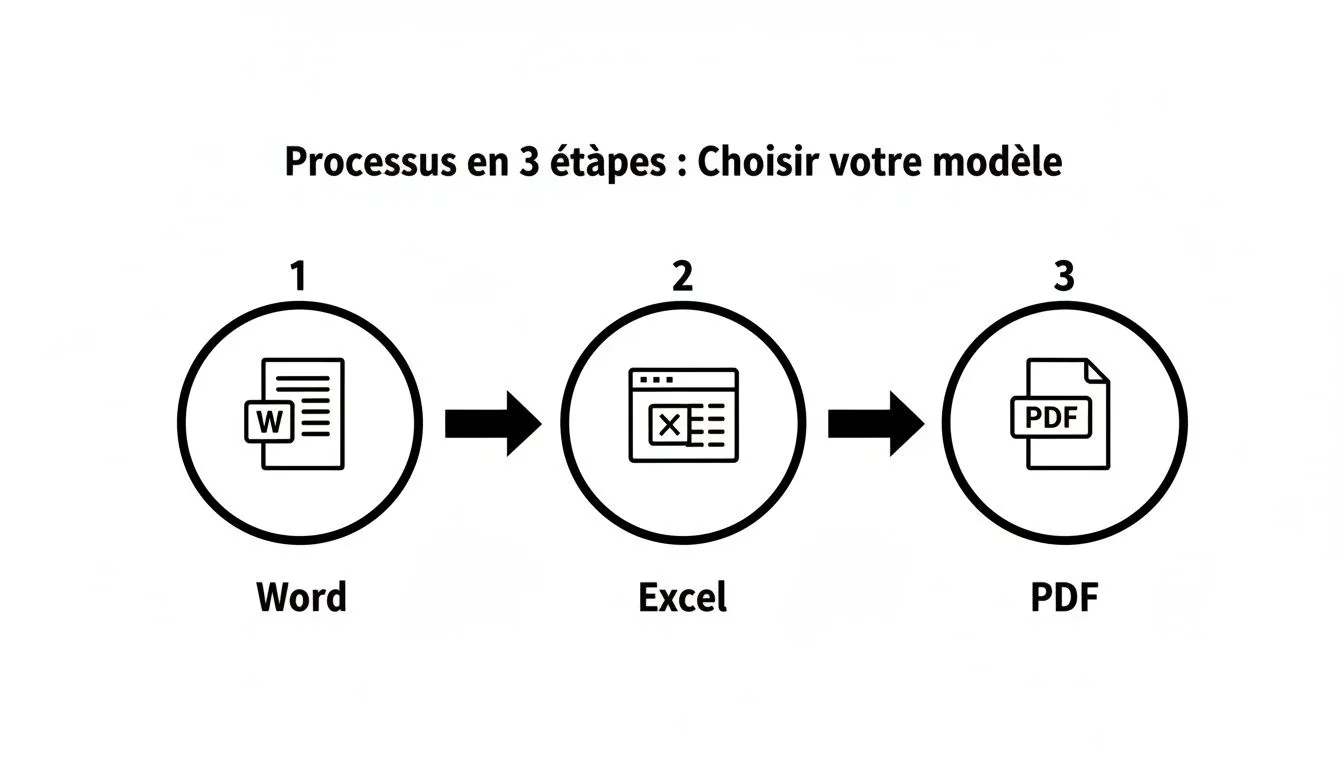
What matters is that no matter the tool (Word, Excel, or a ready-made PDF), the structure and the information you need to provide stay the same.
Precisely detailing the products delivered
Now we get to the heart of the delivery note. Here, the goal is to be as clear as possible so there’s no room for doubt. A vague description is an open door to misunderstandings.
- For the jam: Don’t just write “jam.” Be specific: “3 x Handmade Gariguette Strawberry Jam - 250g jar.” Precision is your best friend.
- For the soaps: Same thing, get into the details: “2 x Handmade cold-process soap - Goat’s Milk & Honey - 100g.” Mentioning the features that make your products unique is always a plus.
This clarity lets the customer check their order at a glance and confirms that you’ve indeed sent the right items.
The customer’s signature on this document is the key moment. It turns this simple piece of paper into solid legal proof that the listed items were received, and in good condition. Without this signature, the document loses much of its value.
At the time of delivery, present the note clearly and invite the customer to take a look at the goods before signing. If a jar of jam arrived broken, that’s what the “Reservations” section is for. If they refuse to sign for any reason, note that too and, if possible, take a photo. Above all, always keep a copy of every signed note (digital or paper); it’s your safety net in case something goes wrong.
How to manage your delivery notes well as a sole trader
As a sole trader, your time is precious. It’s easy to feel overwhelmed by admin work, but some documents are true allies. That’s the case with the delivery note: far from being a chore, it’s a very simple tool that adds a touch of professionalism and secures your sales.
Let’s be clear: unlike an invoice, the delivery note is not a strict legal requirement for you. That said, we can only encourage you to use it systematically. Think of it as free insurance. It proves in black and white that your customer did receive their order and protects you effectively in case of a dispute.
With the rise of e-commerce, this good practice has become almost essential. Millions of packages travel every day, and even at your scale, a clear process brings real peace of mind. To give you an idea, Colissimo’s volume grew from 211 million to 251.6 million between 2014 and 2018. In 2021, that figure exploded to reach 1.7 billion parcels processed by French postal services. These numbers make it clear how essential it is to secure every shipment. To learn more, you can consult this report on the evolution of the postal service.
A few tips for simple and effective management
Don’t worry, you don’t need to invest in expensive, complicated software. To start, a simple delivery note template in Excel or Word, like the ones we offer above, does the job perfectly.
Here are a few simple habits to make your life easier:
- Set up logical numbering: Establish a sequence of numbers that makes sense for your delivery notes (for example: DN-2024-001, DN-2024-002…). This will let you find what you need at a glance.
- Switch to digital archiving: As soon as your customer has signed the note, take a photo with your phone or scan it. Then store the file in a clearly named folder on your computer or on a cloud service (Google Drive, Dropbox…), naming it after the delivery note number.
- Link it to the invoice: This is a golden habit. Always remember to include the corresponding delivery note number on your invoice. This small detail simplifies tracking, both for you and for your customer.
By adopting these few good practices, what seemed like a simple formality becomes a genuine management tool. You project a serious and reliable image, keep better track of your stock and, above all, strengthen your customers’ trust. And for a freelancer, that’s the most valuable thing there is.
Save time by automating the creation of your delivery notes
Using a delivery note template in Word or Excel is fine to get started. It’s practical and costs nothing. But let’s be honest: as soon as your business takes off and orders start piling up, this manual method quickly shows its limits. The time spent copying and pasting information, checking numbers and avoiding typos becomes a real headache.
That’s when automation becomes much more than just an option. It’s the logical next step to regain control and professionalize your management.
Switching to invoicing software like Bizyness, for example, completely changes the game. Creating your delivery notes becomes a simple, fast and, above all, reliable process. No more stress over data-entry errors or gaps in your numbering sequence! The tool handles these details for you, freeing up precious time so you can focus on what really matters: your business.
The concrete benefits of management software
Beyond the simple time savings, automation secures your entire sales chain and reinforces the serious image you project to your customers.
Here’s specifically how a specialized tool can make your daily life easier:
- One-click creation: A quote accepted? A purchase order confirmed? The corresponding delivery note is generated automatically, pulling in all the information without you having to retype anything.
- Flawless numbering: The software automatically assigns a unique, sequential number to each new delivery note. That guarantees perfect traceability, without you even having to think about it.
- Everything centralized: No more documents scattered across folders on your computer. All your delivery notes are archived in one place, accessible in seconds and directly linked to the order and the invoice.
- Turned into an invoice: Delivery done, note signed? With one click, you turn it into an invoice. That way you’re certain that what was delivered exactly matches what will be invoiced.
This overview of the Bizyness interface clearly shows how the different documents flow together logically and smoothly.
You can immediately see that the delivery note isn’t a standalone document, but a key step in a complete sales process, from quote to payment.
Switching to automation is a bit like buying yourself peace of mind. You nearly eliminate the risk of human error, which often costs a lot in time and customer satisfaction. And you ensure rigorous, always up-to-date sales tracking.
Ultimately, this more structured approach gives you the keys to run your business with much greater peace of mind. You become more efficient and give yourself the means to manage your growth without drowning in paperwork. To dig deeper into the topic, take a look at our article on the benefits of automating administrative tasks in your business.
Answering your questions about delivery notes
Even with our templates and tips, a few questions often remain. That’s perfectly normal! To help you get a clearer picture, we’ve gathered here the most frequently asked questions about delivery notes. The goal is to give you simple, practical answers so you can manage your deliveries with total confidence.
A well-crafted delivery note is a real asset for your business. You just need to master the finer points.
Is a delivery note a mandatory document in France?
To put it simply: no, the delivery note is not a strict legal requirement the way an invoice is. But be careful, in practice it’s highly recommended. It’s simply crucial legal proof that goods were indeed delivered.
Imagine for a moment a customer telling you they never received their order, or disputing the quantities. Without proof, it’s your word against theirs. With a delivery note signed by hand, the debate is settled. Think of it as essential insurance to protect your business.
What’s the difference between a purchase order, a delivery note and an invoice?
These three documents are the pillars of your business relationship, but each has its own role and comes into play at a specific moment. They should never be confused.
- The purchase order: This is the starting point. Your customer issues it to officially say “OK, I want to buy this.” It’s their commitment.
- The delivery note: This is your side of the deal. It accompanies the goods and serves to prove that you delivered what was agreed. The customer signs it to say “Received!”
- The invoice: This is the final step, the accounting document that requests payment for the goods delivered.
Think of it as a chain: the purchase order starts the process, the delivery note confirms the execution, and the invoice closes the transaction financially. Together, they ensure perfect traceability from A to Z.
How long should I keep my delivery notes?
Here, the law is a bit vague when it comes to the delivery note as such. It has no legal retention period of its own. However, it’s considered a business supporting document. And for this type of document, the French Commercial Code is very clear: it recommends a retention period of 10 years.
Making it a habit to keep a copy (digital is simpler!) of all your signed delivery notes for a decade is therefore an excellent practice. It’s your safety net in case of a tax audit or a dispute that could resurface many years later.
Tired of juggling document templates? Take it to the next level. With Bizyness, you can generate your quotes, delivery notes and invoices in just a few clicks. Everything is simple, professional and automated. Discover how Bizyness can simplify your life today.
