

 Français
Electronic invoicing for sole traders: the complete guide
Get ready for the shift to electronic invoicing as a sole trader. Our guide covers the obligations, the tools and the steps to be prepared.
Yes, electronic invoicing really is going to become mandatory for all sole traders (micro-entrepreneurs). The news can come as a surprise, especially if you’re VAT-exempt, but you’re directly concerned. No need to panic though — the transition will happen gradually, with key deadlines in 2026 and 2027.
Understanding the reform timeline
The government is well aware that switching to electronic invoicing is a major change. That’s why the rollout happens in stages. The goal isn’t to rush you, but to modernize exchanges between businesses and, ultimately, simplify your tax filings.
For you, as a sole trader, this means two new habits to adopt. First, being ready to receive invoices from your suppliers in electronic form. Then, in a second phase, issuing your own invoices to your business clients through a dedicated platform.
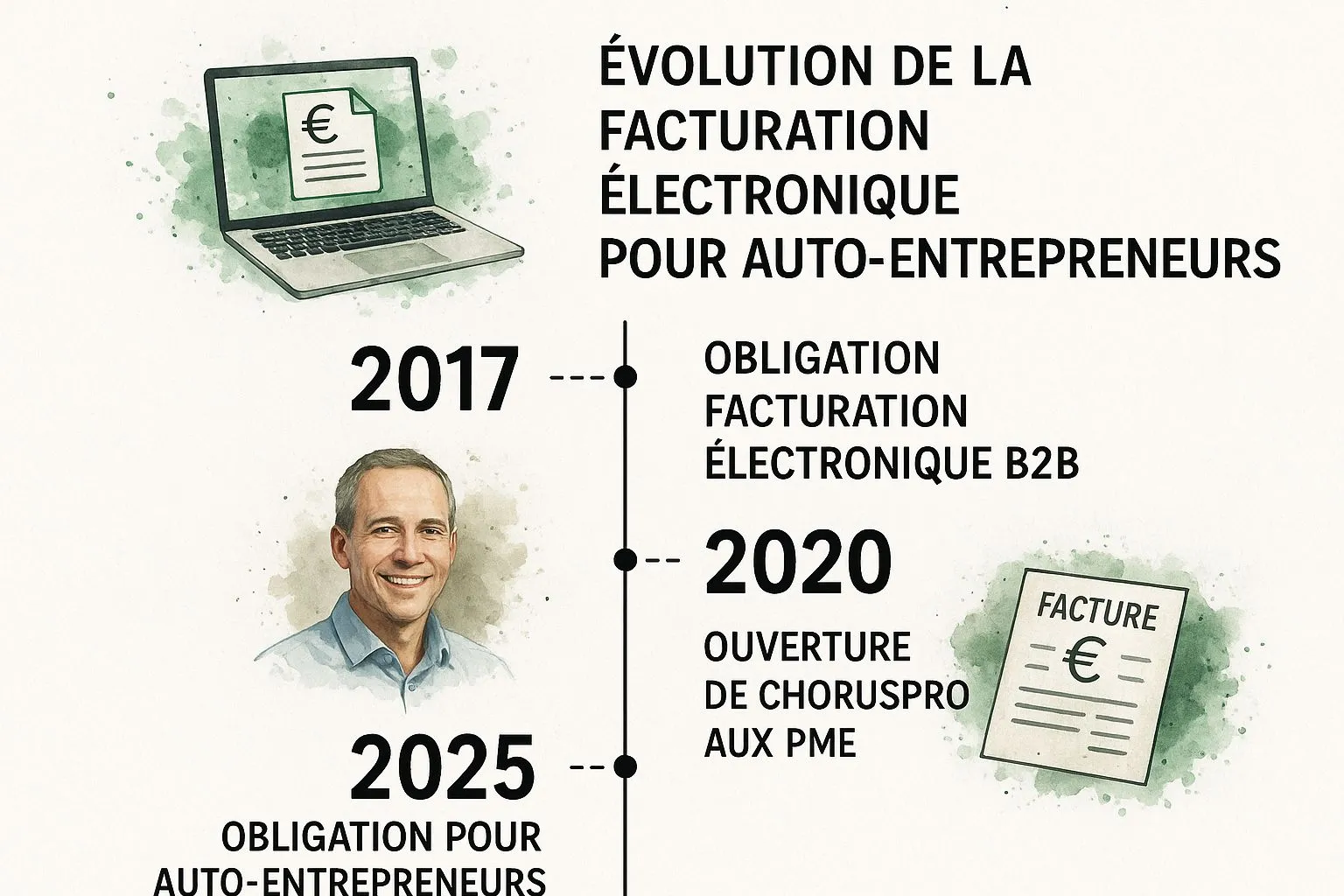
The reform’s timeline has been designed to give you time to prepare. Here’s a clear summary to help you see things more clearly.
Reform timeline for sole tradersSummary of the key deadlines and obligations of electronic invoicing for micro-businesses.
| Deadline | Obligation for the sole trader | Who is concerned? |
|---|---|---|
| September 1, 2026 | Be able to receive electronic invoices. | All businesses, including your micro-business. |
| September 1, 2027 | Must issue your own electronic invoices to business clients (B2B). | Mid-sized companies (ETI) and small and medium-sized businesses (SMEs), which includes micro-businesses. |
This table highlights a crucial point: the obligation arrives in two phases. First reception, then issuance. This gives you a clear roadmap for approaching this transition without stress.
Why am I concerned if I don’t charge VAT?
This is THE question that comes up most often, and the answer is simple: yes, you are concerned. Even if you benefit from the VAT exemption threshold, the law considers you a “taxable person.” For the tax authorities, a taxable person is a business that could be liable for VAT, even if it doesn’t currently collect any.
The reform targets the entire French economic ecosystem, and you’re a full part of it.
The goal is twofold: streamline commercial transactions and more effectively combat VAT fraud nationwide. In practical terms, you won’t have a choice: you’ll need to equip yourself with a compatible invoicing solution.
Think of this as an opportunity to modernize your business management. Adopting the right digital tools is a real asset for growing your business in the long run. To revisit the fundamentals, our complete guide on invoicing rules for sole traders is an excellent starting point.
How does the new invoicing system work?
Let’s break down the mechanics of this reform together so everything becomes simple and concrete. At first glance, electronic invoicing for sole traders might seem intimidating, but it’s based on a fairly logical idea: setting up an information channel that’s both secure and automated between you, your clients and the tax authorities.
Picture this new system as a kind of postal service, but in a digital, smart version. Before, you’d print your invoice, slip it into an envelope and mail it. Tomorrow, your invoicing software will “send” your invoice through an approved platform. That platform won’t just deliver it instantly to your client; it will also notify the tax authorities along the way.
For this to work, the system relies on two key concepts that work hand in hand: e-invoicing and e-reporting.
E-invoicing: exchanging invoices between businesses
The term e-invoicing simply refers to the process of issuing, transmitting and receiving an invoice in a specific electronic format. This part only concerns your transactions with other businesses, known as B2B (Business-to-Business).
What does this change in practice? When you invoice another business, your invoice will no longer be a simple PDF sent by email. It will have to pass through a certified platform that will “translate” it into a standard computer language (such as Factur-X, UBL or CII). This translation ensures your client’s system can automatically read and process the invoice, without anyone having to manually re-enter the information. No more data-entry errors!
Here’s how an electronic invoice’s journey will unfold:
- Creation: You create your invoice as usual from your invoicing tool.
- Sending: Your platform (PDP or PPF, more on that below) sends the invoice in its structured format.
- Transit: The invoice travels through the secure network set up by the government.
- Reception: Your client’s platform receives the invoice and makes it available to them.
This fully digital flow ensures the invoice’s authenticity and will significantly speed up its processing, for both you and your client.
E-reporting: keeping the tax authorities informed
E-reporting is the essential complement to e-invoicing. It’s simply the obligation to transmit to the tax authorities the data for certain transactions that don’t fall under e-invoicing.
This mainly concerns two types of sales:
- Transactions with your individual customers (B2C).
- Transactions with customers based abroad (outside France).
The idea behind e-reporting is to give the tax authorities an overview of your business activity. Even if you don’t issue an electronic invoice for an individual customer, the key sale details (amount, date, VAT…) will still need to be transmitted periodically through your platform.
Don’t worry, you won’t have to do this by hand! Your invoicing software will take care of gathering this data and sending it automatically to the tax authorities.
The tax authorities have actually published some very clear diagrams to help visualize these new information flows. Here’s one that sums things up nicely:
This diagram clearly shows the central role of the platforms (PPF or PDP), which become mandatory intermediaries between you, your clients and the tax authorities.
The central role of invoicing platforms
At the heart of this whole system are two types of players: the Public Invoicing Portal (PPF) and Partner Dematerialization Platforms (PDP). As a sole trader, it’s crucial to understand their role well in order to make the right choice.
The Public Invoicing Portal (PPF) is the free solution set up by the government. It handles the basic services: issuing, transmitting and receiving electronic invoices, as well as e-reporting. It’s the minimal, functional option.
Partner Dematerialization Platforms (PDP), on the other hand, are solutions offered by private companies that have received government accreditation. They naturally provide all the mandatory services, but often add handy features on top: real-time payment tracking, dashboards to analyze your business activity, integration with your other management tools, and more.
The choice between the PPF and a PDP will really depend on your needs, your invoicing volume and the level of service and comfort you’re looking for day to day.
The concrete benefits for your micro-business
Of course, electronic invoicing for sole traders is a new legal obligation. But rather than seeing it as a constraint, I invite you to view it as a genuine opportunity. Behind this formality lie real benefits that can positively change how you manage your business day to day.
It’s not just one more box to tick on your administrative to-do list. It’s a gateway to modernizing your methods, an incentive to adopt tools that will ultimately work for you and simplify your life.
A considerable time saving on admin work
The most obvious benefit is putting an end to time wasted on administrative tasks. No more cobbling together invoices in Word or Excel, triple-checking the legal mentions, then sending them out one by one by email.
With an electronic invoicing solution, a large part of the process becomes automatic. Consider this:
- Creating an invoice takes just a few clicks, thanks to ready-made templates and saved client records.
- Sending is instant and secure, directly from the platform, without having to juggle attachments.
- Archiving is automatic and perfectly organized. All your documents are filed, secured and accessible anytime.
It’s estimated that an electronic invoice costs between €0.40 and €0.45 to process, versus more than €10 for a paper invoice. The gap doesn’t just come from the price of a stamp, but mainly from the human time saved on data entry, sending and filing.
You can finally spend this precious time on what really matters: growing your client base, refining your services, or simply finding a better work-life balance.
Healthier cash flow and faster payments
For a sole trader, cash flow is the lifeblood of the business. The slightest payment delay can quickly become a problem. Electronic invoicing is a powerful ally for securing and speeding up your incoming payments.
An invoice sent via a certified platform reaches your client immediately, in a professional, standardized format. No more classic excuses like “I didn’t get the email” or “the attachment won’t open.” Even better, these tools let you track your invoices. You know in real time whether it’s been viewed and can even schedule automatic reminders for unpaid invoices.
In practical terms, this means much shorter payment terms and much better visibility over your money.
A radical simplification of your accounting
Going fully digital for your invoices greatly lightens your accounting workload. The tax information is extracted and sent to the authorities without you having to lift a finger. This automation limits the risk of errors, speeds up procedures and frees your mind to focus on your craft.
This reform is an opportunity to modernize your management, especially considering that sole traders accounted for nearly 40% of business creations in France in 2023. To dig deeper into the topic, you can check the details on the impact of this reform on the official Auto-Entrepreneur Portal website.
And if you ever exceed the VAT thresholds, the system will greatly ease your tax filings thanks to pre-filling. Adopting electronic invoicing now is therefore also a way to prepare for the future growth of your micro-business with peace of mind.
How to choose the right invoicing tool
Choosing the right invoicing tool is likely the most important decision you’ll make in the face of this reform. Think of it like choosing a vehicle: you can go for the basic model that gets you from point A to point B, or the one with all the options that makes the journey more pleasant and efficient. This tool will be your everyday administrative travel companion.
For electronic invoicing as a sole trader, two main paths are open to you. It’s crucial to grasp their differences well so you don’t go down the wrong road, and instead choose the solution that truly fits your micro-business’s reality and ambitions.
Distinguishing between the PPF and PDPs
At the heart of this new system are two types of players: the Public Invoicing Portal (PPF) and Partner Dematerialization Platforms (PDP). This is the choice you’ll have to make.
The Public Invoicing Portal (PPF) is the government’s solution. It’s free and focuses on the mandatory minimum service: issuing, receiving, transmitting invoices and e-reporting. It’s a bit like the public postal service of invoicing: it gets the job done, with no frills or extra services.
Partner Dematerialization Platforms (PDP), on the other hand, are private operators, like Bizyness, that have received official accreditation from the tax authorities. They naturally handle all the legal obligations, just like the PPF, but they add a range of features designed to simplify your life.
With a PDP, a legal requirement turns into a genuine lever for running your business. The subscription is usually paid, but the investment is quickly offset by the time saved and the efficiency gained.
The right questions to ask before choosing
To make the right choice, there’s no secret: you need to take a step back and look at your own business. There’s no one-size-fits-all miracle solution, only the one that’s most relevant for you. Here are a few pointers to guide your thinking:
-
What is your invoice volume? If you only issue one or two invoices a month to business clients, the PPF may well do the job. On the other hand, if you handle dozens, a PDP will save you a huge amount of time.
-
Who are your clients? Is your client base mostly made up of businesses (B2B) or individuals (B2C)? A good PDP will considerably simplify e-reporting management for your sales to individuals.
-
What do you really need? Are you just looking to be compliant, or would you like a dashboard to track your revenue, automatic reminders for unpaid invoices, or even a module for creating professional quotes?
-
What budget can you devote to it? The PPF is free. PDPs generally offer several subscription plans, with very accessible entry-level offers, sometimes even free for basic functions.
Don’t think of choosing your platform as a mere expense, but rather as an investment. A good tool means less time spent on paperwork and more time devoted to what really matters: your core business.
PPF vs PDP comparison at a glance
To see things more clearly, nothing beats a summary table. It will let you quickly grasp the advantages and limitations of each solution.
**Comparison between the Public Invoicing Portal (PPF) and a Partner Platform (PDP)**Analysis of the main differences to help sole traders choose their electronic invoicing solution.
| Criterion | Public Invoicing Portal (PPF) | Partner Dematerialization Platform (PDP) |
|---|---|---|
| Cost | Free | Paid (often with a free or affordable basic plan) |
| Basic features | Issuing, receiving, transmitting (e-invoicing and e-reporting) | All PPF features and much more |
| Advanced features | None | Dashboard, payment tracking, automatic reminders, quote creation, product/service catalog, customer support… |
| User interface | Functional and basic | Often more intuitive, modern and pleasant to use |
| Support and assistance | Limited (FAQ, documentation) | Responsive customer support (chat, email, phone) and personalized assistance |
| Ideal for… | Sole traders with a very low volume of B2B invoices and very simple administrative needs. | Sole traders who want to optimize their management, save time and professionalize their business. |
This comparison highlights the main trade-off to make: the free, simple nature of the PPF versus the feature richness and comfort of a PDP. To go further and refine your choice, feel free to check our comparison of invoicing software for sole traders, which will give you additional insights.
Your game plan for a smooth transition
Switching to electronic invoicing can seem like a mountain to climb, especially as a sole trader. It feels like just one more constraint. Yet, with a good action plan, what seems complex becomes a simple, perfectly manageable project. The idea isn’t to endure the change, but to steer it with confidence.
To help you, we’ve broken this transition down into 5 clear, concrete steps, designed specifically for the reality of a self-employed professional. Follow this roadmap to approach the upcoming deadlines without stress and with a clear vision of what’s ahead.
Step 1: Take stock of your current situation
Before rushing headlong into it, take a moment to analyze your current habits. It’s a bit like doing a walkthrough before renovation work: it’s the foundation of everything.
Ask yourself a few simple questions:
- What tool am I currently using? A simple Excel spreadsheet, a good old paper invoice book, or maybe already an online software?
- Who are my clients? Do I mainly work with other businesses (B2B) or with individuals (B2C)?
- How many invoices do I issue per month? Your volume is a key criterion. You don’t choose the same tool if you issue 2 invoices or 50 invoices a month.
This first step will give you an accurate snapshot of where you stand. It’s what will keep you from ending up with an oversized, costly solution, or conversely, a tool that’s too basic and will quickly limit you.
Step 2: Choose your platform carefully
Now that you have a clearer view of your needs, it’s time to pick your side. On one hand, the Public Invoicing Portal (PPF), the government’s free, basic solution. On the other, Partner Dematerialization Platforms (PDP) like Bizyness, which offer much more advanced services.
This choice will really impact your day-to-day life. A good platform doesn’t just send invoices; it can automate your filings, give you an overview of your cash flow and save you precious time. It’s a real lever for better managing your business, and it can even influence your finances. By the way, if the topic interests you, our guide on tax optimization for sole traders will give you other angles to explore.
Step 3: Set up and configure your tool
Once you’ve chosen your platform, don’t put off configuring it. It’s tempting, but it’s a mistake. Take the time to set everything up properly from the start.
- Enter your micro-business’s details: your SIREN number, your address, the mandatory legal mentions…
- Import your client file if possible. This will save you from having to re-enter everything by hand.
- Customize your invoice templates with your logo. It’s a small detail, but it reinforces your professional image.
Getting familiar with the tool is a crucial phase. Think of it as an investment: an hour spent today properly setting up your workspace means dozens of hours saved tomorrow.
Step 4: Communicate with your clients
Don’t wait until the last minute to inform your business clients. The reform concerns them just as much as it concerns you, and clear, early communication is always appreciated. It’s a mark of professionalism.
A simple email is enough. Explain to them that you’ll soon be switching to electronic invoicing and that your invoices will arrive through a certified platform. Take the opportunity to check that you have their SIREN number, which will become essential information on your invoices.
Step 5: Test, test and test again to be ready on the big day
Finally, the best way to avoid stress is to practice. Most good invoicing tools offer a “draft” mode or testing features.
Use them! Create a few mock invoices for imaginary clients. Make sure the process runs smoothly and that you’re comfortable with the interface. That way, when the day comes to issue your first official electronic invoice, the action will already feel natural. No hesitation, no stress. You’ll be ready.
The questions you still have about electronic invoicing
Even with all these explanations, there are often a few gray areas left, practical cases that keep nagging at you. That’s perfectly normal! So let’s answer, simply and directly, the most frequently asked questions so that everything becomes crystal clear.
Let’s take a tour of the questions that come up most often among sole traders.
What if my client is an individual?
Excellent question, which brings us to the heart of the difference between e-invoicing and e-reporting. For your individual customers (the famous B2C), rest assured: there’s no need to issue a complex electronic invoice that goes through a platform. The process stays the same for them.
That said, you don’t escape the reform entirely. The key details of these sales (total amount, date, VAT collected…) will still need to be sent to the tax authorities. This is what’s known as e-reporting. A good invoicing software will handle this for you, without you having to think about it.
Will a simple PDF invoice sent by email still work?
The answer is no, at least for transactions between businesses (B2B). A simple PDF file, even if it looks like an invoice, will no longer be considered compliant once the reform is in effect.
To be clear, a real electronic invoice isn’t just a document you can read. It’s a smart file containing structured data (in a format like Factur-X), created and sent through a secure platform. It’s this structure that allows your client’s computer and the tax authorities to process it automatically.
The PDF will essentially become the human-readable “facade,” but all the legal value will lie in the computer data hidden behind it.
What new mentions do I need to add to my invoices?
A few additional pieces of information become mandatory for the system to work. On top of everything you already include, you’ll need to add:
- Your business client’s SIREN number (very important!).
- The delivery address for goods, if it differs from your client’s address.
- The category of the transaction: is it a sale of goods, a supply of services, or a mix of both?
- The mention “Option for VAT payment upon collection” (“Option pour le paiement de la taxe d’après les débits”), but only if you’ve made that tax choice.
A good habit to adopt right away: systematically ask new business clients for their SIREN number.
And if I don’t comply with the rules, what am I risking?
The tax authorities have provided for penalties to make sure everyone plays by the rules. If you forget to issue a compliant electronic invoice, the fine is €15 per invoice, capped at €15,000 per year. That can add up quickly.
An oversight on e-reporting (for your sales to individuals, for example) is penalized with a €250 fine, also capped at €15,000 per year. But beyond the fine, the real risk is complicating your relationships with your clients and running into administrative roadblocks.
Rather than enduring this reform, see it as a chance to modernize how you manage your micro-business. With Bizyness, you choose a solution designed for sole traders, already ready for electronic invoicing and built to simplify your everyday life.Discover how Bizyness can lighten your daily workload today.
