

 Français
Free Accounting Software for Sole Traders: The Ultimate 2026 Guide
Find the best free accounting software for sole traders in 2026. Our guide compares the options, their limits, and helps you choose easily.
Yes, the good news is that there really is free accounting software for sole traders to get started. Several options are even available. But let’s be clear: “free” often rhymes with basic features, like invoicing or keeping a receipts ledger. For more complex needs, such as automating your e-commerce sales, you’ll generally need to move to a paid solution.
Why accounting software is essential in 2026
People often choose the micro-entrepreneur (sole trader) status for its administrative simplicity. That’s true, at first. But the financial reality behind it can quickly become a real headache, especially with compliance requirements tightening as 2026 approaches. And if you sell online, the complexity ramps up a notch.
Picture the daily juggling act: dozens of transactions rolling in from your Shopify store, the fees Stripe takes along the way, and a handful of direct sales on top. That’s the whole paradox of today’s sole trader: a simple legal status, but financial flows that are anything but.
The trap of manual management
Sticking with an Excel spreadsheet or invoices in Word for your bookkeeping is a bit like trying to cross Paris with a hand-drawn map. It might get you by at first, but it quickly becomes a source of stress and mistakes as your business grows. The risks are very real:
- Filing errors: A simple typo can throw off your revenue declaration to URSSAF and expose you to a reassessment.
- Forgotten income: When sales come from everywhere, it’s easy to miss a transaction. The result? Your view of profitability is completely skewed.
- Poorly anticipated VAT management: Monitoring the VAT exemption thresholds without a suitable tool is a real challenge. Exceeding them without realizing it can cost you dearly.
Think of a good accounting tool not as an expense, but as a co-pilot. It secures your business, checks every calculation, warns you before dangerous turns, and makes sure you always play by the rules.
This guide is here to help you see things more clearly, starting with finding the right free accounting software for sole traders. Its role will only keep growing; by 2026, AI will further transform accounting management. To better grasp what’s coming, understanding how AI accounting software can already simplify things is an excellent starting point. The goal: choose a solution that meets your current needs while calmly preparing for your future growth.
Choosing the right tool? First, master your accounting obligations
Before you even start comparing free accounting software for sole traders, there’s an essential step: understanding what the authorities expect from you. It’s a bit like learning the highway code before choosing your first car. Without this foundation, even the best tool in the world could turn out useless — or worse, put you at fault.
Even though a sole trader’s bookkeeping is simplified, it rests on very clear obligations. Ignoring them means risking a reassessment in the event of a URSSAF audit. Your choice of software must, above all, ensure you meet these fundamentals.
The receipts ledger: your financial logbook
The first and best-known pillar is the receipts ledger. Think of it as the logbook of all your incoming money. Every sale, every payment you receive, must be recorded scrupulously, in chronological order, with no gaps and no possibility of alteration.
For example, if you run an e-commerce business, every transfer received from Amazon that consolidates several sales must be recorded. If you’re a freelancer and your clients pay you via PayPal, each payment must appear separately. This ledger must include:
- The date the payment was received.
- The source of the income (your client’s name).
- The amount received.
- The payment method (bank transfer, PayPal, card…).
A good free tool should, at minimum, let you keep this record in a clean, tamper-proof way. The temptation to use a simple Excel spreadsheet is strong, but it offers no protection against alterations and quickly becomes an unwieldy source of errors. That’s one of the reasons it’s strongly discouraged.
Keeping this document rigorously up to date is absolutely essential. Your revenue declaration is based on it, and it must be presentable as-is to the tax authorities. To cover the full topic, feel free to read our guide on sole trader accounting obligations.
The purchases register: an obligation that doesn’t apply to everyone
The second, lesser-known pillar is the purchases register. Unlike the receipts ledger, it isn’t mandatory for everyone. It only applies to sole traders whose main activity is selling goods, supplies, items, or food for consumption on-site or takeaway.
In short, if you sell physical products — whether on Shopify, Etsy, or directly — this register is for you. It’s used to list, in chronological order, all expenses related to your business. To choose the right accounting tool, you therefore need a clear view of your obligations, including your tax obligations if you sell on Vinted, so your business stays fully compliant.
Invoicing: the showcase of your professionalism
Finally, let’s talk about invoicing. Every invoice is an official document, a kind of legal business card. To be valid, it must include a series of very precise mandatory details. The slightest omission can expose you to disputes with a client or to penalties.
This need for rigor matters even more given how much the status has grown, with close to 2.9 million sole traders by the end of 2024. Yet URSSAF studies reveal that errors creep into 20 to 25% of declarations, often due to somewhat chaotic manual management. Good software, even free, should provide you with ready-to-use, compliant invoice templates.
Free software: what it really does (and what it will never do)
When you’re starting out, the idea of free accounting software for sole traders is naturally tempting. It’s the promise of getting organized without spending a cent, an argument that carries a lot of weight at launch. But what’s really behind this “free”? It’s essential to look past the price tag to understand what you’re actually getting… and, more importantly, what you’ll soon be missing.
Let’s be clear: free tools cover the strict legal minimum. It’s a starting point, a foundation — not a complete solution for running your business.
What free software does well
For a sole trader starting out with a simple business, most free solutions get the job done. You can count on them for the basics:
- Creating quotes and invoices: They offer compliant templates for quickly producing documents that look professional. You can add your logo and the mandatory legal wording, like the famous “VAT not applicable, art. 293 B of the French Tax Code.”
- Keeping the receipts ledger: This is the core of their job. You record each payment chronologically, which lets you meet your main accounting obligation.
- Tracking revenue: A simple dashboard gives you a month-by-month view of your income — crucial information for filing your URSSAF declarations without stress.
These features are perfect if you’re a service provider issuing around ten invoices a month. It’s a real step up from an Excel spreadsheet.
But there’s a hidden cost to this simplicity. It can quickly become a bottleneck, especially if your business takes off or if you run an e-commerce store.
Think of free software as a basic rental car: it gets you from point A to point B, but without GPS, without air conditioning, and with a manual gearbox. It’s functional, but every action takes effort on your part.
The blind spots of free tools
The real gap between a free tool and a paid solution is automation. Free software gives you tools to do your bookkeeping by hand; specialized platforms do it for you.
Here’s what you’ll almost never find in a free offering:
1. No automatic bank reconciliation This is the whole difference between spending hours matching every line of your bank statement against your invoices, and letting software do it in seconds. Without this feature, the risk of error or omission is constant.
2. No synchronization with your e-commerce stores Imagine a great weekend with 200 sales on your Shopify store. With a free tool, brace yourself to spend Monday morning manually entering every single transaction into your receipts ledger. An automated solution pulls in those 200 sales while you sleep.
3. Little to no VAT management Free software is designed for the VAT exemption regime. As soon as you approach the thresholds and need to charge VAT, they fall short. They handle neither different VAT rates nor the complexity of international sales (the OSS/IOSS one-stop shop).
To really grasp the difference, the table below compares the typical features of free software with those of an automated solution like Bizyness, built for online sellers.
Feature comparison: free software vs. automated solution
| Feature | Typical free software | Automated solution (like Bizyness) |
|---|---|---|
| Invoicing | Manual creation of invoices and quotes | Manual creation and automatic generation of e-commerce invoices |
| Receipts ledger | Manual entry of every payment | Automatic filling via bank and e-commerce sync |
| Bank reconciliation | Non-existent (must be done manually) | Automatic: the software matches payments and invoices itself |
| Sales import | Non-existent (manual entry required) | Automatic from Shopify, WooCommerce, Stripe, etc. |
| VAT management | Limited to the “VAT not applicable” wording | Full management (declaration, breakdown, OSS/IOSS one-stop shops) |
| URSSAF declarations | Revenue calculated manually for reporting | Calculation and pre-filling of the declaration |
This comparison makes it clear: the time saved and peace of mind that automation brings are considerable. Our article on the best accounting software for sole traders explores these advanced options in more detail.
In short, free accounting software for sole traders is a good springboard. It familiarizes you with the basics for a simple business. But as soon as your business gains complexity — more sales, several channels, or clients abroad — it turns into a bottleneck. It starts eating up your time instead of saving it.
Which free tool should you choose to get started? Our picks by profile
Now that we’ve seen the limits of free tools, let’s get practical. To help you see things more clearly, I’ve grouped the solutions into three broad families, each matching a specific need when you’re starting out.
The idea is to find the right fit so you can get up and running right away, without forgetting the constraints we just covered. Identify yourself in one of these profiles, and you’ll know exactly where to turn without getting lost in the options.
Profile 1: The pure, simple invoicing tool
This type of software gets straight to the point. It’s perfect for service providers (consultants, writers, trainers) with a limited number of clients. Its only mission: to help you produce legally compliant quotes and invoices, fast. Think of it as a Word or Google Docs, but specialized for invoicing, with templates that keep you from forgetting the mandatory legal wording.
This is for you if:
- You send fewer than 10 invoices a month.
- Your only obligation is keeping a receipts ledger.
- You don’t sell any physical products, so you have no stock to manage.
You can get up and running almost instantly. You build a small client database and produce clean documents with your logo. It’s truly the first step to moving away from invoices in Excel or Word, which, as a reminder, guarantee no legal compliance whatsoever.
Profile 2: The improved, secured spreadsheet
This family of tools is for people who like to keep a hand on their numbers but want a more solid framework than a plain Excel workbook. In practice, it looks like a dashboard where you enter your income and expenses by hand, but the interface guides you to avoid mistakes.
It goes a little further than the minimalist tool, sometimes with basic expense tracking or charts to visualize revenue trends. It’s an excellent transition if you started with a spreadsheet and are looking for more rigor, without fully automating everything.
But even with these somewhat more structured tools, you quickly hit a wall.
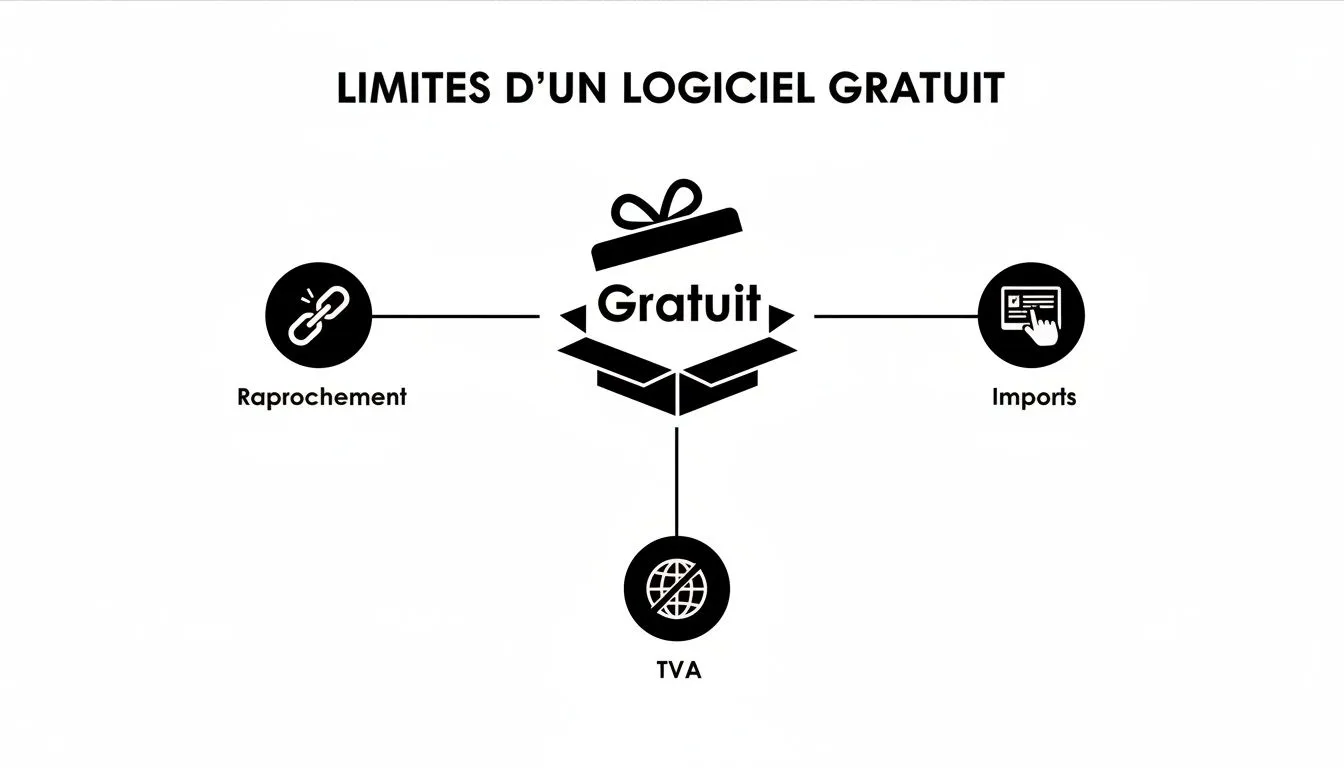
As you can see, the same three big gaps keep showing up: no automatic sales import, no bank reconciliation, and no VAT management. All of that work is left up to you.
Profile 3: The “freemium” offer, a foot in the professional world
Here we’re talking about much more robust accounting software that offers a free version as a loss leader. This offering generally includes the essentials (invoicing, receipts ledger), but gives you a taste of the paid features and of what automation can bring you.
This is arguably the smartest choice if you’re ambitious about growing your business. You start without paying anything and, as your sales volume grows or your needs evolve (moving to VAT, e-commerce, etc.), you can switch to a paid plan without changing tools or losing your history.
Quick-start guide, valid for all these tools:
- Setup: Enter your sole trader business details (SIRET, address, etc.).
- Customization: Upload your logo and make sure the wording “VAT not applicable, art. 293 B of the French Tax Code” appears on your documents.
- First sale: Create a record for your first client, then produce a quote or directly an invoice.
- URSSAF declaration: Find the dashboard that summarizes your revenue. This is the overall amount you’ll simply need to report on the URSSAF website each month or quarter.
Whichever type of free accounting software for sole traders you choose, never forget it’s a starting solution. It will help you lay healthy foundations, but it won’t be able to keep up with your growth without costing you precious time on manual tasks.
Spotting the signs it’s time to switch tools
When you launch your business, free accounting software for sole traders seems like the ideal solution. It lets you create clean invoices and keep a receipts register without breaking the bank. But as your business grows, what was once a valuable help can quickly become a burden. Knowing how to recognize the warning signs is crucial to avoid being overwhelmed.
Think of your free tool as the training wheels on your first bike. They were perfect for learning to keep your balance. But today, you wouldn’t use them to ride on a highway. It’s the same for managing your business: your tools need to grow with you.
Burying your head in the sand means risking that paperwork eats up your time and energy, pulling you away from your real mission: growing your business.
When manual entry becomes a full-time job
The first, most obvious sign is the time you spend on repetitive tasks. If you’re spending more than a few hours a month entering sales one by one, manually matching bank statements, or checking invoices, the warning light is on.
Picture this: your latest social media ad went viral, generating 150 new sales in a month. If your first reaction is a sigh of dread at the thought of having to log it all by hand, it means your system is no longer up to the job. Your time is your most valuable resource — don’t waste it on tasks software can do for you.
When your sales channels multiply
You started with a Shopify store, then added an Etsy profile to reach a different customer base. Great news for revenue, but a real headache for free software.
Every new platform adds another layer of complexity:
- Sales reports in different formats that need to be deciphered.
- Platform-specific transaction fees that need to be isolated and accounted for.
- A total lack of a centralized view of your actual performance.
If your monthly routine involves juggling multiple Excel files trying to figure out where you stand, your free tool has clearly shown its limits.
When you’re getting dangerously close to the VAT thresholds
This is arguably the most critical warning sign — the one that can turn a great entrepreneurial adventure into a real administrative nightmare. As a sole trader, you benefit from a VAT exemption, but be careful: this exemption isn’t unlimited.
Never confuse the revenue thresholds of the status itself (fairly high) with the VAT exemption thresholds (much lower). Exceeding them unprepared is one of the most common and costly traps.
Indeed, the VAT thresholds are much lower than those of the status itself. With close to 25% of service-providing sole traders flirting with the €36,800 threshold, the risk of tipping into the standard VAT regime is a reality for many. Without a tool able to alert you and manage VAT when the time comes, you’re exposed to much heavier administrative work. To prepare, you can check the details of the 2026 thresholds on Mes-Cotisations.fr.
What’s more, if you start selling internationally, even within Europe, specific VAT rules (such as the IOSS/OSS one-stop shop) apply. Free software simply isn’t designed to handle this complexity. If your business has ambitions beyond your borders, your software needs to be able to keep up.
Moving to automation to grow your business
At first, free accounting software for sole traders does the job. But once your business takes off, its limitations quickly become a real bottleneck. We see it every day: what was once a help turns into an administrative burden.
Switching to an automated solution is then no longer a luxury, but a strategic decision to secure your growth. It’s a bit like ditching an old road map to finally equip yourself with a real-time financial GPS.
Picture a tool built for online entrepreneurs, one that solves the problems you know all too well: endless manual entry, the fear of making a VAT mistake, the headache of juggling different sales channels… That’s the promise of tools like Bizyness: taking you from bookkeeping you endure to truly steering your finances.
Free up your time with automatic synchronization
The most obvious benefit of automation? Time. Precious time you get back instantly. Rather than copying every transaction by hand, a specialized platform connects directly to your revenue sources and does the work for you.
What does that mean in practice?
- Every Shopify sale is recorded automatically, with product details, customer information, and the correct VAT rate.
- Every payment via Stripe or PayPal is synced, separating out transaction fees so you know exactly what you’re earning.
- Amazon’s complex sales reports are decoded and integrated into your accounts, without you lifting a finger.
This synchronization can eliminate up to 90% of the manual tasks involved in keeping your receipts ledger. That time, you can finally spend on what really matters: your marketing, customer service, or developing new products. If you’re interested in the topic, we explain in detail how automating administrative tasks can transform your day-to-day.
Secure your tax and accounting compliance
More growth also means more responsibilities, especially on the tax side. Managing VAT, particularly when selling internationally, is a real obstacle course. And that’s something a simple free tool can’t do. That’s where an automated platform becomes your best ally.
Switching to automation means buying yourself peace of mind. It’s the certainty that every invoice is compliant, every declaration is accurate, and your business rests on sound financial foundations.
A tool like Bizyness is built to handle this complexity. It automatically applies the correct VAT rate based on your client’s country — an almost impossible task to do by hand across hundreds of orders. Even better, it generates accounting exports in the standard format (FEC), ready to send to your accountant. Collaboration becomes simple and error-free.
This rigor matters even more as charges evolve. From January 1, 2026, the social contribution rate for services (BNC) will rise to 25.60%. For an online seller generating €80,000 in revenue, that represents an increase of nearly €800 a year. A simple filing error, caused by an unsuitable tool, can quickly cost you dearly. You can find the details of this measure in this report on the new contribution rates.
Ultimately, investing in automation means choosing peace of mind and efficiency. It means giving yourself the means to focus on your growth, while letting technology handle the administrative complexity.
Sole trader bookkeeping always brings its share of questions. That’s perfectly normal! Let’s untangle the questions that come up most often so you can see things more clearly.
Even with good free accounting software for sole traders, some gray areas can remain. The goal here is to give you honest, direct answers so you can move forward with confidence.
Can I just get by with a simple Excel file?
Technically, the answer is yes. But in practice, it’s really a false good idea. A spreadsheet, even one kept impeccably, can at a stretch serve as a receipts ledger. It still needs to be chronological and, above all, unmodifiable — which is already a real challenge to guarantee.
The problem is that this solution doesn’t grow with you. An Excel file won’t help you create compliant invoices, manage VAT, do your bank reconciliation, or alert you if you’re approaching the thresholds. The risk of human error is enormous and, believe me, managing it becomes a nightmare as soon as your business picks up a bit. Even basic free software is far safer.
Is a dedicated business bank account really mandatory?
Yes, the law requires it once your revenue exceeds €10,000 for two consecutive years. But honestly, don’t see it as a constraint. It’s above all a matter of common sense and good management hygiene.
Separating your business and personal finances is the golden rule for calmly running your business. It makes tracking your cash flow crystal clear, avoids headaches at declaration time, and massively simplifies things in the event of an audit.
When do I need to start charging VAT?
You must apply VAT from the first day of the month in which you cross the exemption threshold. As a reminder, in 2026 these thresholds are set at €91,900 for the sale of goods and €36,800 for services.
This is a major tipping point. Good paid accounting software will send you alerts well before you reach this ceiling. It will then let you switch to VAT management in just a few clicks, applying the correct rates and preparing your declarations. Something free software won’t be able to do.
Can accounting software file my URSSAF declaration for me?
No, it can’t submit it for you. However, it does 99% of the prep work. Accounting software, even free, will calculate the exact revenue amount to declare for the month or quarter.
All you have to do is copy that figure and paste it onto the URSSAF website. It’s a considerable time saver, but above all it’s a huge safeguard against costly calculation errors.
Moving from a free tool to an automated solution is a natural step that comes with your business’s growth. Bizyness was designed exactly for that: a platform built for online entrepreneurs, turning every sale into the correct accounting entry, without you lifting a finger. To see how to take back control of your finances and free up your time, take a look at https://www.bizyness.fr.
