

 Français
 How to make an online invoice: a practical guide
Learn how to make an online invoice that's compliant and professional. Our guide shows you how to simplify your invoicing and save time.
Wondering how to create an invoice online? In reality, it’s very simple: with a dedicated tool like Bizyness, you can generate, customize and send perfectly compliant invoices in just a few clicks. This modern approach puts an end to manual errors, speeds up payments and saves you a huge amount of time compared to old methods like Word or Excel.
Why online invoicing really is a game changer
If you’re still juggling spreadsheets for your invoicing, this is no longer simply a matter of preference. It’s a strategic decision that has a direct impact on your business. We’ve all been there: Excel files that turn into a tangled mess, Word templates you forget to update… The process is not only long but also terribly prone to errors. A simple typo in an invoice number or a miscalculated VAT rate, and you’re opening the door to administrative headaches and payment delays.

Switching to a dedicated tool to make an online invoice isn’t just a minor adjustment — it’s a genuine breath of fresh air for your day-to-day management. The impact goes well beyond simply creating a document.
Save precious time and avoid silly mistakes
The first visible effect is the time saved. Immediate and dramatic. Invoicing software takes care of all the repetitive tasks for you: numbering that keeps running without you having to think about it, automatic tax calculation, and saving your customers’ information. All you have to do is pick a customer, add your services, and the system handles the rest.
This automation almost entirely eliminates the risk of human error. No more duplicate invoice numbers or calculation mistakes that can undermine your credibility and turn your bookkeeping into a headache.
Switching to an online tool is a bit like getting a virtual administrative assistant available 24/7 who never makes a mistake in their sums. The mental load you free up is huge, and you can finally refocus on what you do best: your actual job.
Boost your cash flow and polish your brand image
To keep your cash flow healthy, rigorous tracking is essential. A tool like Bizyness gives you a clear, real-time view of all your invoices: sent, viewed by the customer, paid or overdue. You can even schedule automatic reminders for unpaid invoices. The result? Payment delays drop drastically, without you having to play the enforcer.
And that’s not all. Sending professional, clear invoices customized with your logo strengthens your brand image. Your customers see that you’re organized and reliable, which builds trust from the very start.
This shift to digital is no longer optional. In France, more than 70% of B2B invoices were already dematerialized in 2023, proof that it has become the norm for staying competitive. If you want to dig deeper into the topic, you can learn more about business invoicing statistics to grasp the scale of this shift.
Comparing management before and after online invoicing
To really visualize the change, nothing beats a direct comparison. This table highlights the concrete benefits of switching to an online tool compared to the good old manual method.
| Management aspect | Manual method (paper/Excel) | Online invoicing (dedicated tool) |
|---|---|---|
| Creating the invoice | Manual entry of all information. High risk of errors. | Automatic filling of customer data. Automated calculations. |
| Numbering | Must be tracked manually in a register or spreadsheet. | 100% automatic and sequential, guaranteed no duplicates. |
| Payment tracking | Tedious. Manual reconciliation, no overview. | Real-time dashboard. Statuses (sent, viewed, paid). |
| Reminders | Manual and time-consuming (emails, calls). Often forgotten. | Customizable automatic reminders. |
| Professional image | Variable, depends on the template used. Can look amateurish. | Clear documents, customized with logo, professional look. |
| Legal compliance | Entirely the user’s responsibility. Hard to keep up with the law. | Regular updates to guarantee compliance (mandatory notices, VAT). |
In short, the table speaks for itself. One system is a source of stress and wasted time, while the other brings you peace of mind, efficiency and professionalism. The choice is easy to make.
Mandatory notices: the foundation of a proper invoice
Before thinking about design or even listing your products, there’s one absolutely non-negotiable step: making sure your invoice is rock-solid from a legal standpoint. Many see this as an administrative chore, but it’s much more than that. It’s a legal document that protects your business, an essential accounting tool and proof of your professionalism. A poorly put-together invoice can be rejected by a customer, or even get you into trouble with the tax authorities. Trust me, that’s a situation worth avoiding.
Fortunately, making an online invoice with software like Bizyness does a good chunk of the work for you by automatically filling in a lot of the information. But understanding what’s behind these fields gives you real mastery and peace of mind. Let’s dive together into what makes the difference between a simple piece of paper and a rock-solid invoice.
The fundamentals: the details that change everything
Think of this information as the foundations of your invoice. If it’s missing or incorrect, everything else falls apart.
Let’s start with numbering. This is the starting point. Every invoice must carry a unique number that follows a clear, continuous logic, without a single gap. The classic mistake? Deleting a draft invoice and creating a gap in the sequence. Invoicing software is your best ally here, automatically generating sequential numbers like INV-2024-001, INV-2024-002, and so on. Simple, clean and flawless.
Next, let’s talk about dates. They’re crucial, and you need two of them:
- The issue date: the day you create and send the document.
- The date of the service or sale: the day you delivered the product or completed your assignment.
These two dates are not interchangeable; each plays a specific role for your bookkeeping, particularly for VAT purposes.
Clearly identifying who’s who
A transaction is an exchange between two parties. Your invoice must therefore identify them without the slightest ambiguity. It’s a bit like a guest list for a party: you need to know who’s there.
On your invoice, you must therefore include:
- Your complete details: Your company name (or your first and last name if you’re a sole trader/micro-entrepreneur), your registered office address, your SIREN/SIRET number and, if applicable, your intra-EU VAT number.
- Your customer’s details: Their name, address and intra-EU VAT number if they’re a business based in the European Union.
Forgetting one of these mentions is a bit like sending a contract without the signatories’ names. In the event of an audit, the invoice may be considered invalid.
Rigor around these mandatory notices isn’t just an administrative formality. It’s protection. A properly filled-out invoice is your best ally in the event of a dispute or late payment, since it unambiguously proves the nature and terms of the business agreement.
The core of the invoice: the service and the figures
Now we get to the central part, the one that explains why your customer owes you money. Every line must be absolutely clear.
For each product or service, be sure to detail:
- A precise description: Avoid vague terms. The clearer it is, the less room there is for interpretation.
- The quantity: The number of units, hours worked, days of service, etc.
- The unit price before tax: This is your base rate.
- The VAT rate applied: 20%, 10%, 5.5%… or if you’re VAT-exempt, the famous mention “VAT not applicable, art. 293 B of the French Tax Code.”
- Clearly visible totals: The total amount before tax, the total VAT amount, and of course, the total amount including tax that your customer needs to pay you.
To make sure you don’t leave anything to chance, our full guide on mandatory invoice notices is the perfect checklist to keep handy.
And one last piece of advice: never forget to state the payment due date as well as late payment penalties. Not only is this mandatory, it’s also an excellent way to encourage your customers to pay you on time.
Ready to create your first invoice on Bizyness? Here’s how
Theory is all well and good, but nothing beats hands-on practice to really get comfortable with a tool. So let’s get started! Creating your first online invoice with Bizyness is much simpler and faster than you might think. Let me walk you through the few key steps so this administrative task becomes second nature.
To give you a clear idea of the process, this little visual perfectly sums up the journey: you start by setting up your profile, then add your customer, and finish by generating the document.
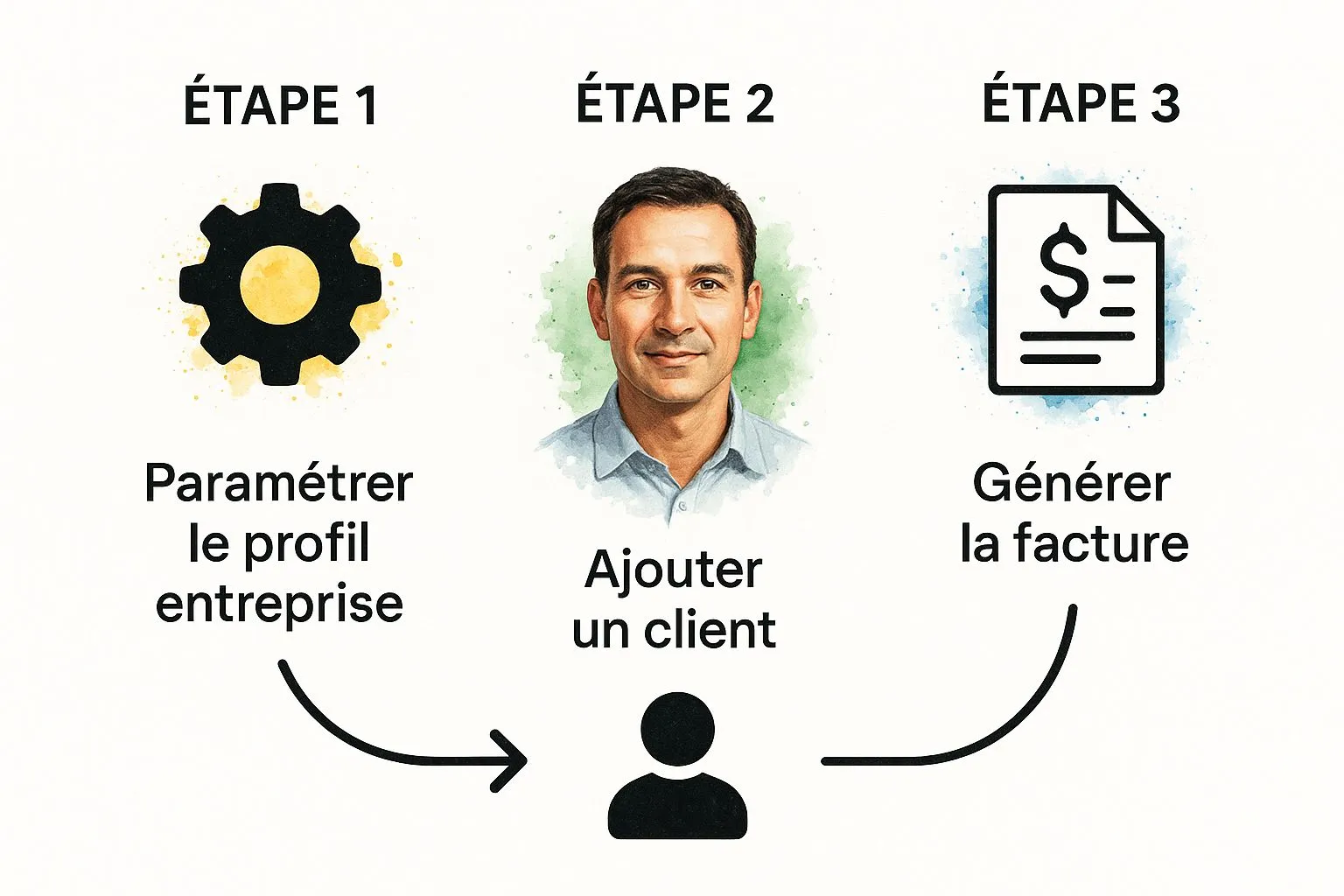
As you can see, everything flows logically. The platform is designed to save you time and help you avoid any oversights.
First, let’s prepare the ground: setting up your profile
Before diving headfirst into invoicing, there’s a bit of initial setup to do. This is a crucial step, because once it’s done properly, you won’t need to touch it again. It ensures that all your invoices will automatically include the correct legal information and your brand image.
To do this, go to your Bizyness account settings. Look for the section dedicated to your business profile and take a few minutes to carefully fill in this information:
- Legal details: Your company name, its address, your SIRET number and, if applicable, your VAT number. This is the foundation for compliant documents.
- Your logo: Upload it once and for all. It will then appear on every invoice, immediately boosting your professionalism.
- Your default payment terms: Specify your usual deadlines (for example, 30 days net) and any late payment penalties. That’s text you won’t have to rewrite every time.
With this solid foundation in place, you’re all set to move on to actual invoicing.
Next, add your first customer
To make an online invoice, you logically need a recipient. One of the great advantages of a tool like Bizyness is precisely that you can build a reusable customer database. No more retyping the same details over and over.
Simply click on the “Customers” tab, then “Add a customer.” Fill in the important fields: the company or contact name, the address, and their VAT number if needed. Once saved, this customer will appear in a dropdown menu on every new invoice. It’s as simple as that.
Think of this step as building your digital address book. A well-filled-out customer record today means precious minutes saved on every invoice to come.
Finally, generate the invoice and detail the services
Now that your profile is ready and your customer is saved, actually creating the invoice will only take you a few moments. This is where the magic happens.
Click “Create a new invoice.” The interface has been designed to be as intuitive as possible. All you have to do is select your customer from the list, and all their information fills in automatically. Today’s date and a new invoice number are also generated for you, ensuring flawless sequential numbering.
All that’s left is to describe the reason for this invoice — that’s the heart of the document.
- Add service lines: For each service or product sold, create a new line.
- Be precise: A clear description like “Logo design” or “SEO consulting - 2 hours” avoids any confusion for your customer.
- Enter the amounts: State the quantity, the unit price before tax, and select the correct VAT rate from the dropdown menu.
The software handles all the calculations: the total before tax, the VAT amount and the total including tax. The risk of calculation errors is reduced to zero. Once everything looks right, you can preview the final document. It’s then ready to be sent by email directly from the platform or downloaded as a PDF.
To go further, feel free to explore all of Bizyness’s invoicing features and discover the other options that will save you even more time.
Level up: automation to free up your time
Once you’re comfortable with manual creation, Bizyness’s true potential reveals itself. This is where the tool goes from a simple digital notebook to a genuine personal assistant. It works for you, even when you’re not around. The idea? Turn an administrative chore into a smooth, autonomous system that saves you precious time.

Think about all those small, repetitive tasks that eat away at your day. The monthly invoice to send to that loyal customer, the chase for late payments… These actions, while essential, pull you away from your core business. Automation is the key to reclaiming those hours and focusing on what really matters.
Schedule your recurring invoices
Do you bill certain customers on a regular basis? A subscription, a maintenance contract, a monthly service? Recurring invoicing is about to become your best friend. No more recreating the same invoice over and over. You set it up just once.
The process in Bizyness is child’s play:
- Select the relevant customer and prepare a template invoice.
- Set the frequency: monthly, quarterly, yearly… it’s up to you.
- Specify a start date and, if needed, an end date for the contract.
And that’s it! The system handles the rest. The invoice will go out automatically on the scheduled date, without you having to think about it. It’s an immediate saving of time and mental load, while ensuring regular cash inflows.
Set up smart reminders
Payment tracking is often the least enjoyable part of the job. Chasing an unpaid invoice is not only time-consuming but also uncomfortable. We tend to put it off, and in the meantime, cash flow suffers.
Automating reminders completely changes the game. You can schedule polite but firm emails that go out on their own after a certain number of days overdue (7, 14, or 30 days, for example). You write the message once, and the tool handles sending it.
This approach depersonalizes the reminder, which preserves your customer relationship while being much more effective at recovering what you’re owed. It’s a very simple feature that can have a huge impact on your business’s financial health. In fact, automating administrative tasks is a winning strategy for any small business looking to grow.
Speed up creation with custom templates
Automation isn’t limited to scheduled sending. It also helps speed up your manual actions. If you often create the same type of quote or invoice, templates will save you a huge amount of time.
You can pre-save product or service lines that you use all the time. Instead of retyping everything each time, you just select them from a dropdown list.
This method fits into a broader trend: in 2023, nearly 31% of French businesses were already using structured electronic invoices, designed for automatic processing.
By combining recurring invoices, automatic reminders and custom templates, you’re not just creating invoices faster. You’re setting up a genuine management system that frees your mind to focus on growing your business.
Getting ready for the e-invoicing reform
A major regulatory deadline is looming on the horizon, and it’s becoming hard to ignore. Mandatory electronic invoicing is coming to France, and it’s much more than a simple administrative constraint. Think of it instead as a golden opportunity to modernize your management and take things to the next level.
The goal of this reform is twofold: to simplify life for business owners and, of course, to strengthen the fight against VAT fraud. In concrete terms, the good old PDF sent by email between businesses is coming to an end soon. Invoices will need to follow specific formats and go through platforms certified by the State.
The key dates to keep in mind
No need to panic — the rollout will be gradual so that everyone can adapt without stress.
Here’s the timeline to remember:
- September 1, 2026: The big day for large companies and mid-sized enterprises (ETI), which will have to start issuing their invoices in electronic format.
- September 1, 2027: SMEs, small businesses and micro-entrepreneurs will follow, switching to issuing electronic invoices.
Watch out — a crucial point that’s often overlooked: as of September 1, 2026, all businesses, without exception, will need to be able to receive electronic invoices. Planning ahead is therefore essential.
For anyone tempted to drag their feet, the penalties are meant to deter that: we’re talking about a fine of up to 15 euros per invoice that doesn’t comply. To dig deeper into the topic, you can discover the details of the e-invoicing reform and prepare with confidence.
Who does what in this new system?
This transition brings a whole new vocabulary. You’ll increasingly hear about formats like Factur-X. It’s a rather clever hybrid format: it contains a classic PDF, which you can read, and a structured data file, which computers can interpret automatically.
For these new invoices to circulate, two types of players come into play:
- The Portail Public de Facturation (PPF): The free platform set up by the State.
- The Plateformes de Dématérialisation Partenaires (PDP): Private companies, certified by the authorities, that will offer more complete services (archiving, tracking, etc.).
Expert tip: In reality, if you’re already using a modern tool to make invoices online, you’re already ahead of the game. Solutions like Bizyness are designed with these changes in mind. They’ll take care of integrating these new standards so the transition is completely seamless for you.
Adopting good invoicing software now isn’t just a way to save time today. It’s above all the best strategy to be compliant tomorrow, without having to change everything in a rush. You’ll be ready well before everyone else, with working habits already firmly in place.
Your questions about online invoicing
Switching to online invoicing is a big step, and it’s completely normal to have a few questions. We’ve all been there. To help clear things up, I’ve compiled here the most common questions I hear from business owners who, like you, just want to make life simpler.
Let’s get straight to the point to clear up any remaining doubts.
Can you really create invoices online for free?
Yes, and that’s great news! Many tools, including Bizyness, offer a free plan or a very complete trial. Honestly, for a freelancer or small business that only sends a handful of invoices a month, that’s often more than enough.
With these offers, you already have the essentials at hand:
- Create perfectly legal invoices compliant with French legislation.
- Add your logo, your colors — basically, customize everything in just a few clicks.
- Have a small dashboard to see at a glance who’s paid you and who’s dragging their feet a bit.
As your business grows, as you get more customers or get tired of manually chasing bad payers, moving to a paid plan starts to feel natural. It’s simply a tool that grows with your business.
How can you be sure invoice numbering is correct?
This is where specialized tools change everything. The administrative rule is strict: every invoice must have a unique number, following a chronological sequence, without the slightest “gap.” This is the classic trap when tinkering with Excel: you delete a draft and, oops, you break the sequence — which is strictly forbidden.
Good online invoicing software takes care of this for you. You don’t even need to think about it. Every time you create an invoice, it automatically assigns the next number (INV-2024-001, then INV-2024-002, and so on). Zero risk of error, guaranteed compliance.
A small but important reminder: an invoice sent as a PDF by email has exactly the same legal value as a paper invoice. The only condition is that it includes all the mandatory notices. Software secures all of this, making sure nothing is forgotten and everything is properly tracked and archived. By the way, don’t forget that you must keep these electronic invoices in their original format for at least 10 years.
This automation brings real peace of mind. You can focus on what you do best, knowing your paperwork is spotless.
So, ready to leave administrative stress behind and reclaim some precious time? Discover how Bizyness can truly change your day-to-day life as a business owner. Create your very first professional invoice in under 2 minutes and join the thousands of freelancers who’ve already taken the plunge. Try Bizyness for free today
