

 Français
 Sole trader accounting software: the best tool for your e-commerce business
Discover the best tool: sole trader accounting software for your e-commerce business, and simplify invoices, VAT and tax filings.
For a sole trader launching an e-commerce business, suitable accounting software isn’t just another gadget. It’s the real dashboard of your business. It turns administrative management, often seen as a chore, into a powerful tool to steer and secure your online shop.
Why accounting is a strategic lever for your e-commerce business
For many sole traders, the word “accounting” instantly conjures endless spreadsheets and evenings spent poring over invoices. But in the world of e-commerce, that image is completely outdated. Well-kept financial management is no longer just a legal obligation — it’s one of the pillars of your success.
Think of your online shop as a ship. Without reliable navigation instruments, you’re sailing blind. There’s no way to know whether you’re heading toward growth or drifting dangerously close to financial reefs. Accounting is your cockpit: it gives you a clear, real-time view of your business’s health, its profitability and areas for improvement.
Turning challenges into opportunities
E-commerce is a world with its own rules of the game: a near-continuous flow of orders, juggling multiple sales channels (your Shopify store, Amazon, Etsy…), and the headache of international VAT (the famous OSS/IOSS one-stop shops). Trying to manage all of that by hand isn’t just a monumental waste of time — it’s also taking real risks. A simple calculation error can quickly turn into penalties or completely skew your view of profitability.
This is exactly where sole trader accounting software designed for e-commerce comes into play. Its job isn’t just to line up numbers. It automates repetitive tasks to turn these challenges into a genuine advantage. If you want to dig deeper, take a look at our guide to e-commerce accounting.
Choosing the right tool isn’t an expense, it’s an investment. It frees up precious time — time you can reinvest in what really matters: marketing, customer service or developing new products.
Data, your best ally for decision-making
Good software doesn’t just pull in your sales data. It analyzes it and turns it into easy-to-understand performance indicators (KPIs). At a glance, you can identify:
- Your most profitable products, so you know where to focus your marketing efforts.
- Your best-performing sales channels, so you can allocate your ad budget intelligently.
- Peak activity periods, so you can anticipate your stock needs and never be caught off guard.
In short, automating your accounting turns an administrative obligation into a real competitive advantage. You secure your business, you’re certain to stay compliant, and above all, you have every card in hand to make the right decisions and grow your business with peace of mind.
Demystifying the accounting obligations of e-commerce sole traders
The sole trader (micro-entrepreneur) status attracts a lot of people with its promise of simplicity. And it’s true, the accounting requirements are lighter. But watch out: “lighter” doesn’t mean “nonexistent,” especially in the fast-paced world of e-commerce where every sale, every click, matters.
Think of these obligations as the rules of the road. They’re not there to complicate your life, but to make sure your entrepreneurial journey goes smoothly, safely and within the lines. This is where good sole trader accounting software becomes your GPS: it guides you to respect every sign, without you even having to think about it.
The pillars of your day-to-day management
At the heart of your responsibilities are a few fundamental practices. They’re the foundation on which your online shop’s financial health rests.
The first, and best known, is keeping a revenue ledger (livre des recettes). It’s a bit like your business’s logbook. Every payment you receive from a customer must be recorded in it, in chronological order, clearly and — crucially — in a way that can’t be altered. A simple spreadsheet may seem to do the job at first, but it doesn’t guarantee this immutability required by the authorities in the event of an audit.
Next comes issuing compliant invoices. Every sale must be sealed with an invoice that follows precise rules. It must include mandatory details such as your SIREN number, the customer’s information and, if you’re not yet VAT-registered, the well-known mention “VAT not applicable, article 293 B of the French Tax Code” (TVA non applicable, article 293 B du CGI).
Even though they may seem simple, these tasks can quickly become a real headache and eat up a huge amount of time. To dig deeper into the topic, our guide on accounting obligations for micro-entrepreneurs gives you all the keys.
Watching the thresholds like a hawk
The sole trader status is great, but it’s conditional on revenue ceilings. As an e-commerce seller, your activity falls under buying and reselling, and that threshold currently stands at €188,700. If you exceed it two years in a row, you fall out of the scheme.
But the threshold that requires constant vigilance is the VAT one. It’s the classic trap many e-commerce sellers fall into.
At the start, you benefit from the VAT exemption scheme (franchise en base de TVA). In practice, you don’t charge it to your customers, which is a nice advantage. But this advantage has a limit. If your revenue exceeds €91,900 (or €101,000 if it’s the first year you’ve gone over), you become liable for VAT from the very first day of the month in which you crossed that threshold.
Anticipating this transition is absolutely vital. Specialized software alerts you well before you reach these thresholds. That saves you from the hassle of having to correct dozens of invoices and, worse, facing a tax reassessment.
Anticipating the VAT reform and international sales
The tax landscape is never set in stone. A major reform, stemming from a European directive, is going to change the rules of the game for VAT on micro-businesses. Starting January 1, 2026, the VAT exemption thresholds will be unified into a single ceiling of €37,500 in annual revenue. This measure will directly affect e-commerce sellers selling internationally via platforms like Shopify or WooCommerce, simplifying management while requiring greater vigilance around this new threshold.
If you sell to individuals within the European Union, other mechanisms already come into play, such as the OSS (One-Stop Shop) and IOSS (Import One-Stop Shop) portals. These systems let you declare and pay VAT owed in other member states from a single portal in France. Trying to manually manage the different European VAT rates and the corresponding filings is nearly a guarantee of mistakes.
Modern accounting software does all this work for you. It recognizes each order’s destination country, applies the correct VAT rate and prepares all the data for your OSS/IOSS filings. It turns what could be a genuine administrative nightmare into a smooth, secure process — letting you grow internationally with peace of mind.
What are the truly essential features of accounting software for e-commerce sellers?
When looking for sole trader accounting software, it’s easy to feel lost among the many options. But for an e-commerce seller, the choice is actually quite simple: the tool must be tailor-made for the challenges of online selling. It’s not about ticking boxes — it’s about finding a concrete solution to your everyday problems.
Think of this software as a Swiss Army knife designed specifically for your shop. Each feature is a tool that saves you time, secures your business and, above all, gives you a clear view of what you’re really earning. Let’s set aside the marketing jargon and focus on what matters.
1. Automatic sales synchronization
The engine at the heart of your business is the constant flow of orders. Entering them one by one into a revenue ledger? That’s not only a monumental waste of time, it’s also the best way to make costly mistakes.
The absolutely essential feature, then, is automatic sales synchronization. Good software plugs directly into your sales channels:
- Online stores: Whether you’re on Shopify, WooCommerce or PrestaShop, every new order flows instantly into your accounting.
- Marketplaces: Selling on Amazon, Etsy or Cdiscount? The software centralizes all these revenue streams in one place, with nothing for you to do.
This synchronization is far more than a simple copy-paste. It retrieves all the key information: who the customer is, which products were sold, the amounts and, above all, the destination country. Everything is ready for the next step, with no manual entry required.
2. Smart, compliant invoicing
Every sale must come with a flawless invoice that follows the rules of the game. Creating these documents by hand is a repetitive task with no added value. This is where automation changes everything.
High-performing software doesn’t just spit out an invoice. It does so intelligently:
- Automatic generation: An order is confirmed on your site? The corresponding invoice is created immediately, with sequential numbering that never has a gap or a duplicate.
- Legal compliance: It automatically applies the right mentions, such as the famous “VAT not applicable, article 293 B of the French Tax Code” if you’re under the VAT exemption scheme. No more doubts.
- Customization: You can of course add your logo and adapt it to your brand colors to polish your image.
This automation ensures every document is perfect. It’s your best protection in the event of an audit.
3. Easy bank reconciliation with Stripe and PayPal
Money from your sales doesn’t arrive in your business account like magic. It first passes through payment processors like Stripe or PayPal, which take their cut along the way. Trying to reconcile all this by hand is a real headache.
This is where smart bank reconciliation comes in. The software connects to your Stripe and PayPal accounts, as well as your bank. It then links up the orders from your shop, the payments received on the platforms, and the transfers that ultimately land in your account.
This is a vital function for getting an accurate view of your cash flow. It automatically identifies commissions and fees, and finally shows you what you actually earn once all these intermediary costs are deducted.
4. Automated VAT management (OSS and IOSS one-stop shops)
Selling across Europe is an incredible opportunity, but VAT management can quickly turn into a nightmare. Every country has its own rates, and everything must be declared via the OSS (One-Stop Shop) or IOSS (Import One-Stop Shop) single-window systems.
Software specialized for e-commerce turns this complexity into a simple formality:
- It detects the destination country for each order.
- It applies the correct VAT rate in effect in the customer’s country, without you having to look it up.
- It prepares your filings by consolidating all the data. You get a ready-to-use report for your OSS/IOSS declaration.
It’s a genuine safeguard against tax errors, letting you expand internationally with peace of mind.
5. Accounting export and the French Accounting Entries File (FEC)
Even as a sole trader, there will come a day when you need to provide structured accounting data. Whether for a tax audit or to start working with an accountant, you’ll be asked for the famous Fichier des Écritures Comptables (FEC) — the Accounting Entries File.
This is the standard format required by the French tax authorities. Quality software should be able to generate this file with a single click. It compiles all your sales and expenses into a standardized, tamper-proof format. It’s the ultimate guarantee of compliance and a huge time saver for an accountant, who won’t have to re-enter everything. It’s the seal of professionalism on your management.
Does the idea of having to manage all this manually scare you? That’s normal. A simple spreadsheet very quickly shows its limits when faced with the complexity of e-commerce.
The table below summarizes why switching to specialized software isn’t a luxury, but a necessity for growing with peace of mind.
Feature comparison: specialized software vs. a spreadsheet
| Feature | Managing with a spreadsheet (Excel, Sheets) | Managing with specialized software (Bizyness) |
|---|---|---|
| Sales synchronization | Manual entry of every order. High risk of errors and wasted time. | Direct connection to Shopify, WooCommerce, etc. 100% automatic import. |
| Invoicing | Manual creation of each invoice. Complex numbering management. | Automatic generation and sending of compliant invoices as soon as an order comes in. |
| Bank reconciliation | Manual line-by-line matching between sales, Stripe/PayPal and the bank. Very complex. | Automated reconciliation that identifies sales, transfers and commissions. |
| VAT management (OSS/IOSS) | Manual calculation of VAT rates by country. Tedious preparation of filings. | Automatic application of the correct VAT rate. Ready-to-use filing reports. |
| FEC export | Impossible to generate in a compliant way. Requires a full rebuild by an accountant. | Export of the Accounting Entries File (FEC) in 1 click, guaranteed compliant. |
In short, while a spreadsheet may be enough for your very first steps, it quickly becomes a drag and a source of risk. Dedicated software like Bizyness isn’t just an accounting tool — it’s a genuine co-pilot for your e-commerce business.
How to choose the accounting software that truly fits your business
Choosing sole trader accounting software is a bit like searching for a rare pearl. It’s easy to drown in endless lists of features. The real secret isn’t ticking as many boxes as possible, but finding the tool that fits perfectly into your way of working, like the missing piece of a puzzle.
Rather than asking “What can this software do?”, ask yourself the right question: “How will this tool make my life simpler as an e-commerce seller?” Starting from your own challenges is how you’ll make the best choice.
The crucial point: native integrations
Think of your business as an ecosystem. On one side, you have your shop (Shopify, WooCommerce), your payment methods (Stripe, PayPal) and maybe marketplaces like Amazon. Accounting software that works in isolation is a desert island: the information is there, but it doesn’t communicate with anything.
Native integrations are the bridges connecting this island to the rest of your world. They let your accounting software “talk” automatically with your other tools, without you having to lift a finger. This is the foundation of automation. A good integration fetches every sale, every refund, every commission and files it in the right place, as if by magic.
Software without direct connections to your sales tools forces you to juggle CSV file exports. That’s not a growth strategy, it’s a patch. It’s an open door to errors and a monumental waste of time that runs counter to the very goal of automation.
This little illustration will help you see things more clearly by asking the right questions about sales sync, European VAT and bank reconciliation.
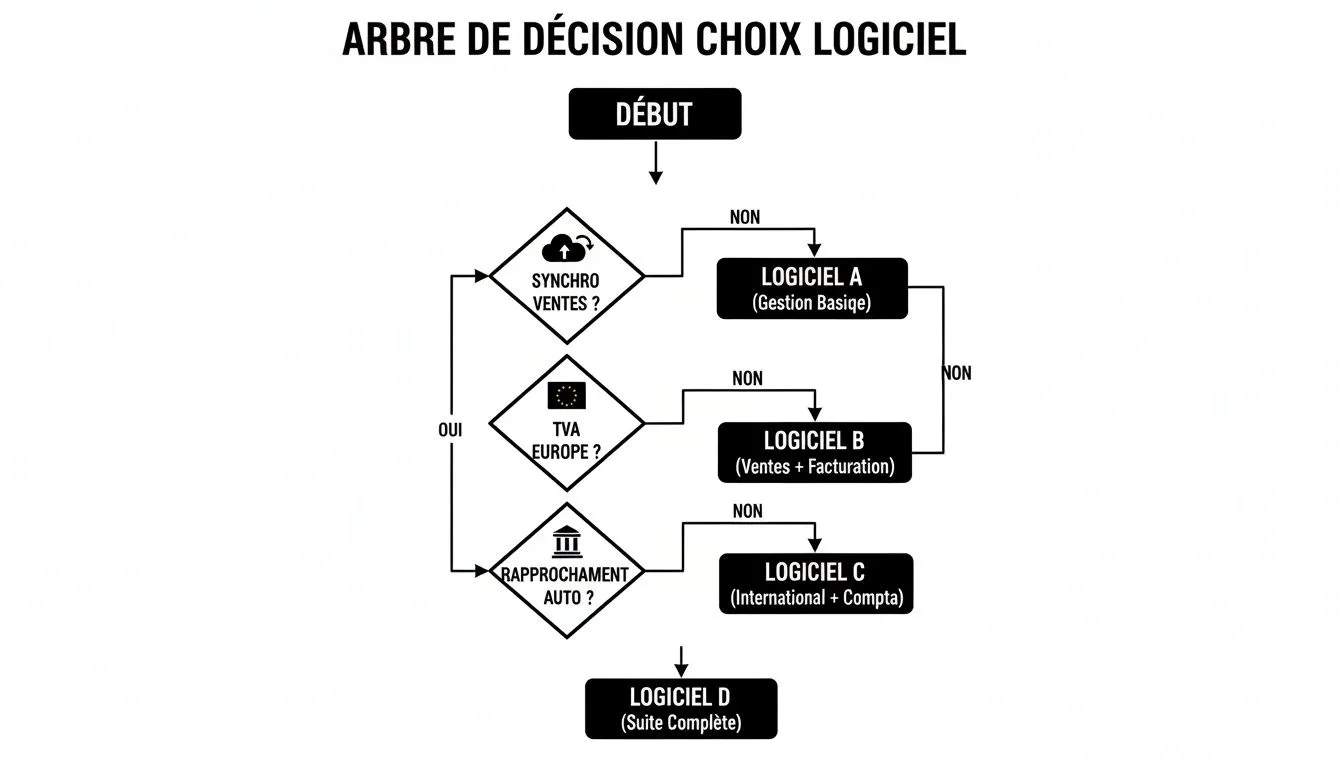
This decision tree makes it clear: the more complex your business becomes — particularly with international sales or a need to automate your bank flows — the more indispensable advanced software becomes.
Software that can grow with you
Your business today won’t be the same tomorrow. Maybe you’ll expand internationally, exceed VAT thresholds, or open a second shop. Your software should be a partner that supports you through this growth, not a ball and chain slowing you down.
Here are a few concrete situations to help you think it through:
- Mainly selling via Amazon FBA? Your top priority will be an integration capable of breaking down Amazon’s complex sales reports, which are packed with various fees (storage, advertising, shipping…).
- Your Shopify store targets Europe? The key feature is automatic VAT management via the OSS portal. The software must apply the correct rate for each country, without you having to think about it.
- Selling digital products with Stripe? The tool needs to know how to distinguish between your revenue sources and manage subscriptions.
Don’t forget usability. The interface should be designed for an entrepreneur, not an accountant. You should understand your numbers at a glance, without needing a dictionary. Good software is a translator that turns accounting complexity into clear, useful information for steering your business.
Anticipating changes to protect your income
The legal framework is changing, and that has a direct impact on what’s left at the end of the month. For example, starting July 1, 2026, social security contributions for sole traders in France will rise to 26.1%. This increase, which may seem small, weighs heavily on margins that are often already thin, especially on marketplaces. Given that the average net income of a sole trader is barely €590 per month, every euro counts. To learn more, you can read this article on upcoming changes for sole traders.
In this context, effective software is no longer a luxury. It takes a chore (filing with URSSAF) and turns it into an automatic process. Every sale is instantly translated into an accounting entry, saving you precious time and ensuring you pay exactly what you owe, with no risk of error. It’s simply an essential tool for securing and maximizing your income.
Setting up your accounting software, step by step
Moving from theory to practice can feel a bit daunting, but configuring good sole trader accounting software is now child’s play. The idea is to create a system where your financial data flows on its own, with no effort on your part. Let’s see how to set up this autopilot in a few very simple steps.
Imagine you’re building a small circuit. You’re going to connect different sources (your shops, your payment accounts) to a central dashboard (your software). Once that’s done, information flows continuously, giving you a clear, real-time view of your business’s health.
Step 1: Connect your sales platforms
The very first building block of your system is connecting it to your revenue sources. This is where the magic happens. Modern software no longer requires you to juggle Excel files to import. It plugs directly into your tools.
Whether you sell on Shopify, WooCommerce, or a marketplace like Amazon, the software uses a direct connection. In a few clicks, you authorize the link, and there you go! Every new order is automatically pulled into your accounting. That’s the end of manual entry and the small, costly mistakes that come with it.
Step 2: Link your payment accounts
Now that sales are flowing in, you need to follow the money trail. Your customers pay through platforms like Stripe or PayPal, which take their commission along the way before transferring the funds to your business account.
Connecting these payment accounts is therefore a key step. It allows the software to:
- Identify each transaction and link it to a specific sale.
- Automatically calculate and record the commissions deducted.
- Simplify reconciliation with the transfers you receive into your bank account.
This is essential to get an accurate view of what you actually have left in your pocket, once all fees are deducted.
Step 3: Set up your information and invoicing rules
Your software needs to know who you are in order to issue documents by the book. This step, which you only do once, involves entering a few pieces of basic information:
- Your business name, address and SIREN number.
- Your VAT scheme (usually the VAT exemption, with the mention “VAT not applicable, art. 293 B of the French Tax Code”).
- Your logo, to give a professional touch to your invoices.
In short, you set the rules of the game once and for all. The software will then apply them to every invoice, guaranteeing you stay compliant without even thinking about it.
The purpose of these initial settings is to turn your software into a model employee. Once briefed, it does its job autonomously, rigorously and without ever complaining.
The setup interface is often very visual, as you can see here.
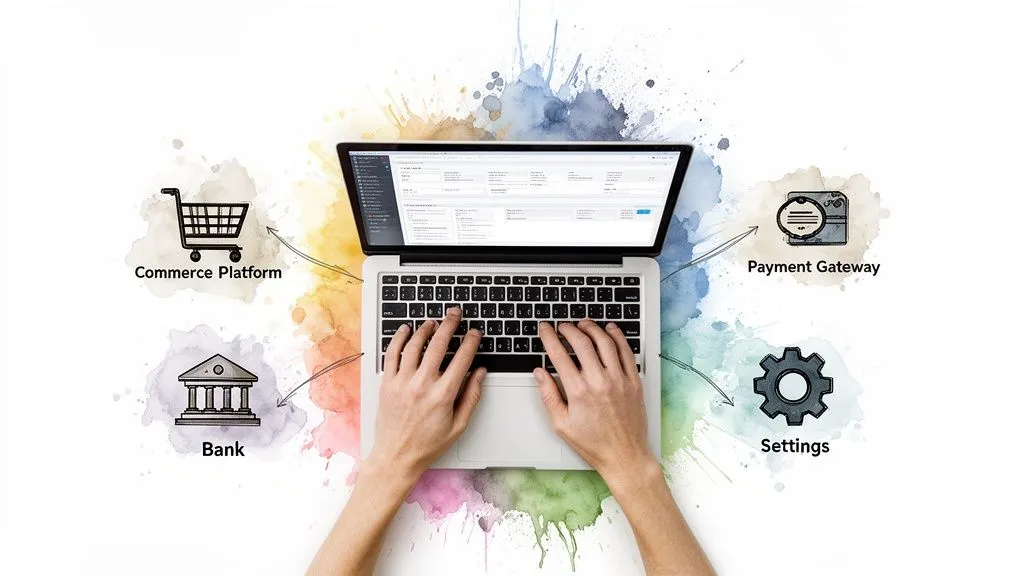
You can clearly see how the different connections (e-commerce, payments, bank) are grouped together to offer a clear, simple overview.
Step 4: Run your first synchronization
Once all the connections are in place, it’s time to hit the “Sync” button. The software will then pull in the history of your sales and transactions for the period you choose. It’s a slightly magical moment when your dashboard comes to life with your own numbers.
You’ll see your revenue, income and expenses appear and update in real time. This overview lets you take your business’s pulse at a glance. You’ll also be able to generate compliant accounting exports, a vital function in the event of a tax audit. To learn more about this obligation, our article on the Accounting Entries File (FEC) explains it all in detail.
By following these few steps, you turn a chore into a simple, well-managed process. Your accounting finally becomes what it always should have been: a genuine tool for steering your business, rather than a source of stress.
Avoiding the most common accounting management mistakes

Of course, setting up an automated system is great. But understanding the headaches it saves you from is even better. For a sole trader in e-commerce, certain management mistakes, however common, can quickly turn into a nightmare. Automation isn’t a luxury — it’s your best insurance against these pitfalls.
Using sole trader accounting software goes well beyond simply saving time. It’s above all a safety net that protects you from the oversights and approximations that, added together, threaten the health of your business. Let’s go over the most classic mistakes and see how good software nips them in the bud.
Mistake #1: Accounting procrastination
Ah, the temptation to put off the paperwork to focus on sales… We always tell ourselves we’ll get to it at the end of the quarter or, worse, right before the annual filing. It’s the perfect recipe for landing in trouble.
This buildup turns a small, manageable routine into a discouraging mountain of work. That’s when the risks of forgetting things, losing receipts and making entry errors explode.
Accounting software well integrated with your sales tools kills this problem at the root. Every sale is recorded in real time, without you having to lift a finger. Accounting is no longer done at the end of the month — it’s done every second.
Mistake #2: The non-compliant invoice
An invoice isn’t just a piece of paper. It’s a legal document that must follow very strict rules, with mandatory mentions. A simple numbering error, a missing VAT mention, or incorrect customer info, and there goes your invoice’s validity, with the risk of a fine attached.
Handling this by hand exposes you to error. Copy and paste a little too quickly, and you create a duplicate in your numbering, which is strictly forbidden.
Good software, on the other hand, automatically generates 100% compliant invoices for every order. It handles the logical sequence of numbers without ever making a mistake and adds the correct legal mentions based on your status. True peace of mind.
Mistake #3: Underestimating the shift to VAT
This is the classic trap for e-commerce sellers who start doing well. You’re heads-down, focused on growth, and you don’t see the VAT exemption threshold dangerously approaching. The day you cross it, it’s a cold shower: you become liable for VAT from the very first day of the month you exceeded it. In practice, you have to remit it to the state, even if you didn’t charge it to your customers.
The financial consequences can be dramatic. Specialized software, on the other hand, keeps a constant eye on your thresholds. It alerts you well before you reach the point of no return, giving you time to prepare and anticipate this major turning point.
Mistake #4: A neglected revenue ledger
Keeping a revenue ledger is one of your fundamental obligations as a sole trader. It must be chronological, with no gaps or corrections. A simple Excel spreadsheet, however handy, doesn’t guarantee that famous “immutability” required by the tax authorities.
At the end of June 2025, France had 3.186 million sole traders. Yet only 49.8% were actually active, with average quarterly revenue of €5,072. Even at these amounts, manually managing flows on a spreadsheet quickly becomes a chore and a risk, especially once you add the complexity of international VAT. To learn more, take a look at key figures on sole traders on TPE Actu.
Accounting software worthy of the name builds this ledger for you, automatically. Every payment is recorded securely and immutably. The result: you have a fully compliant register, ready to be presented in the event of an audit.
Your frequently asked questions on sole trader accounting
Accounting for micro-businesses can quickly become a headache. There are a thousand questions, and that’s perfectly normal. To help you see things more clearly, I’ve gathered here the questions that come up most often, with direct answers, without unnecessary jargon.
The goal is to clear away doubts so you can make the right choices for your online shop. Let’s focus on the essentials: staying compliant, saving time and, above all, keeping your peace of mind.
Is accounting software really mandatory?
To be very direct: no, the law doesn’t require you to use accounting software. The only exception concerns merchants who are VAT-registered and use point-of-sale software — that’s a different story. But watch out: thinking it’s a good way to save money is a mistake, especially when you’re doing e-commerce.
Imagine juggling your sales on Shopify, marketplace sales, the complex management of European VAT (OSS/IOSS), and the obligation to create spotless invoices for every customer… Doing it by hand isn’t just a Herculean task, it’s also taking on a huge risk.
Thinking you can do without it is a bit like wanting to cross the ocean with a simple compass when a GPS is right there next to you. Technically, it’s doable, but the risk of getting lost and the time wasted are enormous. Good sole trader accounting software is therefore more than a help — it’s a safety net.
Isn’t a simple Excel spreadsheet enough?
Right at the very start, when you’re managing a handful of orders a month, a spreadsheet like Excel or Google Sheets can seem sufficient. It’s tempting, I get it. But this solution hits its limits at lightning speed and quickly becomes a ball and chain slowing down your growth.
A spreadsheet doesn’t guarantee the integrity of your data as required for the revenue ledger. It doesn’t create compliant invoices with a single click, and it can’t handle the subtleties of international VAT. The risk of making a small entry error is huge, and a small error can cost a lot in the event of a URSSAF or tax audit.
Will my accountant be able to work with the software’s data?
Yes, of course! And that’s actually one of the biggest advantages. The best software designed for sole trader e-commerce accounting is built exactly for that: making life simpler for everyone, including your accountant. It lets you export accounting data in standard formats that professionals know inside out.
The holy grail in this area is the Accounting Entries File (FEC). It’s an official format, required if the tax authorities ask for it. Software worthy of the name generates it for you with a single click. For your accountant, it’s a huge time saver (which is reflected in their fees), and for you, it’s the assurance of more professional management and friction-free collaboration.
Ready to shift into high gear and finally focus on what really matters — your growth? Bizyness is the accounting platform designed by and for e-commerce sellers. It automates everything, from the sale to the accounting export.
Discover how Bizyness can simplify your life today
